Oxide
01What it is
Oxide is a free Max for Live audio effect: a tape, a spring reverb, a lock-in amplifier and a freeze, in one window.
It started as a small part of The Machine, the generative instrument I am releasing in January 2027. In there it sits after a looper and slowly ruins whatever the looper has recorded. I kept coming back to it, so I made it a device of its own that works on any track in Live.
While building it I added a lock-in amplifier, an idea I got from the Collide 4 by Joranalogue and Hainbach. It does the opposite of the tape: it picks one frequency out of a sound and gives you only that. You can put it before the tape or after it, and the two orders sound very different.
Oxide is free. It is a gift to the people who follow my work. You can download it on Gumroad.
02Quick start
- Drop Oxide on a track and press open.
- Switch Tape on and try Spool, Wow and Sat.
- Switch Disint on. The tape starts to wear out and the clock shows how long it has left. Switch it off to get the sound back.
- Switch Lock-In on and click a peak on the scope. You hear only that frequency.
- Press Freeze to hold what you hear.
You need Ableton Live 12 with Max for Live, and Max 9 or later. On Live 11 the Freeze does not work: it is built on parts that only come with Live 12.
03The window
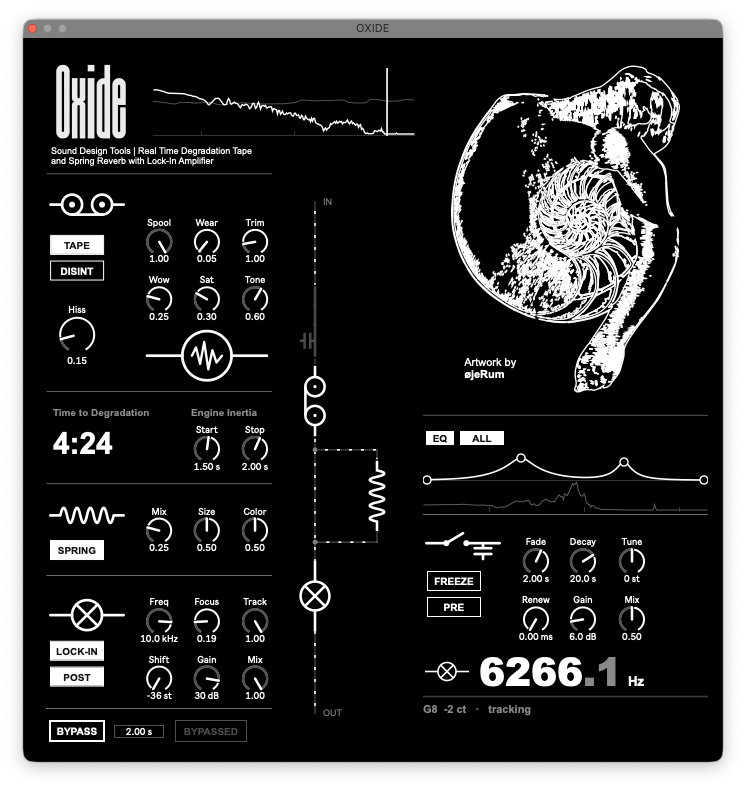
Four blocks of controls: Tape, Spring and Lock-In on the left, Freeze and EQ on the right.
The circuit
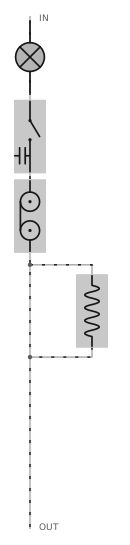
- The diagram shows the real signal path, top to bottom.
- The moving dots are the signal. They slow down when you lower Spool.
- What is on is white, what is off is grey.
- The Lock-In and Freeze symbols move when you change their Pre / Post switch.
- With Disint on, the tape symbol fades as the clock runs down.
The scope
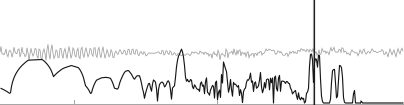
The white line is the spectrum, lows on the left. The vertical line is where the Lock-In is aimed, and the band around it is how wide it listens.
Click or drag on the scope to move Freq. See a peak, click it, and you hear it.
The scope shows what the Lock-In receives: the input in Pre, the tape output in Post.
The frequency readout

The big number at the bottom right is the frequency the Lock-In is on. Below it you get the nearest note, how many cents away it is, and the word tracking when the Lock-In is following a sound.
Bypass
Bypass fades the whole device out and back in, over the time next to the switch (0.1 to 20 seconds). Nothing stops while it is bypassed: the tape keeps wearing and a frozen sound stays frozen.
04Tape

Tape switches the tape on. It does not click in: it starts and stops like a motor. The two knobs under Engine Inertia, Start and Stop, set how long that takes, from 50 milliseconds to 10 seconds. With a long Stop, switching Tape off becomes a gesture: the machine winds down slowly, wobbling on the way.
Spool is the tape speed. Slower means lower in pitch, darker and less steady. Below 0.2 it sounds like a machine struggling, which is where it gets interesting.
Wear is how worn the tape sounds. With Disint off it is just a colour, and you can turn it back.
Disint
Disint makes the tape wear out by itself, and it does not recover. Wear now sets how fast: about ten minutes at its lowest (0.02), four minutes at 0.05, a little over a minute at 0.15, fifteen seconds at 0.5. These are the times at 48 kHz. At 44.1 kHz they are a little longer, at 96 kHz they are half.
Time to Degradation shows how long is left. With Disint off it shows how long a full run would take at the current Wear.
At the end the highs are gone and the level is much lower, whatever the value of Wear. That is how it is meant to work. Trim brings the volume back, not the highs. Switch Disint off and you have a fresh tape.
Try it once: play a chord or a texture, set Wear to 0.15, switch Tape and Disint on, and listen for a minute without touching anything.
The other knobs
| Control | What it does |
|---|---|
| Wow | Speed instability. It grows as Spool goes down |
| Sat | Tape saturation. It thickens before it distorts |
| Tone | How bright the tape is |
| Hiss | Tape noise. It comes forward as the tape wears out |
| Trim | Output level, up to six times. Above 1 it saturates softly |
05Spring

A stereo spring reverb fed by the tape, so it needs Tape on. If the tape is wearing out, the spring hears that too.
Switch Spring off and the tail rings out on its own.
| Control | What it does |
|---|---|
| Mix | How much spring against the dry tape |
| Size | Length of the springs, and of the decay |
| Color | Low is dark and elastic, high is bright and metallic |
06Lock-In

The Lock-In picks one narrow band of the sound and gives you only that. Aim it at a peak on the scope and the rest disappears. I think of it as a microscope for sound.
It does filter, but not the way an EQ or a band-pass does. A normal filter lets a band through. The Lock-In measures that band and rebuilds it as a new clean tone, with the loudness and the movement of the original. That is why it can listen so narrowly, and why it can play what it found at another pitch with Shift.
| Control | What it does |
|---|---|
| Lock-In | On and off, with a three second fade |
| Pre / Post | Before the tape or after it. See the next section |
| Freq | Where it is aimed, 20 Hz to 20 kHz. You can also click on the scope |
| Focus | How narrow it listens. At zero about 200 Hz each side, at the top a single partial |
| Track | Lets it follow the strongest sound near Freq, also when that sound moves |
| Shift | Plays what it found at another pitch, up to 36 semitones either way. The rhythm does not change |
| Gain | Up to 36 dB. One partial alone is quiet, this brings it up |
| Mix | At 1 only what the Lock-In found. Lower it and the full sound comes back |
Things to know
- It finds a frequency, not a source. A hum, a held note or an insect come out whole. A voice, a snare or anything noisy gives you one partial of it, which is still a usable sound.
- With Track you do not have to be exact. Aim roughly and it pulls itself onto the sound. It never moves further than half of Freq.
- High Focus is slow. The narrower it listens, the longer it takes to react. Sounds swell and fade instead of clicking in.
- On drums it does not isolate "the snare". Each hit comes back as a tone at the frequency you chose. With Shift a drum loop starts playing a tuned line.
A sub layer from a drum loop
- Duplicate the drum track and put Oxide on the copy. Lock-In on, Pre, Mix 1.
- Click the lowest strong peak on the scope, usually the kick between 40 and 70 Hz.
- Focus around 0.5, Track around 0.4, then bring Gain up.
- Use Shift to tune it. The readout shows the note you are on.
- Blend it under the original drums.
07Pre / Post
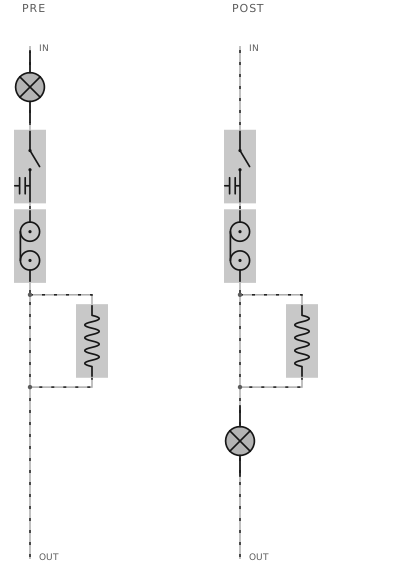
Pre: the Lock-In comes first. You isolate one thing, then the tape wears it away.
Post: the tape comes first. It turns the sound into a slow, worn texture, and the Lock-In searches what is left. This works best with a low Spool and the Spring open.
You can switch while the sound plays. It is a three second crossfade.
Oxide does not wear out in a straight line. For a long time the tape just gets darker and quieter. Then, near the end, other things come forward: random drops in level, flakes of noise, a hiss that breathes with the sound. They are driven by chance, so they never repeat. That is why what you hear after ten or twelve minutes is not what you heard in the first one, and why it is different every time.
The Lock-In makes it stranger. It chases whatever is left, and with Track low it locks onto one thing, loses it and finds another. A small change, or just the order of the two blocks, can take the sound somewhere else. There are very fine details in there, close to microsound.
So be patient, as with all my instruments. Start with the Lock-In Gain low and Shift at zero. Change one thing, swap Pre and Post, watch the scope, and wait. Better still, record the output and listen back: that is where you notice what it did. If you only let it play for a minute you will miss the best part.
08Freeze and EQ

Press Freeze and the sound of that moment is held. It is not a loop: nothing repeats. The held sound goes through a long dark hall and becomes a slow cloud.
Switch it off and the cloud fades out. Switch it on again and it takes a new moment.
| Control | What it does |
|---|---|
| Freeze | On holds the moment, off lets it go |
| Pre / Post | Pre: before the tape, so the cloud wears out with it. Post: last in the chain, so it holds whatever the tape and the Lock-In produce |
| Fade | How slowly the cloud comes and goes, 20 milliseconds to 10 seconds |
| Decay | Length of the hall, up to a minute |
| Renew | At zero the cloud never changes. Raised, it takes a new moment every few seconds and slowly follows what is playing |
| Tune | Pitch of the cloud, up to 24 semitones either way |
| Gain | Level of the cloud |
| Mix | How much the cloud replaces the incoming sound while Freeze is on |
One thing to try: raise Renew with the Lock-In on Track. The cloud keeps taking new moments, so the reverb follows the frequency the Lock-In is on and moves with it. With Track at zero the Lock-In stays on one frequency, so the pitch of the cloud stays more static. Both are useful, it depends on what you want. For this the Freeze has to come after the Lock-In: Freeze in Post, or both in Pre.
A frequency isolated by the Lock-In and then frozen can get very loud. Bring both Gains down before you freeze, then raise them while you listen.
The EQ

EQ switches it on. The switch next to it chooses All (the whole output) or Cloud (only the frozen sound).
- The two outer points are the low cut and the high cut. Drag them sideways.
- The two inner points are bands. Drag sideways for frequency, up and down for gain, up to 18 dB.
- Hold Alt and drag a band to make it narrower or wider.
- Double click a point to reset it.
09Starting points
Isolate, then degrade
Field recording. Lock-In on, Pre, Mix 1, Focus 0.6. Click a narrow peak on the scope and raise Gain. Then Tape on, Wear 0.15, Disint on.
Degrade, then search
Any sustained sound. Tape on, Spool 0.3, Wow 0.5, Spring on with Size high. Then Lock-In on, Post, Track 0.5, Focus 0.4. Drag across the scope until something sings, then Shift it down an octave.
Colour only
Tape on, Disint off. Wear between 0.1 and 0.4, Sat 0.4, Hiss to taste. Nothing wears out.
A second voice
A voice or an instrument. Lock-In on, Focus 0.8, Track 0.3. Aim at an upper partial, Shift by 7 or 12 semitones, Mix 0.5.
Hold, then let it wear
Tape on, Wear 0.15, Disint on. Freeze in Pre, Fade 2 s, Decay 20 s, Mix 1. Press Freeze on a moment you like.
Find, then hold
Field recording. Lock-In on, Post, Focus 0.6, click a narrow peak. Freeze in Post, Fade 4 s, Mix 0.7.
10Extra material
Oxide comes with a small Ableton Live set and four soundscapes I made for it. They are there to try the device on: open the set, pick one, and start from one of the starting points above.
- Synthetic nightscape. A night landscape of insects, frogs and birds, generated entirely by code. The best one to start with for the Lock-In.
- Pinging feedback chaos. A modular patch with no clock, pings and drifting lows. The video of the patch is on Instagram.
- Latent counterpoint. A small neural network trained on a single recording and played back along a path through what it learned.
- Synthetic chamber. A slow resonant room, also generated by code. Best on headphones.
Of course Oxide works on anything: drums, a voice, a synth, a bus.
11Good to know
- Every control can be automated and mapped.
- You can run several copies in the same set.
- The Freeze is the heaviest part and it runs all the time, also when it is off.
- A set saved with Freeze on reopens holding silence. Switch it off and on again.
- To judge a disintegration, solo the track.
On Push
| Bank | Encoders |
|---|---|
| Tape | Tape, Disint, Spool, Wear, Wow, Saturation, Tone, Hiss |
| Spring | Spring, Spring Mix, Spring Size, Spring Color, Trim, Tape Start, Tape Stop |
| Lock-In | Lock-In, Lock-In Post, Freq, Focus, Track, Shift, Gain, Mix |
| Freeze | Freeze, Freeze Post, Fade, Decay, Renew, Tune, Gain, Mix |
| EQ | Low Cut, 1 Freq, 1 Gain, 1 Q, 2 Freq, 2 Gain, 2 Q, High Cut |
| Bypass | Bypass, Bypass Time, EQ, EQ Target |
12How the Lock-In works
For the curious. You do not need any of this to use it.
A lock-in amplifier is a laboratory instrument. Physicists use it to measure a very small signal of a known frequency buried under much louder noise.
It works in three steps. It makes a pure tone at the frequency you chose with Freq. It multiplies the incoming sound by that tone, which moves whatever was at that frequency down to zero hertz. Then it averages: only what was at that frequency survives, and everything else cancels out. The longer the average, the narrower the band. That is Focus.
So there is a filter inside: the average is a low-pass on the shifted signal, and from the outside the whole thing behaves like a very narrow band-pass around Freq. What makes it different from a classic filter is that it follows a reference, and that it gives you a measurement of the band instead of the band itself.
What is left is a slow signal that carries the loudness and the phase of that one band. Oxide multiplies it again by a tone to turn it back into sound. If that second tone is at another pitch, you get Shift.
Track measures how far the sound is from the reference and moves the reference until the two match. That is the "lock" in the name.
The idea of using a lock-in as a musical instrument comes from the Collide 4 by Joranalogue and Hainbach, a module I have studied for a long time. What I added is the tape next to it, the scope to aim it, tracking and stereo.
13Artwork and credits
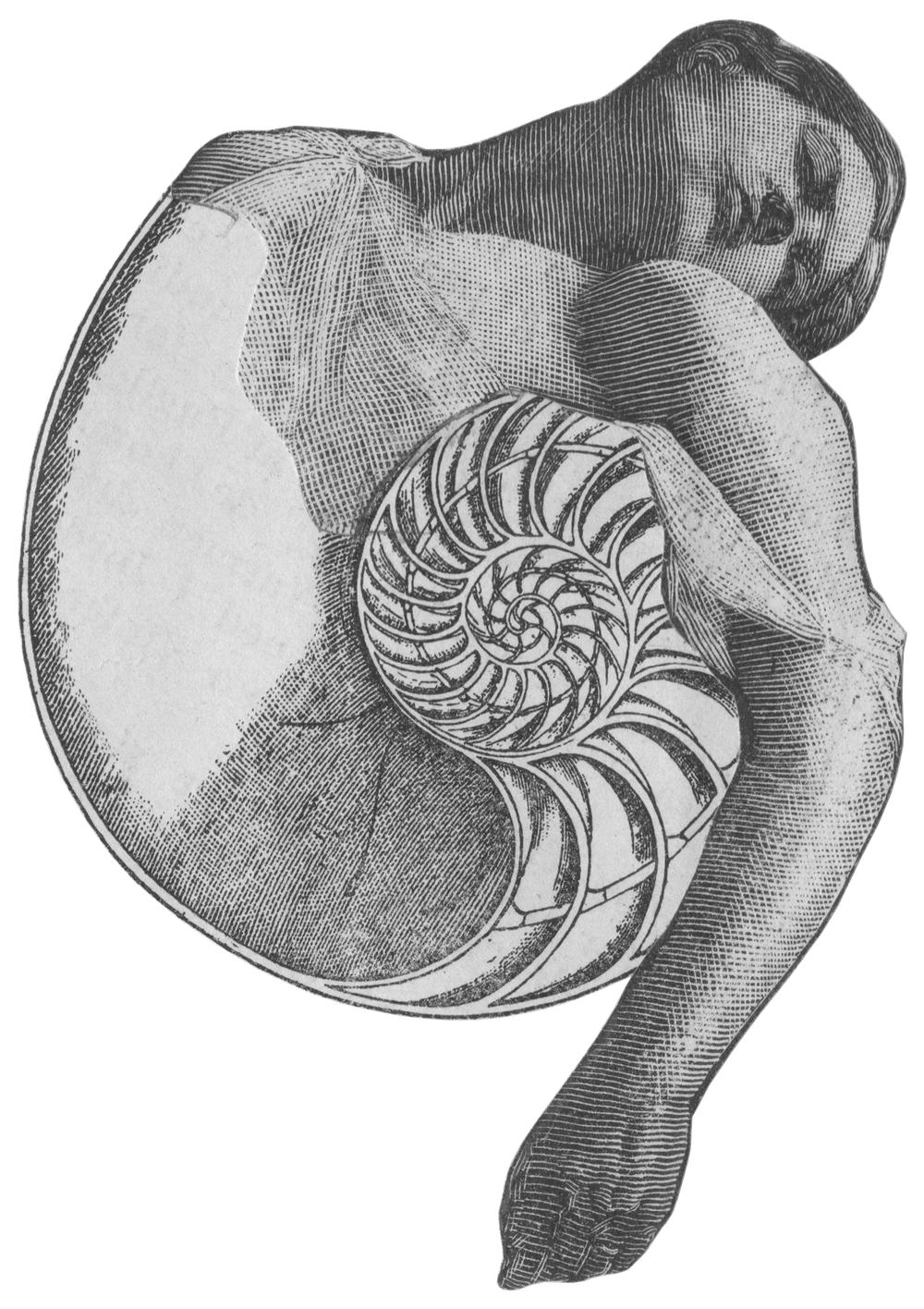
The figure in the window is by øjeRum, Paw Grabowski, a collage artist and musician from Copenhagen. His music has come out on Room40, IIKKI, Line and Opal Tapes, and on 12k under the name Støvfigur. The image was his gift to this project. Bandcamp · Instagram
Oxide is designed and built by Emiliano Pennisi. It is free to download and to use in your music. The code, the sound and the design remain my intellectual property. The device is provided as is, without warranty.
If you make something with it, I would love to hear it.
Download Oxide · Gumroad
emilianopennisi.net
Oxide manual · October 2026