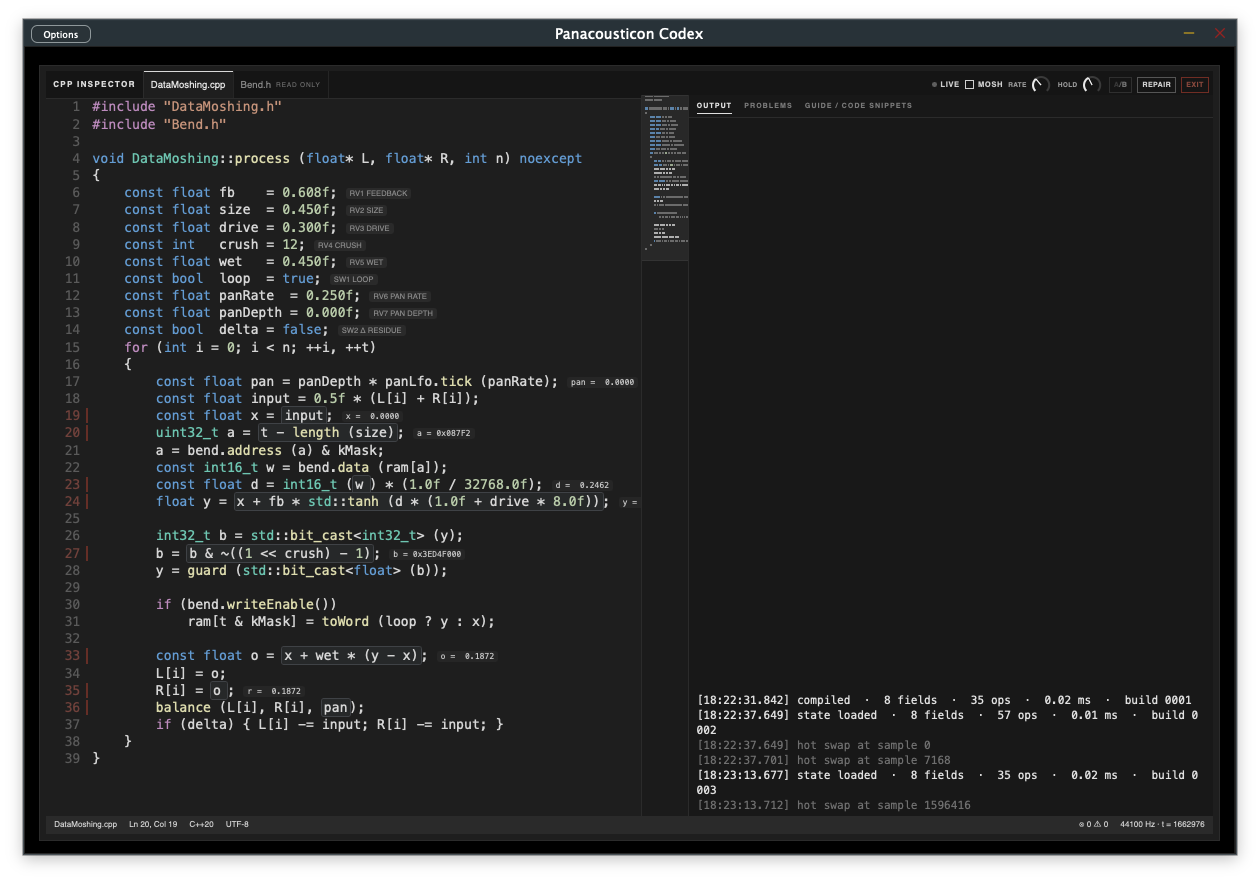
Codex is the area of the plugin where you go under the sound. I call it the Circuit Bender Environment: a place made for noise textures and broken soundscapes, where you can write code while it plays and patch by hand.
It has two entries at the bottom of the module list, one under the other. They are the same module, opened in two ways: one switch, one fader, one preset.
| Entry | What you do there |
|---|---|
| Stealth · PATCHING | Patching. A stereo sheet, as in Max: objects, cords, inlets and outlets. The sound of the board comes in at the top, and only what reaches dac L and dac R goes out. Every object is built for one job: to grow textures out of feedback, memory and noise, and to break them. It has its own manual. |
| Data Moshing · CODE | Live coding. The sound is written into the memory of a digital board and read back by C++ code. The code is on screen, you change it while it plays, and what you see is what runs. |
The title at the top follows the entry you clicked: Stealth or Data Moshing, always next to the CODEX badge.
Data Moshing is not like the other modules. It has three levels, one under the other:
| Level | What you find there |
|---|---|
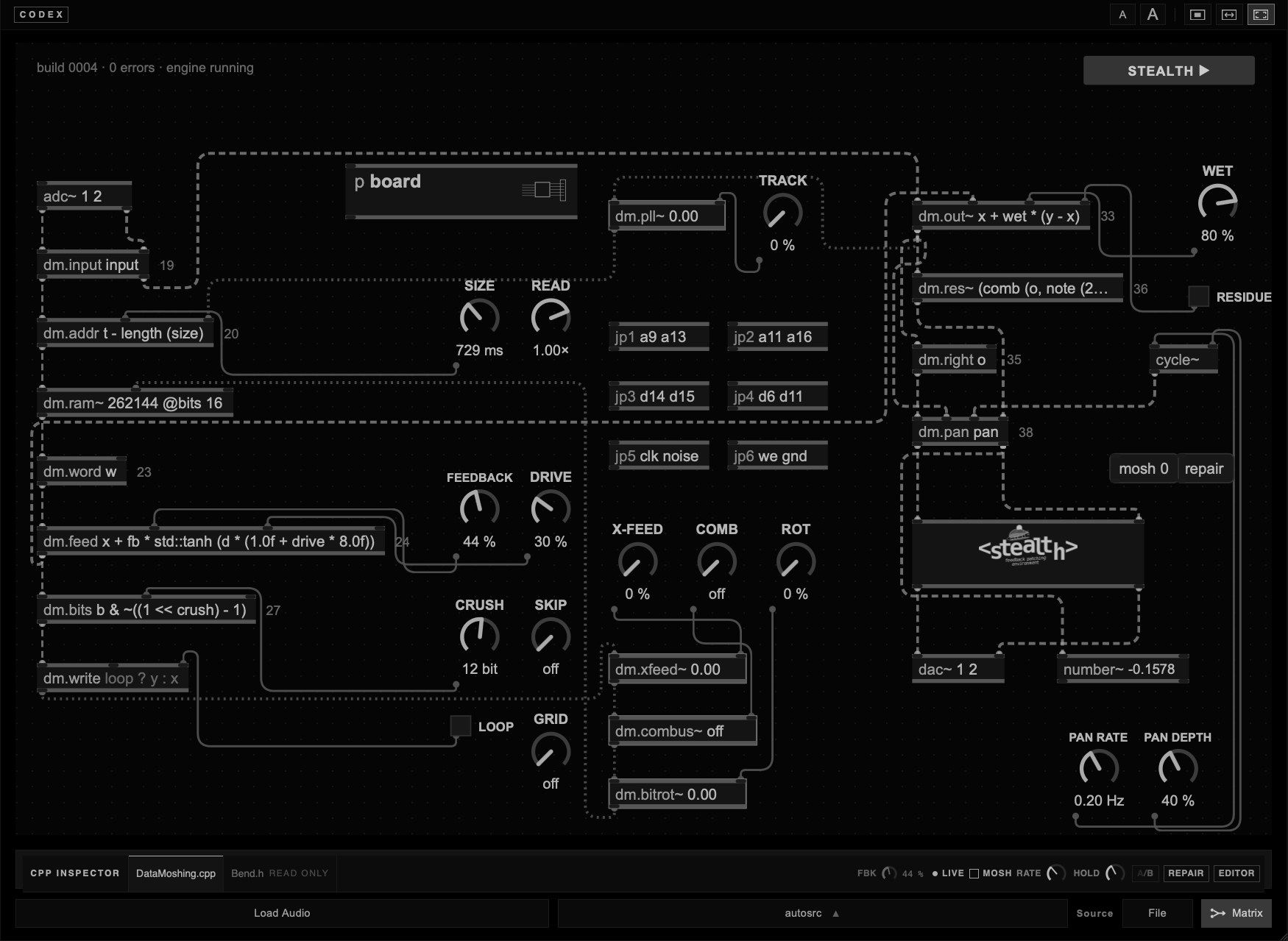
| The patch | The first thing you see: boxes and cords, as in Max, with the dials of the board. Everything here is safe to touch. |
| p board · p stealth | Two grey boxes on the patch, as in Max, they open the levels below. Double-click p board for the drawing of the circuit, with jumpers to bridge. Double-click p stealth, or press STEALTH ▶ in the top right corner, for Stealth Patching, a sheet where small objects feed each other. |
| The code | The CPP INSPECTOR under the patch, or the whole window with EDITOR. Nine framed lines can be edited; the rest is the program that holds them. |
You do not need to know C++ to start. Three ways in:
| Start from | How |
|---|---|
| A preset | Data Moshing/Pad Lab for long sounds, Moshing Subtle for a thin layer under the mix, Drone Voice or Cybernetic for patches that play on their own, Stealth Board for a patch that bends the board. |
| Two dials | WET full, FEEDBACK about halfway, LOOP off. Then paste one snippet from the guide at a time and listen. |
| LEARN | In FULL, switch LEARN on and click a framed line. A menu of snippets opens and you hear each one as you move through it. Your own code always stays at the top. |
Keep your monitors low the first times. One changed number can make the module much louder or start a loop that rings on its own. The limiters stop clipping, not loudness.
Stealth has a manual of its own. The rest of this page goes deeper into Data Moshing with the board and its jumpers, every line of the code with its snippets, the recipes, and at the end what is under the hood of the code box and of Smart mix.

Stealth has a manual of its own: Stealth · Feedback Patching Environment. The sheet, the 73 objects one by one, the menus, copy and paste, undo, slot~, DICE and OBJ, patch files, the presets made in Stealth and every key.
STEALTHFeedback Patching EnvironmentThe sheet, the objects, the presets and every gesture, from the first cord to a patch file.enter →On this page Stealth comes back only where it meets the board: p stealth on the patch, and the outlets that turn the dials.
Audio is data. In this module the signal is written into the RAM of a digital board, read back, and mixed out again. The code that does it is on screen, in the CPP INSPECTOR, and it is the code that runs: when you change a line, it is compiled and swapped in while the sound keeps going.
I don't know of another plugin that shows its own code being compiled live.
The module has three levels, and it helps to keep them apart.
| Level | What it is |
|---|---|
| The board | A memory that records the sound and reads it back broken: the address jumps, the bits are cut, the read head stops, skips or loops. This is the data moshing. You play it with the dials and the jumpers. |
| The code | The circuit of the board, written out line by line. Change a line and the board breaks in a different way. |
| Stealth | The patching bench around the board. It can move the dials of the board, work on the sound of the board, or play on its own without using it. |
When a preset plays only from Stealth, as the Cybernetic and Drone Voice presets do, the board is silent. Codex says so: the board dims and a band reads board not in use. Click the band to open Stealth.
Datamoshing was born in video. Compressed video does not store every frame as a picture. It stores a full picture now and then, and in between only the movement: small blocks pushed around by motion vectors. Remove the full pictures and the movement is applied to the wrong image. One scene melts into the next, pixels drag and bloom. In the mid-2000s artists such as Takeshi Murata made it a language; by 2009 it was in music videos.
Audio has its own history of the same idea: bent circuits, damaged CDs, files opened as if they were sound. None of this is new, and I don't pretend it is. What I wanted was to bring the way a codec breaks into audio. Not an effect that imitates an error, but a real digital path, with a converter, a RAM, an address bus and a clock, where the error actually happens.
Aliasing. In most audio software aliasing is a defect to remove. Here it is part of the material. Reading memory at the wrong address, dropping bits, letting the clock tremble: all of this folds frequencies back into the spectrum, and I treat that folding as a sound to work with. It is part of my research, not an accident left in.
The way I use Data Moshing most is not as an effect on its own, but as a thin layer under the other modules. The MIXER is what makes this work. Data Moshing has its own strip, with level, width and a full EQ, so I decide exactly how much of it gets into the mix and in which part of the spectrum.
Keep the source clean and slide a small amount of broken memory under it. Around −10 dB you no longer hear Data Moshing as a separate sound. You hear the mix open up: a second space behind the source, more depth, and dynamics that start to move, small swells and drops that the source alone does not have. Mute the strip and the mix goes flat and still.
This is the setup of Example 10.1. Load it from the Library: Data Moshing/Moshing Subtle. In my own version Data Moshing played a recording from disk; in the factory preset the same recording comes from autosrc 01 in Tape Reamp, which plays it clean (Dry / Wet at 0, no output of its own) and sends it to Data Moshing through the matrix. So the preset works anywhere, with nothing to load.
| Part | Setting |
|---|---|
| Modules | Atrax and Divine Carceri, straight to Out. Tape Reamp plays autosrc 01 dry, sent only to Data Moshing. Data Moshing on, Source Matrix. |
| Board | FEEDBACK 13 %, SIZE 1205 ms, DRIVE 30 %, CRUSH 12 bit, WET 100 %, PAN DEPTH 0 %, LOOP on, SW2 RESIDUE on. Jumpers JP1, JP2 and JP4 bridged: the RAM read jumps and two bits of the stored sample are tied together. |
| Code | Line 19: z + 0.2f * (input - z), a darker input.Line 20: t - length (size) * (1 + (t >> 15 & 3)). The delay length jumps between one and four times SIZE, every three quarters of a second.Line 23: w << 8 | w >> 8 & 0xFF, bytes swapped. On its own this is the loudest snippet on the board. |
| Mixer | Data Moshing strip: Level −10.9 dB. Low 152 Hz, −5 dB. Mid 1.2 kHz, −13.3 dB. LPF 10 kHz. Atrax +5.3 dB, Divine Carceri −2.5 dB. |
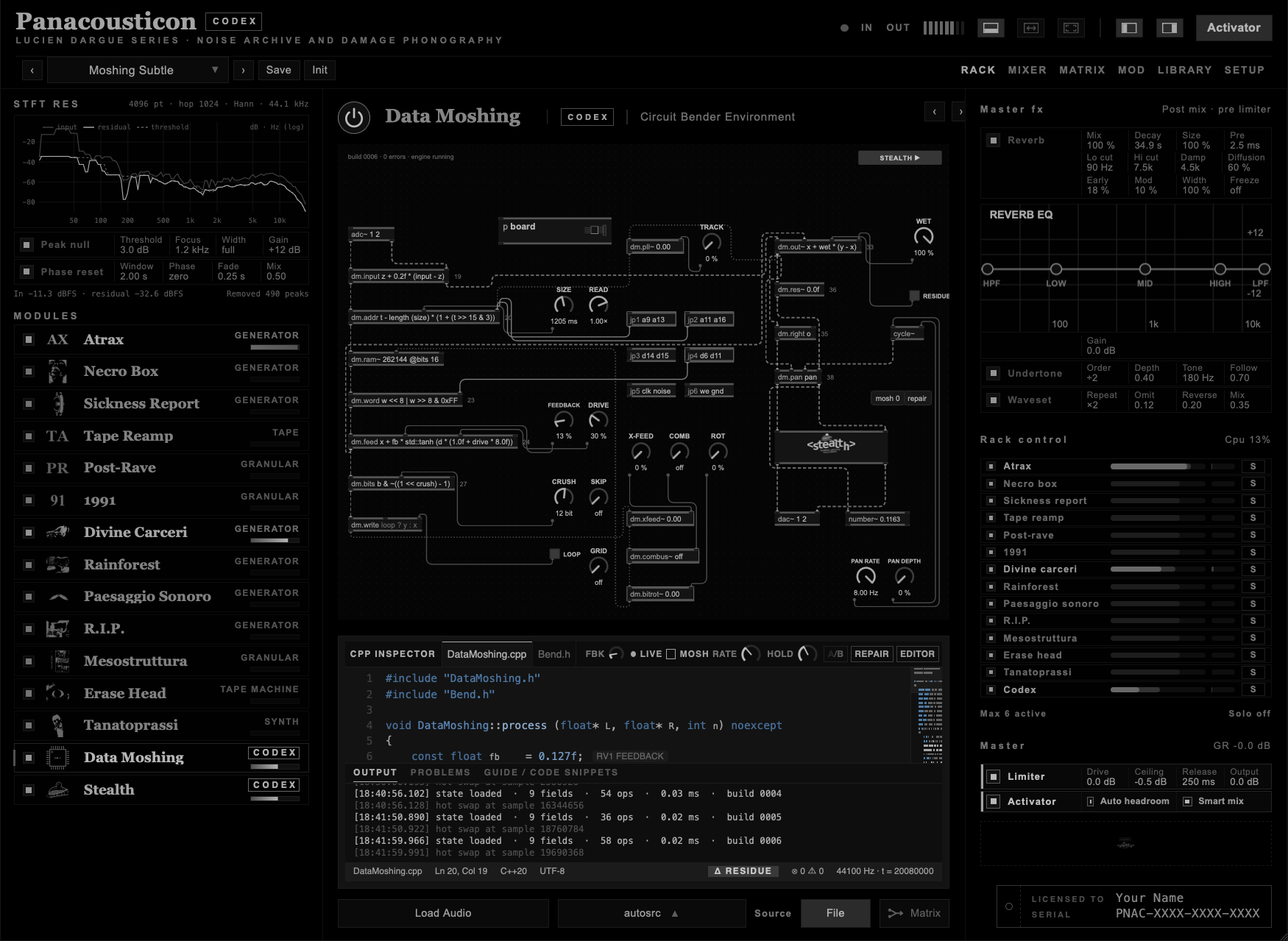
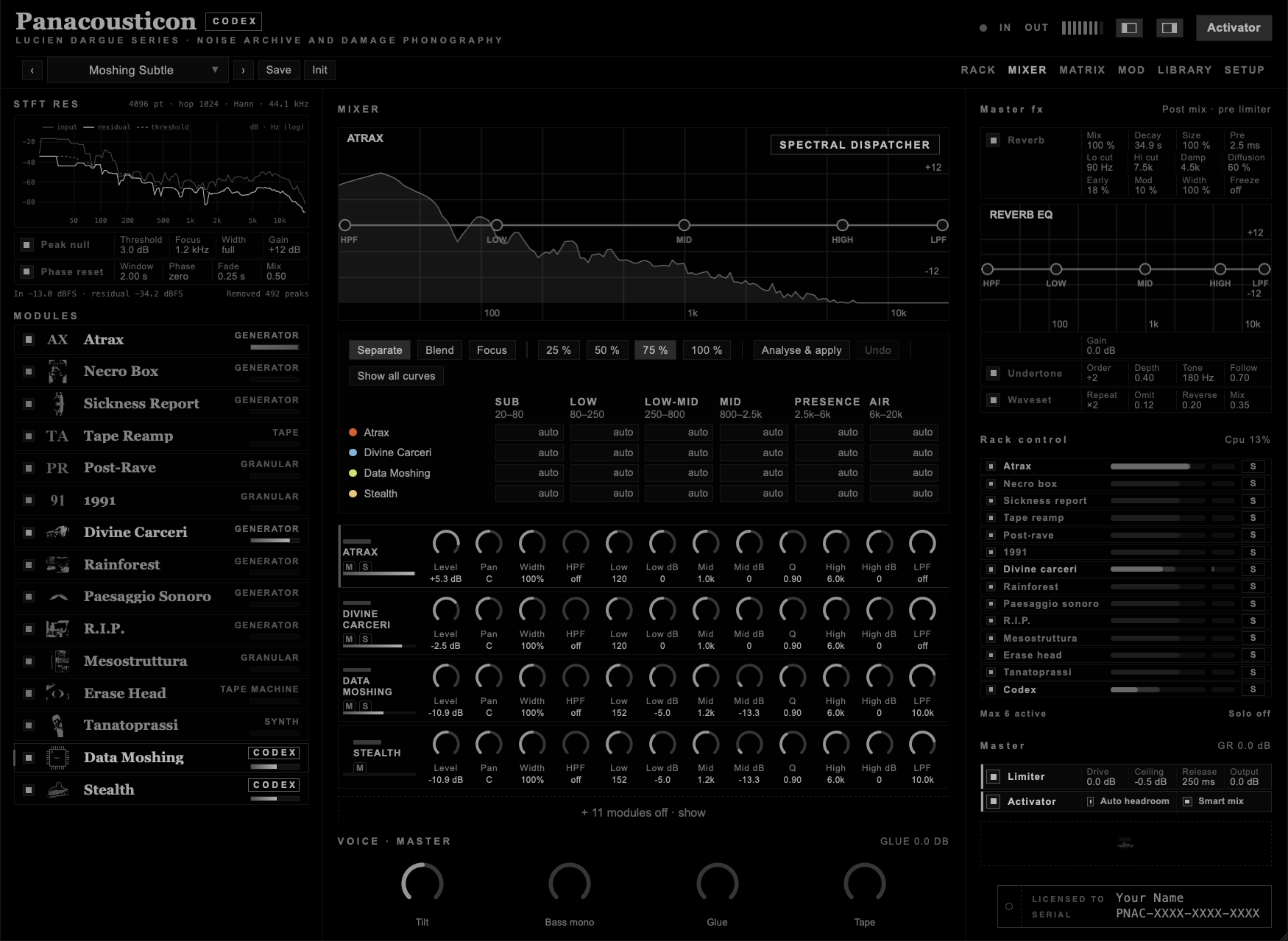
With RESIDUE on, the board plays only the difference between its output and its input. Here that difference is the memory read back at a delay that keeps jumping, minus the sound as it is now. It has no steady part: it is made of the moments where the memory and the present disagree, and they change all the time. Line 23 swaps the bytes of every word read from the RAM: on its own that is a wall of digital noise, but here only its residue comes out, through the EQ and 11 dB down, and it turns into a fine grain inside the echo. Mixed low, the ear does not take all this as a second sound but as space and movement around the first one.
I measured it on the versions of Example 10.1, A without the layer and B with it, rendered from the same take. The layer sits about 20 dB below the mix. Its level moves more than the source: measured over 100 ms windows, it varies by 1.25 dB against 1.03 dB. It is also mono, so by itself it adds depth and movement, not width. To open the stereo as well, change line 35 (C, below).
The EQ on the strip keeps the layer out of the way of the source. Less low end, so the bass of Atrax stays solid. A deep cut around 1.2 kHz, where Divine Carceri sits. Nothing above 10 kHz, so the 12-bit grain stays a texture and does not turn into hiss. The level does the rest: a few dB more and the layer becomes an effect; a few dB less and it disappears, though the mix still feels less flat than without it.
Start with the Data Moshing strip at −20 dB and bring it up until the mix opens, then back off by 2 or 3 dB. If you can point at it, it is too loud.
Cut the layer where the source is strongest: find that frequency on the EQ curve of the source, then cut the Mid of the Data Moshing strip there.
For real width, paste peek (a + 2205) on line 35: the right channel reads the memory 50 ms later than the left. The layer stops being mono: the correlation between its left and right drops from 1.0 to almost 0. The source stays where it is, and the space around it opens.
The same idea works with any line that changes the timing of the memory: try the reverse or the octave snippets on line 20, always with RESIDUE on and the strip low.
The factory preset Moshing Subtle: the same 20 seconds three times, at the same gain. A: the Data Moshing strip muted. B: with the layer, as in the preset. C: the layer with peek (a + 2205) on line 35. Switch while it plays, on headphones: the layer is felt more than heard.
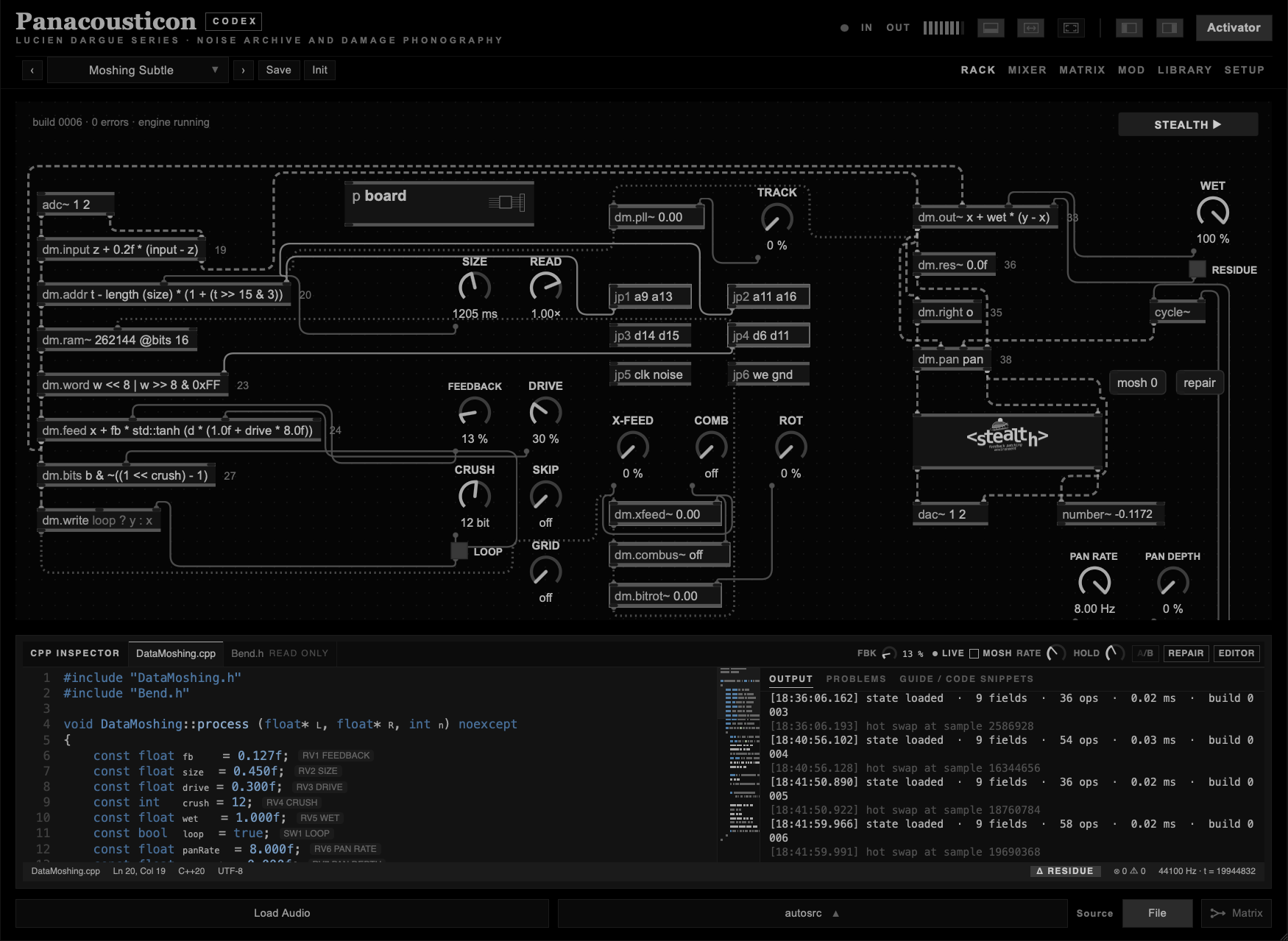
Data Moshing needs an input. Load a file with Load Audio, pick one of the built-in sounds with autosrc, or set Source to Matrix and send a module into it. Picking an autosrc sets Source to File. EXPAND gives the module the whole window; DOCK, blinking red while expanded, brings the side columns back. The third layout button in the top bar shows only the view I am in, at full window: the patch of Data Moshing, or the Stealth sheet, without the side columns and without the code. The same button, or Esc, brings the window back. EDITOR, in the bar of the CPP INSPECTOR, hides everything else, the board too, and leaves only the code editor with the OUTPUT, PROBLEMS and GUIDE pane beside it, in a larger type. LIVE, MOSH, A/B and REPAIR stay at the top. EXIT, or the Esc key, brings the window back.
| Control | What it does |
|---|---|
| FEEDBACK | How much of the RAM comes back into the signal. It acts through line 24. |
| SIZE | Length of the memory loop. |
| READ | How the read head moves through the memory: from twice the speed backwards to twice the speed forwards. 1× is normal; at 0 the head stops and the board holds one instant. |
| SKIP | Random jumps of the read head, from never to 30 a second. A few make the memory stumble; many make it stutter. |
| GRID | Plays every block of the memory four times before moving on. The block is from a few milliseconds to half a second: short gives a buzz, long a broken loop you can play. |
| DRIVE | Saturation on the feedback. |
| CRUSH | Bits removed from every sample. |
| WET | Balance between the input and the board. It acts through line 33. |
| PAN RATE · PAN DEPTH | A slow stereo movement. At depth 0 the sound stays where it is. |
| X-FEED | Cross feed: part of what the board has just played is written back into the memory with the new sound. PANIC sets it to 0. |
| COMB | A short echo inside the memory, from 30 to 1500 samples back, written in with the new sound. The memory rings at a pitch. Off at 0. |
| ROT | Bit rot: now and then one bit of a sample flips as it is written. More ROT, more often. |
| TRACK | The read head follows the loudness: the louder the board plays, the further the read slips behind the write. |
| SW1 LOOP | On: the processed sound goes back into the RAM and builds up. Off: the RAM records only the clean input. |
| SW2 Δ | Plays only the residue: what the code adds or removes. |
| JP1 · JP2 | Bridge two lines of the address bus: the RAM read jumps. |
| JP3 · JP4 | Bridge two bits of the stored sample. |
| JP5 | Noise on the clock: the read trembles. |
| JP6 | Holds the write line: the RAM stops writing and loops what it has. |
The signal goes through the code in this order:
line 19 INPUT → 20 ADDR → 23 WORD → 24 FEED → 27 BITS → RAM → 33 OUT → 35 RIGHT → 36 RES → 38 PAN
Only these lines can be edited: they are framed and numbered in red. Click one, type or paste, press Enter. If the line compiles, you hear it at once. If it does not, the error appears in the PROBLEMS tab and the last good build keeps playing. The tab GUIDE / CODE SNIPPETS lists, for every line, the names it can use and a set of tested snippets to paste.
| Control | What it does |
|---|---|
| A/B | Switches between the current build and the previous one. |
| REPAIR | Puts every line back and clears the RAM. |
| EDITOR · EXIT | Only the code editor and its pane, full window. EXIT or Esc goes back. |
| MOSH | Changes the lines on its own. RATE sets how often. If a change does not compile, the engine crashes and loops its last 2048 samples until HOLD repairs it. |
Line 36, RES, adds a tuned resonator to both channels. Its default, 0.0f, does nothing. comb (o, note (45), 0.96f) * 0.1f makes the output ring on A like a string; up to four comb in one line make a chord. The preset Data Moshing/comb (o, note (38), 0.97f) starts from there. How it works, with examples: Codex · RES.
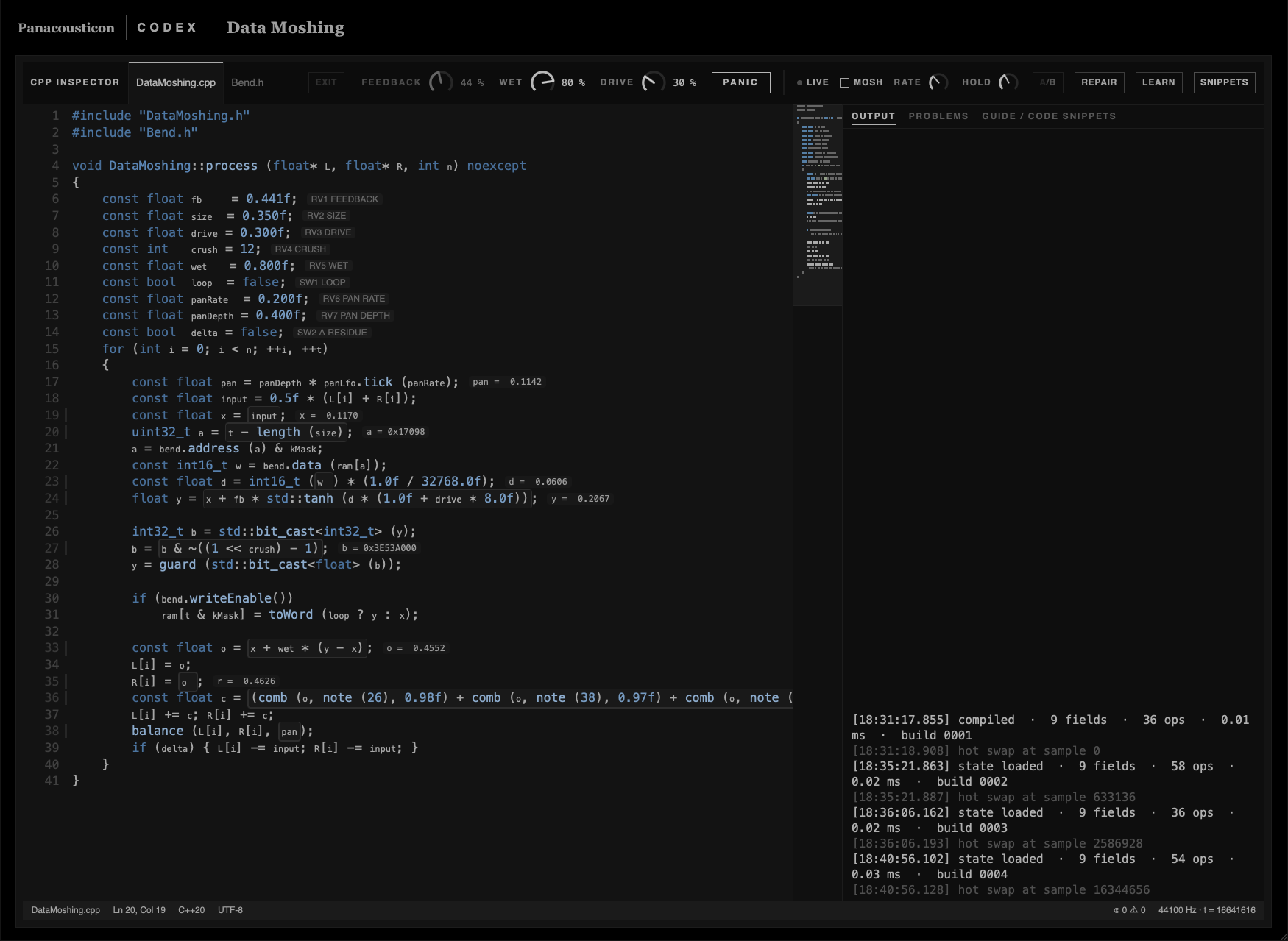
In FULL the patch is hidden, so the bar on top brings three of its dials with it, FEEDBACK, WET and DRIVE, and a PANIC button: it sets FEEDBACK and X-FEED to 0 and clears the RAM, and leaves the code as it is. Two more buttons appear. SNIPPETS hides the pane on the right, so the code has the whole width. LEARN turns every framed box into a menu of the snippets for that line: click one and you hear it, step through them with the arrows, and your own code always stays at the top. See Codex · LEARN.
Keep your monitors low while you edit. The snippets are set up to sound good, but one changed number can make the module much louder, feed back hard or fall into a loud crash loop. The limiters stop clipping, not loudness.
Try this. WET full, FEEDBACK 40 to 50 %, LOOP off. Paste one snippet at a time and use A/B and Δ to hear what it really does. For pads and long sounds, start from the preset Data Moshing/Pad Lab.
The two red dials do not act on their own: they reach the sound through the code. WET is used only on line 33, in its default x + wet * (y - x). Paste a line 33 snippet without wet in it and the dial does nothing. FEEDBACK is used on line 24. With the default code the echo is the only effect, so WET up and FEEDBACK at 0 gives you the clean sound. Snippets that change the sound directly, on lines 19, 23, 27 and 33, work with FEEDBACK at 0 too.
With WET at 0 you still hear lines 19, 36 and 38, and lines 33 and 35 if their snippet does not use wet. Lines 20, 23, 24 and 27 keep running in silence: the memory fills, the bits break. Raise WET and it is all already there.
| Name | What it is |
|---|---|
input | The sound coming in. |
x | The sound after line 19. |
a | The RAM address being read. |
w | The 16-bit word read from the RAM. |
d | That word as sound, from −1 to 1. |
y | What goes back into the RAM. |
b | y as raw bits. |
o | What you hear on the left. |
t | The sample counter. |
z | The value the same line gave on the previous sample. With it a line can filter or hold. |
fb size drive crush wet | The five dials. |
pan | The stereo LFO, from −1 to 1 times PAN DEPTH. It works in every line. |
kMask | The last RAM address. |
Each line accepts only some of these names; the GUIDE tab lists them under "uses". The functions are the usual ones from C++ (std::tanh, std::clamp, std::floor and so on) plus a few of the board's own: peek (n) reads the RAM at address n, lfo (hz) is a slow sine, hash (n) a repeatable random integer, noise () a random value, bits (v) and flt (n) move between a float and its raw bits, fold, wrap, soft, tube, cheb (v, n) and diode are waveshapers. The bit operators & | ^ ~ << >> work only on integers, as in C++.
Three for each line, taken from the GUIDE tab, where there are 76 in all. Each one compiles as written. Click the framed line, select all, paste, Enter.
std::floor (input * 8.0f + 0.5f) / 8.0f | 4-bit converter, gritty. |
std::clamp (input * 3.0f, -1.0f, 1.0f) | Overdriven converter, hard clip. |
z + 0.2f * (input - z) | Darker input. |
t - ((t & 0xFFFF) << 1) | Reverse, in windows of about 1.4 s. |
t - length (size) - ((t & 0x7FFF) >> 1) | One octave down. With LOOP on, every repeat goes one more octave down. |
t - length (size) * (1 + (t >> 15 & 3)) | The delay length jumps in steps. |
w & 0xF000 | 4-bit RAM. |
w << 8 | w >> 8 & 0xFF | Bytes swapped, the classic file datamosh. Very loud: start with WET low. |
w ^ 0x1000 | One data line stuck. |
x + fb * d | Clean echo. |
z + 0.6f * (x + fb * d - z) | Every repeat darker than the last. |
x + fb * flt (bits (d) & ~(hash (t) & 0x3F)) | Memory that wears out. |
b ^ (t & 0xFF) << 15 | A tone made of bit noise. |
b & 0xFFC00000 | Only 2 bits of detail left. |
(hash (t) & 0x7) == 0 ? b ^ 0x00400000 : b | Random soft errors. |
d | Only what is read from the RAM. |
z + 0.25f * (x + wet * (y - x) - z) | Dark. |
(t & 3) == 0 ? x + wet * (y - x) : z | Sample and hold, clock divided by 4. Aliasing. |
o * 0.8f + peek (a + 441) * 0.2f | A touch of width, about 10 ms. |
peek (a + 2205) | Reads the RAM about 50 ms later. Wide. |
x + wet * (peek (kMask - t) - x) | Plays the memory backwards on the right. |
Turn PAN DEPTH up to hear these. PAN RATE sets the speed.
-pan | The LFO in the opposite direction. |
std::clamp (pan * 3.0f, -1.0f, 1.0f) | Hard autopan, all the way to each side. |
(t >> 13 & 1) == 0 ? pan : -pan | Flips side every 170 ms. |
Times are at 44.1 kHz, a little shorter at 48 kHz.
Start from REPAIR, so every other line is at its default, then paste the lines below and set the dials. LOOP off in all five. I checked each one on the engine with a drone and a pad as input: at these settings they come out at about the level of the clean sound.
| Recipe | Lines | Dials |
|---|---|---|
| Memory backwards | 20: t - ((t & 0xFFFF) << 1) | WET 100 %, FEEDBACK 45 % |
| Old sampler | 19: std::floor (input * 8.0f + 0.5f) / 8.0f33: (t & 3) == 0 ? x + wet * (y - x) : z | WET 100 %, FEEDBACK 40 % |
| Corrupted file | 23: w << 8 | w >> 8 & 0xFF27: (hash (t) & 0x7) == 0 ? b ^ 0x00400000 : b | WET 15 %, FEEDBACK 45 %. Loud: above 25 % it jumps up by more than 10 dB. |
| Pad flanger | 20: t - 200 - int ((lfo (0.2f) + 1.0f) * 150.0f)33: x + wet * (cheb (y, 3) - x) | WET 50 %, FEEDBACK 30 % |
| Aliasing | 27: b & 0xFF80000033: (t & 15) == 0 ? x + wet * (y - x) : z | WET 100 %, FEEDBACK 30 % |
The last one is the plainest example of what I mean by aliasing as material. Line 33 holds each sample for sixteen, so the sound runs at a sixteenth of the sample rate with no filter; line 27 keeps only powers of two. At 44.1 kHz that is a rate of about 2.8 kHz: everything above 1.4 kHz folds back down into the spectrum.
The same example as 4.14.
After the left and right outputs there is one more line you can edit:
36        const float c = 0.0f;
37        L[i] += c; R[i] += c;
38        balance (L[i], R[i], pan);
Whatever line 36 gives is added to both channels, before the pan. With its default, 0.0f, nothing changes. It works even with WET at 0.
A feedback comb: the sound is added to itself as it was one period of hz ago, slightly darker, again and again. It rings at hz and at its multiples, like a string or a tube. Feedback near 1 rings longer and louder; at 0.9 it is a short colour, at 0.995 a long tone.
Each comb has its own memory, up to four in one line, so a chord is four combs added together. It works in every line, not only on 36: on line 24, x + fb * comb (d, note (40), 0.9f) * 0.3f tunes the feedback of the memory itself.
Turns a MIDI note into hertz: 45 is A2, 110 Hz; 57 is A3; every 12 is an octave. To move a whole chord down, take the same number from every note: −5 is a fourth, −7 a fifth, −12 an octave.
| Line 36 | What you hear |
|---|---|
comb (o, note (45), 0.96f) * 0.1f | The output rings on A. |
(comb (o, note (45), 0.95f) + comb (o, note (52), 0.95f)) * 0.07f | A fifth, A and E. |
comb (o, 110.0f + 90.0f * lfo (0.05f), 0.97f) * 0.2f | A slow sweep, like a resonant filter. |
comb ((t & 0x3FFF) < 48 ? noise () : 0.0f, note (45), 0.995f) | A string plucked every 0.34 s, even on silence. |
comb (d, note (33), 0.98f) * 0.05f | A deep A from the memory only. |
A comb rings only where the sound has energy. If you hear little, the incoming sound has nothing near that note: move the note up or down a semitone at a time until it catches. The plucks do not depend on the input, because they make their own: a short burst of noise every few thousand samples.
Keep the level low the first time. Feedback above 0.99 on a loud input can be much louder than the dry sound; the limiters stop clipping, not loudness.
FULL shows only the editor. The bar on top grows and gets these controls:
| Control | What it does |
|---|---|
| FEEDBACK · WET · DRIVE | The same dials as on the patch, so you can turn them down without leaving the code. FEEDBACK is in the bar in every view, as FBK when the module is docked, and it blinks red above 30 %. |
| PANIC | FEEDBACK and X-FEED to 0, RAM cleared. The code stays as it is. Use it when a line makes the module run away. |
| SNIPPETS | Hides or shows the pane on the right, with the output, the problems and the guide. Hidden, the code takes the whole width. |
| LEARN | Turns every framed box into a menu of the snippets for that line. |
With LEARN on, click a framed box. A menu opens with every snippet for that line, each with a few words on what it does. At the top is always your own code, as you left it.
| Gesture | Result |
|---|---|
| Click a snippet | It goes into the line, compiles and plays at once. |
| ↑ ↓ | Step through the snippets and hear each one. |
| Enter | Keep the one you are on. |
| Esc | Back to your code. |
| Type | The menu closes and you edit by hand, as usual. Cmd + V still pastes over the whole line. |
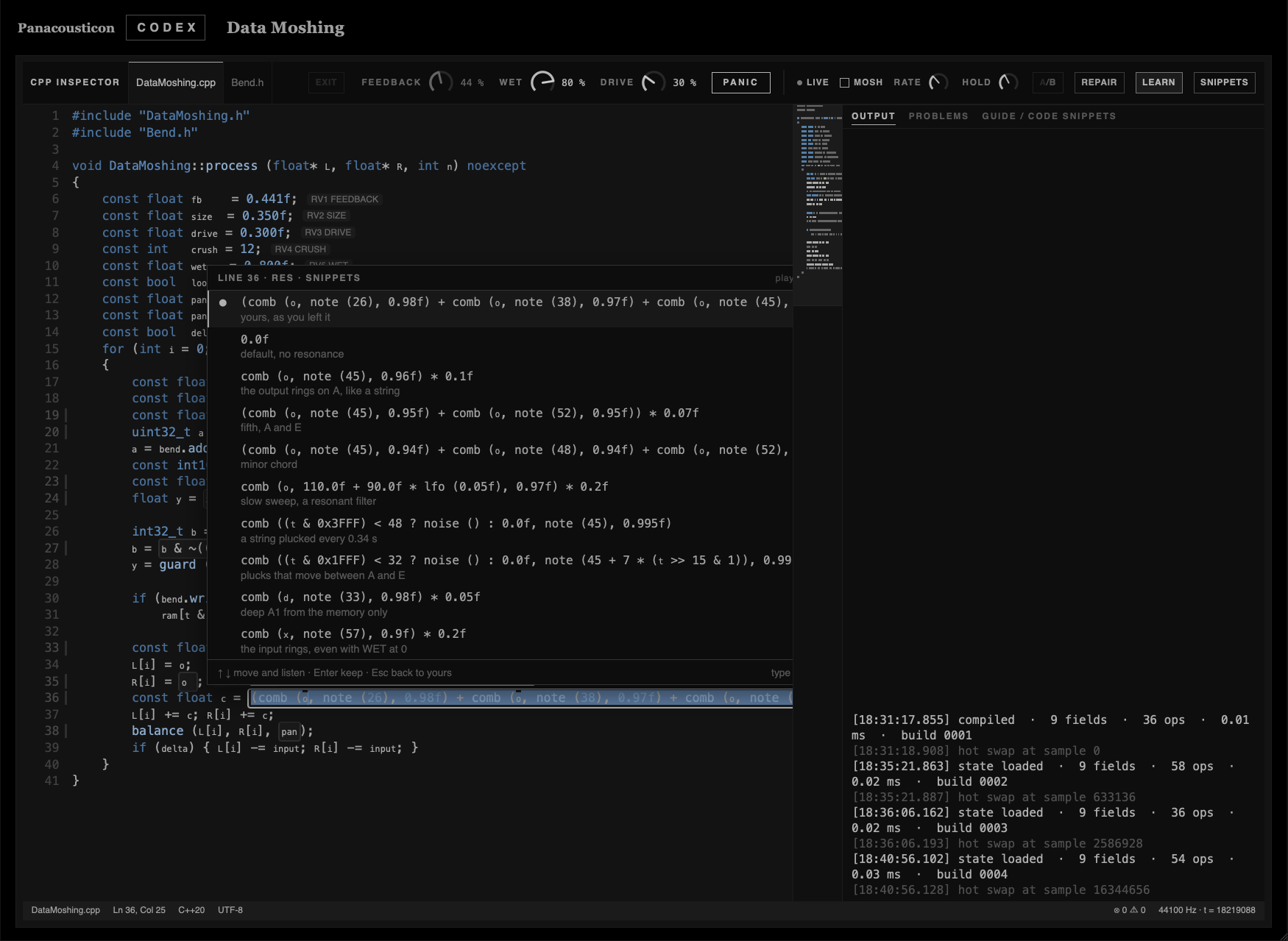
The menu reads the same snippets as the guide, so nothing is in one and missing from the other. Every snippet has been compiled on its line.
Two parts of Codex that are not in Data Moshing but come from the same idea: show what really runs.
On Necro Box, Sickness Report, Divine Carceri, Rainforest and R.I.P. the middle column shows the code of the engine. It is the real source, copied into the plugin when it is built, with its real line numbers. The numbers on the right are read from the engine while it plays, many times a second.
Turn a dial and the box jumps to every line that reads it. There are usually two kinds:
| Line | What happens there |
|---|---|
| where the dial is set | The engine receives the dial as p.name and turns it into a target, often with setTargetAtTime. Next to the line you see p.name with the value you are setting. |
| where the target is read | Every sample the engine moves a little closer to the target, with .next (frame). Next to the line you see that smoothed value gliding, the number the sound is actually using. |
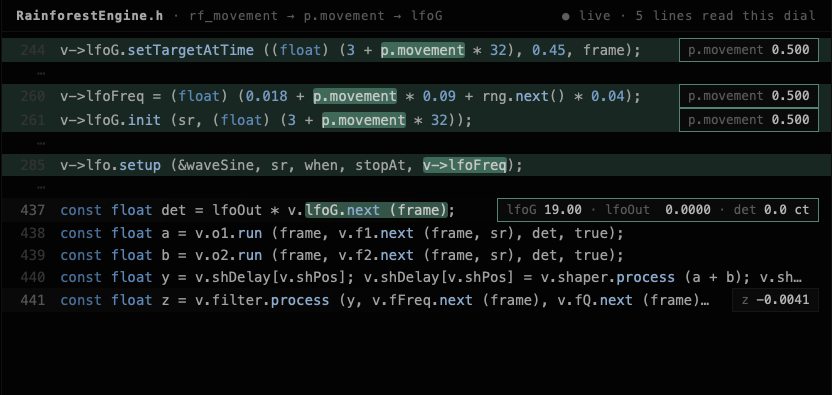
Some dials are read only when a new voice starts. Their lines light up too, but their value changes on the next voice, not while you turn. A few dials appear in more than one place, and then every place lights up.
The map from each dial to its lines is not written by hand: it is taken from the source when the plugin is built, so it always follows the code. Nothing in the box is invented or decorated.
Smart mix sits on the output, where the modules meet. What they send to each other through the matrix is not touched.
It listens to every module in six bands, around 80, 250, 650, 1600, 4000 and 10000 Hz, about forty times a second. From that it knows where each module has its energy: a drone in the low bands, a hiss in the top ones. Then it applies three rules.
| Rule | What it does |
|---|---|
| Make room | In each band, a module that needs it less than another steps back, by up to 6 dB, only as long as they overlap. |
| Protect | A module covered everywhere keeps its best band untouched, and the others step back there. |
| Balance | If the whole mix sticks out in one band, too much sub or too much presence, only the modules making the excess are turned down there. |
The loudness taken away by the cuts is given back to the whole mix, so switching Smart mix on does not make the sound quieter. With a single module it does nothing at all. With six modules playing it costs less than one percent of a processor core.
It never boosts a band and it does not compress. It only decides, band by band, who steps back.