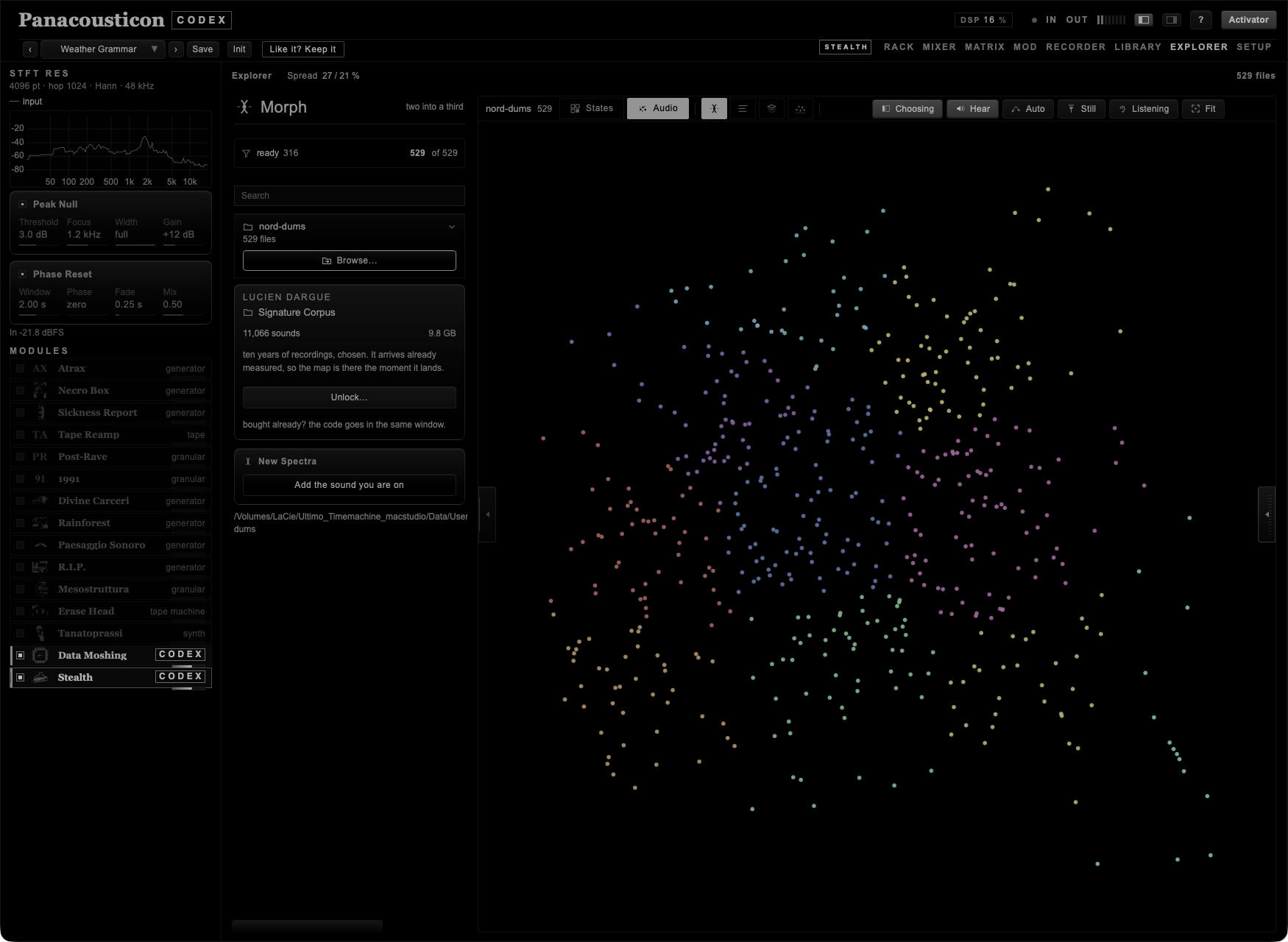
EXPLORER is a map of sounds. Codex measures every file you give it and places it on the map so that near means similar: the same microphone, the same room, the same kind of noise land next to each other. I built it because I have more recordings than I can remember, and a list of names tells me nothing about what is in them.
There are two maps. States places the presets of Codex. Audio places your own files, and it is where the rest of this chapter happens.
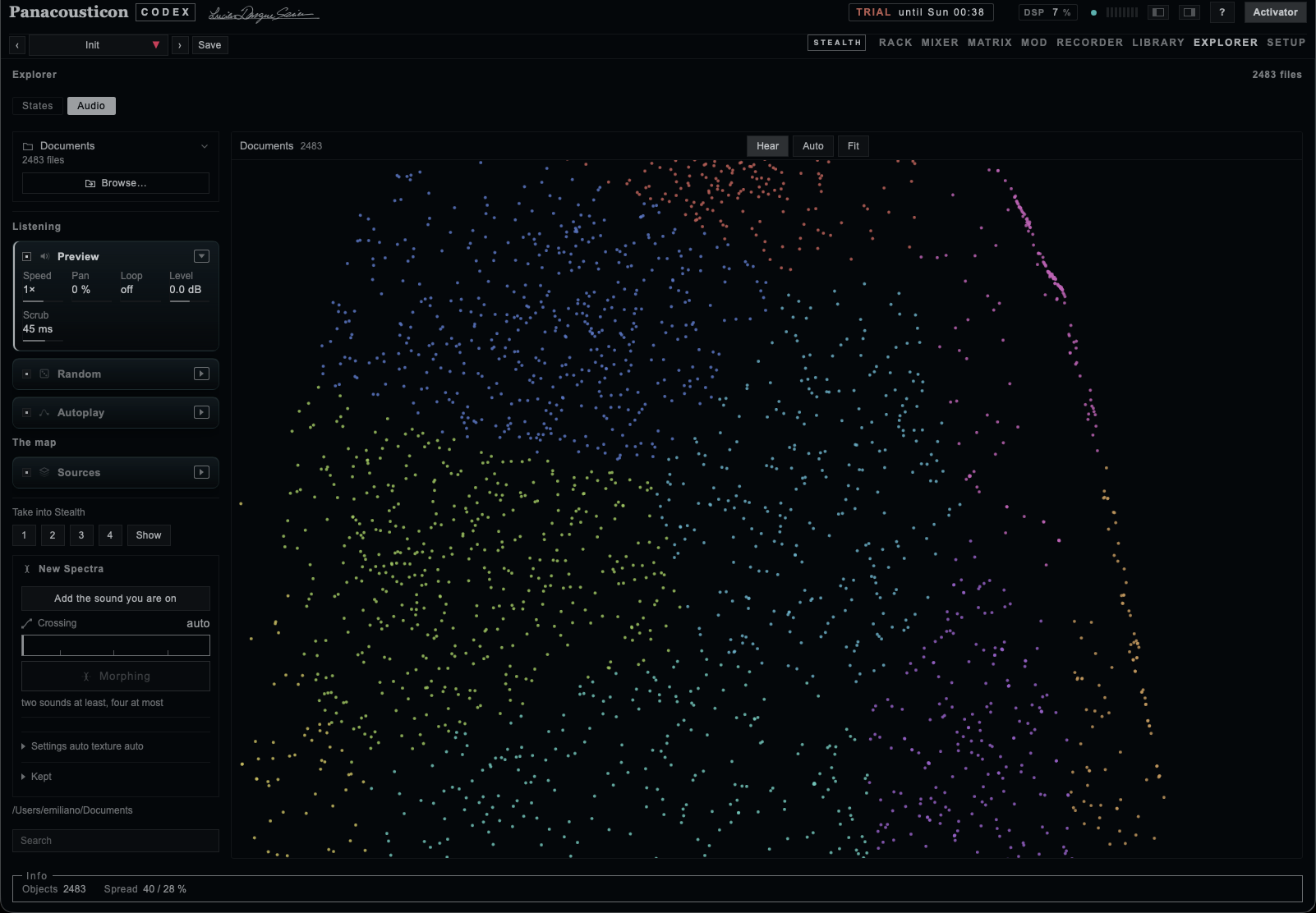
Browse… opens a folder, a disk, or anything in between. Only audio files are read; everything else is ignored. Subfolders are read too, so you can point Codex at a whole archive.
Before it reads, Codex shows you what is in there: how many audio files, in which subfolders, and how long the analysis will take. From that window you can leave out the folders you do not want. On a disk with tens of thousands of files this is the difference between a minute and an afternoon.
The analysis is kept, so the second time the same folder opens at once. Files too quiet to be a sound are left out and counted: a recorder left armed on an empty input writes a real file with eighty decibels of nothing in it, and a hundred of those pile into the same corner of the map and tell you nothing.
The analysis is kept, and the Read menu lists every folder that has one, with how many files are in it. Those open at once, however large they are. A day of trying things out leaves thirty clouds of three thousand files behind, so there is a way to clear them from here rather than going to look for them in the Finder.
A folder that has moved, been deleted or lives on a disk you have unplugged sinks to the bottom of the list, switched off, saying not there any more: the measurement outlives the thing it measured. Its cross throws away that measurement and nothing else, because there is nothing else left to throw away.
| On every row | What it does |
|---|---|
| The lock | Closed, nothing can remove that folder: not the cross beside it, not Delete all, not a stray click at two in the morning. It is the one gesture that makes a corpus safe to keep working next to. |
| The cross | Asks first, and says the numbers. On a cloud Codex made itself: to the Trash — 3 000 files, 212 MB, and it goes to the Trash, not into nothing, so you can take it back. On any other folder — your own recordings — it says forget this measurement and does exactly that: it does not touch a single one of your files. |
That split is the whole of it. Codex throws away sounds only where Codex made them. Everywhere else the most it can do is forget what it learned, and you can always have it learn again.
Move the pointer over the cloud and you hear what is under it. Click a point to keep it. The wheel zooms, dragging moves the map, and Fit brings the whole cloud back; a double-click on the map does the same.
| Control | What it does |
|---|---|
| Choosing | Puts the left column away and gives the map the whole window. On a folder of ten thousand sounds it is the difference between points you can tell apart and a smear. The tab on the edge of the map does the same. |
| Hear | Plays what the pointer passes over. |
| Auto | Codex moves through the cloud by itself. |
| Still | Nails the map down: it stops travelling when the pointer nears an edge, and stops sounding under it. For when you are working in the column and the map keeps running away. |
| Listening | Opens the right column over the map. The view does not move when it opens, so nothing you were looking at is lost. |
| Fit | The whole map again. |
At the foot, Info holds what Codex knows about the map as a whole: Objects, how many are drawn, and Spread, how much of what differs between these sounds the two directions of the map account for. A high spread means the map is telling you most of the story; a low one means these sounds differ in ways two directions cannot show.
A panel that is switched off keeps its name and puts its controls away. Switch it on and it opens; the name folds it by hand.
| Control | What it does |
|---|---|
| Preview | Plays the sound under the pointer. |
| Speed | How fast the sound is read, from a hundredth to the last audible octave. Pitch goes with it. |
| Pan | How far each sound lands from the middle. |
| Loop | The sound under the pointer is held until you leave it. |
| Level | How loud the preview sits under what Codex is playing. |
| Random | Throws dice at every hit: Pitch how far the speed may jump, Steps free or on notes, Level how much quieter a hit may come out, Chance how often a hit is thrown at all. |
| Autoplay | Moves on its own: Every how often, Step how far the next point may be, Drift how much the interval wanders, Clock puts the step on the beat of the host. |
Try this. Autoplay on, Step small, Drift high, Speed at a tenth. Codex walks one family of sounds and stops to think between one and the next, and the folder plays itself while you work on something else.
Sources says what the one map is made of. Codex measures and places every source together, so a sample of yours and a recording from the other side of the world sit at a distance that means something.
| Source | What it holds |
|---|---|
| Folder | The files of the folder you have read. |
| Interfera | The field recordings interfera~ has fetched. |
| Archive | The recordings internetarchive~ has brought back. |
| Kept | The crossings you have kept, measured with the same ears as everything else. |
| On map | How many are drawn right now, in that order. |
Take into Stealth sends the sound you are on into one of the four slots of the patching sheet, where slot~ reads it. Show opens the sheet at that object.
The left column has four tabs, and three of them are named after what you do there. Morph is the bench where two sounds become a third: you choose, you listen, you cross. Semantic is the measured words of the folder. Material is where sounds come in from outside and where they are taken apart. Texture is the bench that makes a piece out of many fragments at once.
Under the tabs there is one strip that belongs to all three, because a filter belongs to the map and not to a tab: it shows which words are on, how many sounds are left, and a cross that clears them. It stays in view while the column scrolls.
Three places to look, and all three are made of files: you search them, you listen, you keep what you want. Pick one before you write, because the same word means different things in each.
| Where | What is in it |
|---|---|
| Sounds | Recordings people have put up to be used, each with its licence. |
| Commons | Instruments, bells, languages, recordings a century old. Public domain or creative commons, with the author on every row. |
| Archive | The Internet Archive: broadcasts, tapes, records. On this one two ready queries are offered, old time radio and radio programs — fifty-seven thousand and five million items, most of them public domain. |
Write what you are after and press Search. Four results come back, not twenty: every row is a sound you will want to hear, and hearing it means fetching it. While Codex is asking, a thin bar runs under the field.
Each row says what it is, who made it and under which licence, with its length on the right. The triangle plays it and becomes a square while it sounds; the line along the bottom of the row is the time of the file. What you hear is a light, shortened copy: enough to decide, and it does not fill your disk.
The + keeps that sound. Only then does Codex fetch the whole file, at the quality it is published in, and put it in your material with a small sheet beside it holding the title, the author, the licence and the page it came from. The file itself carries a number, not a name.
While a file is on its way the other rows go quiet: their triangles and their + turn grey and stop answering, and the one you asked for says how much of it has arrived. They are not broken, they are in a queue — and the strip where the controls will be is already there, switched off, so you can see what you are waiting for.
I did it because the right thing to do in front of a program that is not answering is to press something, and pressing the other three triangles started three more downloads: four files on the same line, all slower, and the one you were waiting for arriving last.
The same while a file is being kept: Forge stays off and the Cloud panel says a file is on its way, with the megabytes. Forging half your material is not what you asked for.
Then one more line, getting it ready for the forge, and this one is not decoration: the file has landed but the material has to be read again before the forge knows what it is working on. The same three steps, in the same words, whichever way a sound comes in — the +, the thirty seconds, or a station caught off air. When the count comes back and Forge starts breathing, it is ready.
The waiting is drawn in the colours of the corpus. The strip under the search carries the whole wheel of hues of the map, drifting slowly, with a sweep of light crossing it every couple of seconds: it cannot say how much is left, because nobody knows what a server will do, so it says that something is still working — which is the only true thing. The bar of the thirty seconds does know, because it counts bytes, and there the ramp is a ruler: the part that has arrived is lit and the rest is the same ramp, dimmed, so the colour under the head tells you how far along you are out of the corner of your eye. The dashes of a file arriving in a row are windows onto the same ramp, and the line that runs under a sound while it plays is that ramp again, scaled to the file: warm at the start, green in the middle, violet near the end.
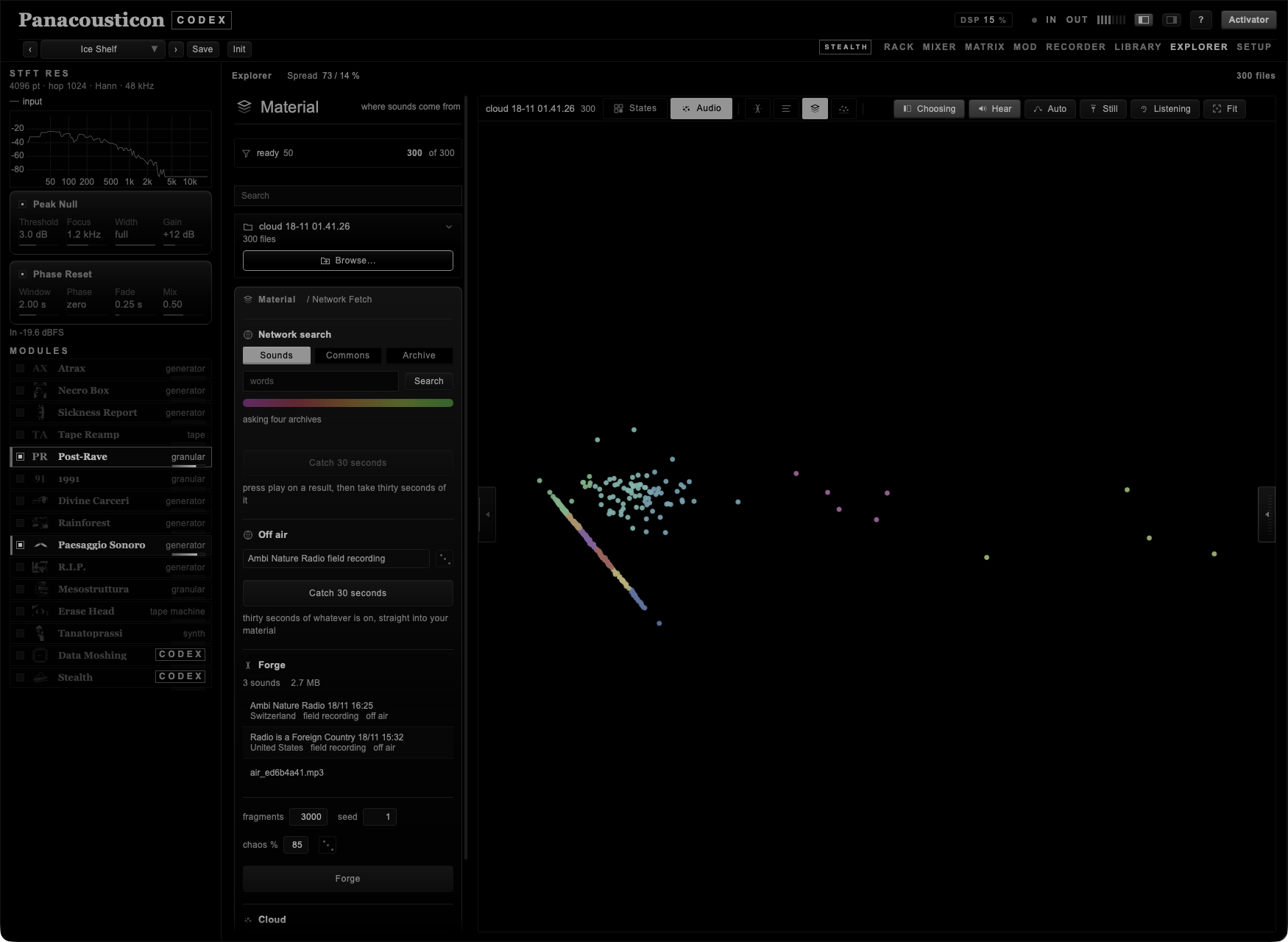
While something is playing, a strip appears under the results: a square for silence, a bar you can drag, where you are written out in full, and 30 s.
The bar is the one gesture I kept missing myself. Drag it and the sound goes where your finger is, so a four-minute recording can be gone through in a few seconds instead of listened to from the beginning. What you are going through is the light copy, which stops after a while — so you are exploring the opening of a long file, not all of it.
Then 30 s, which is the same gesture as catching a radio station, here on a file: it keeps thirty seconds from where you are standing, and nothing else. Codex fetches only the part it needs to reach the end of that window, decodes it and writes the thirty seconds out as a wav, with the usual sheet beside it saying which second it came from.
I put it there because among four results there is always one that is four minutes long, and four minutes is not a sound, it is a tape. The forge would cut fragments out of it anyway, but then every fragment comes from a recording you never really chose. Thirty seconds you picked by ear are worth more than four minutes you downloaded.
At the bottom of the search you can see how many previews are on your disk and how much they weigh, with a cross that throws them away. They also keep themselves under a ceiling, and the oldest go first.
If a search comes back with nothing, a line appears saying who answered and how — commons answered 503, no internet, or blocked. It only appears when nothing came back: with results on screen a warning would be a warning about something that worked.
Next to it, open the log. Codex keeps a line for every question it asks the network: the time, where it asked, the words, how it went and how many milliseconds it took. The last four hundred lines, in Panacousticon/network.log. When something is slow or empty it is usually the network, a country blocking a host, or an archive that changed its answer — and that file says which.
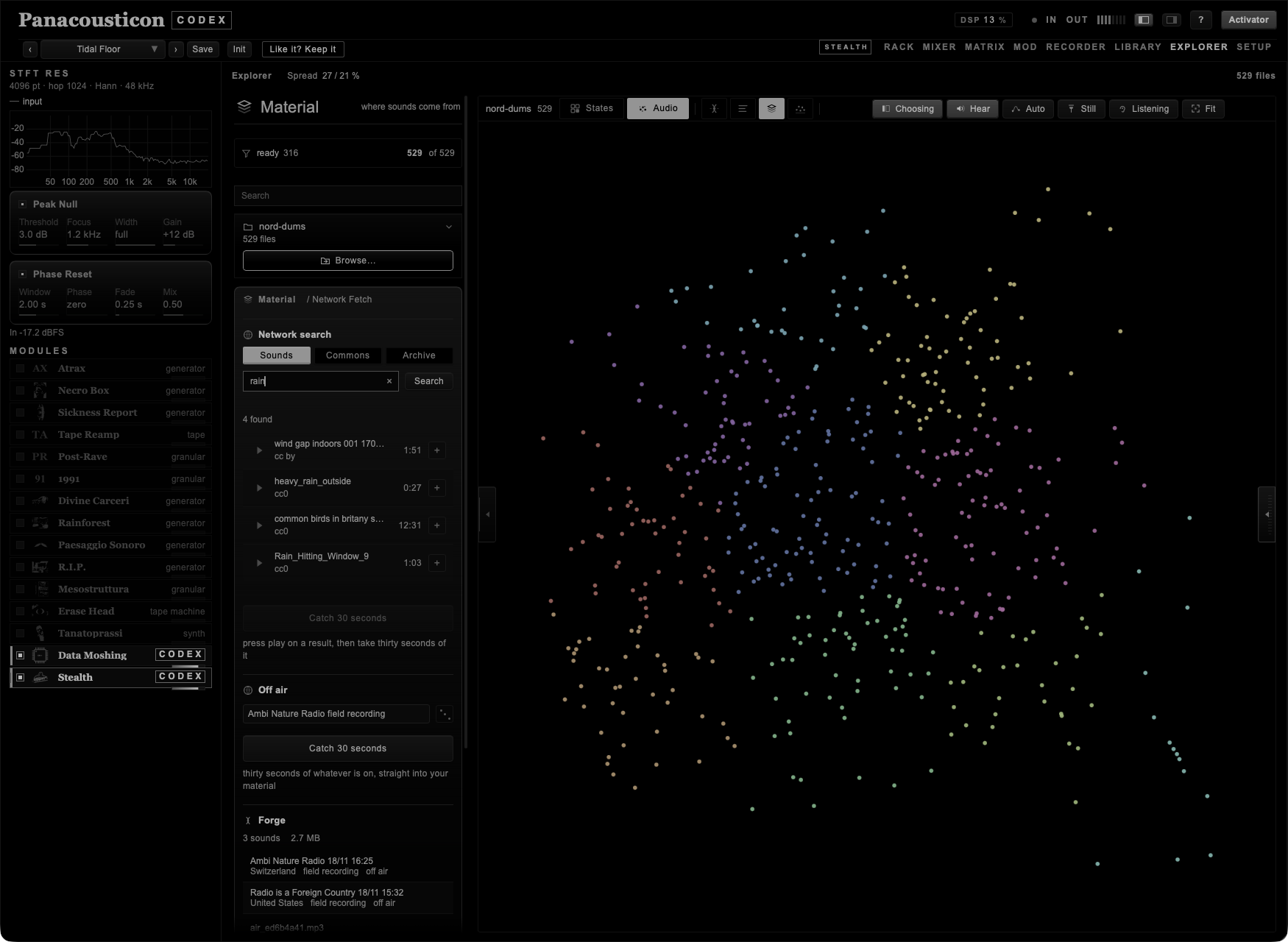
Radio is not searched, it is caught. There is nothing to write in a field: a station is not a catalogue, it is something going past, and either you take it or it is gone.
So there is no query here, only a list and a button. Thirteen stations, chosen by hand and tried one by one — field recording, nature, shortwave, ritual, noise — and a die for when you would rather not choose. Press Catch and about thirty seconds of whatever is on goes straight into your material.
Beside it Codex writes what it knows: the station, the country, the family, the exact hour, and off air where a licence would be. Of a stream you cannot know whose it is, but you can know where it came from and when — which, a year later, is the part that matters.
The length is counted in seconds, not in bytes: between a station at 64 and one at 320 the same bytes would be ten seconds or one.
And it is never the same thirty seconds. What arrives is what is going out at that moment, so pressing Catch twice on the same station gives you two different recordings — that is the whole point of it, and it is why I would leave one station running while you work on something else. The one exception is Brown Noise, which is continuous: the file is new, the sound is the same. Everything else is a real schedule, with weather, voices, and silences in it.
Thirteen stations and thirty seconds each is a corpus in an afternoon, made of material nobody else has, because nobody else was listening at that minute.
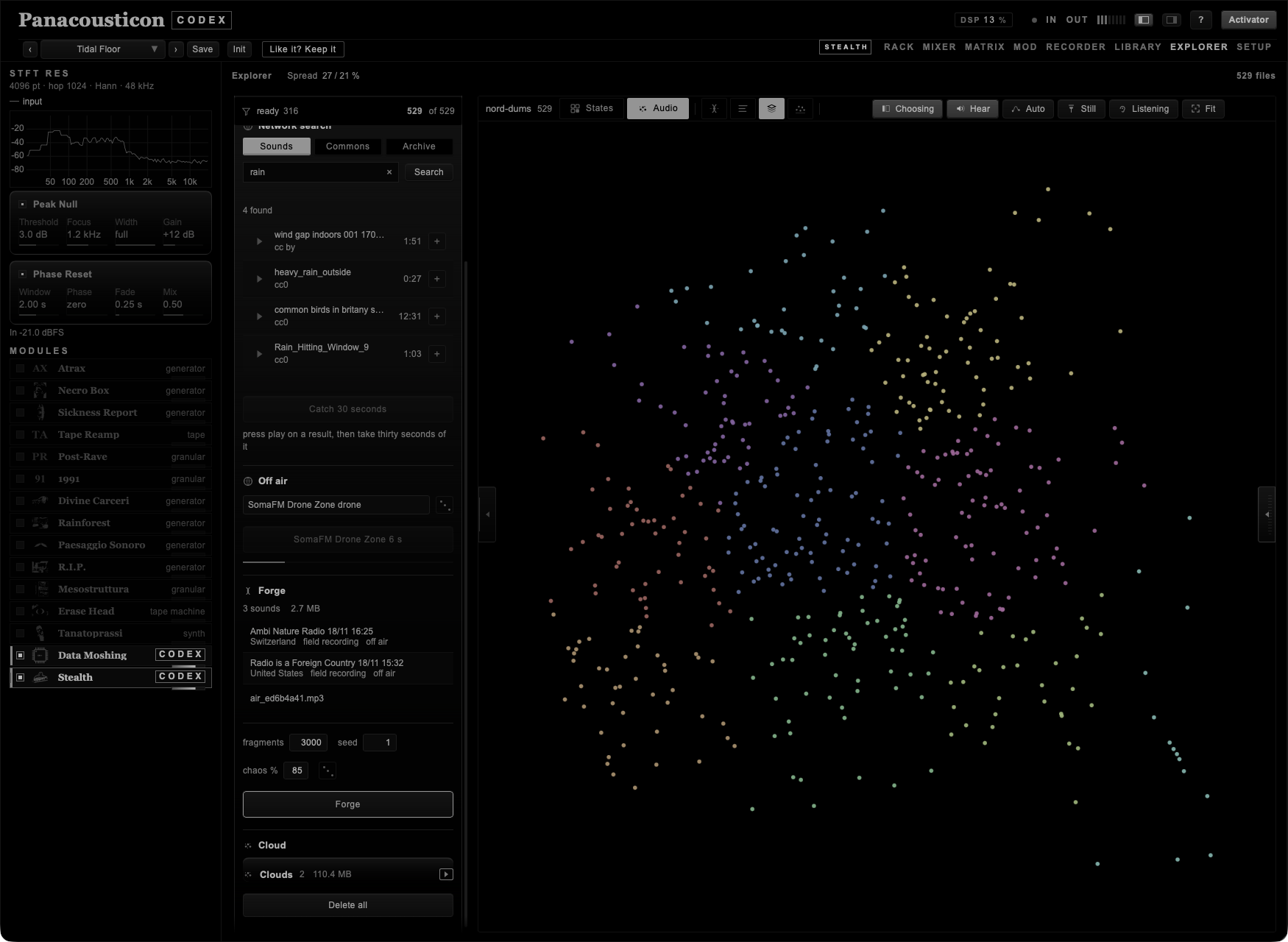
A cloud is thousands of fragments made from the sounds you have kept. It exists so that you have enough material to navigate instead of choosing by hand.
Codex takes the sounds in your material and shares the work between them: two sounds and three thousand fragments means fifteen hundred from each.
Then, for every single fragment, it makes three choices.
Where to cut. Four ways, mixed: on an attack, where the timbre changes scene, somewhere at random inside the sound, or in grains. So the cloud holds hits, passages and dust, instead of one kind of thing three thousand times.
How long. Not one length but three bands. Out of a hundred fragments, sixty are very short — between ten and eighty milliseconds — thirty are middling, up to seven tenths of a second, and ten are long, up to three seconds. Grain, events, gestures: three time scales in one cloud.
What to break. This is what chaos decides. At 85, eighty-five fragments out of a hundred are damaged and fifteen come out as clean cuts. A damaged one goes through one to three faults out of eight — stretched without changing pitch, saturated, folded, reduced to a few bits, multiplied by a sine, made to resonate on a note that was not in the source, pulsed, or cut up and reassembled out of order — and the order is drawn too. That is why two fragments born next to each other in the same recording can come out as two materials that have nothing to do with one another.
| Number | What it does |
|---|---|
| fragments | How many pieces to make. Ten is a handful, twenty thousand is a world. |
| seed | The number all the randomness starts from, from 1 to 999. The same seed on the same material gives the same cloud, fragment by fragment. Change it and everything changes. Three digits because a seed you cannot remember is a seed you have lost — and nine hundred and ninety-nine worlds are more than anyone will visit. |
| chaos | How many fragments out of a hundred go through the faults. At zero a cloud is only cuts; at a hundred every piece has been through something. |
A cloud you like can be made again exactly, as long as the material is the same: the number is enough. You do not have to remember it — a cloud you save carries its own seed, written in its register and shown under its name in Clouds.
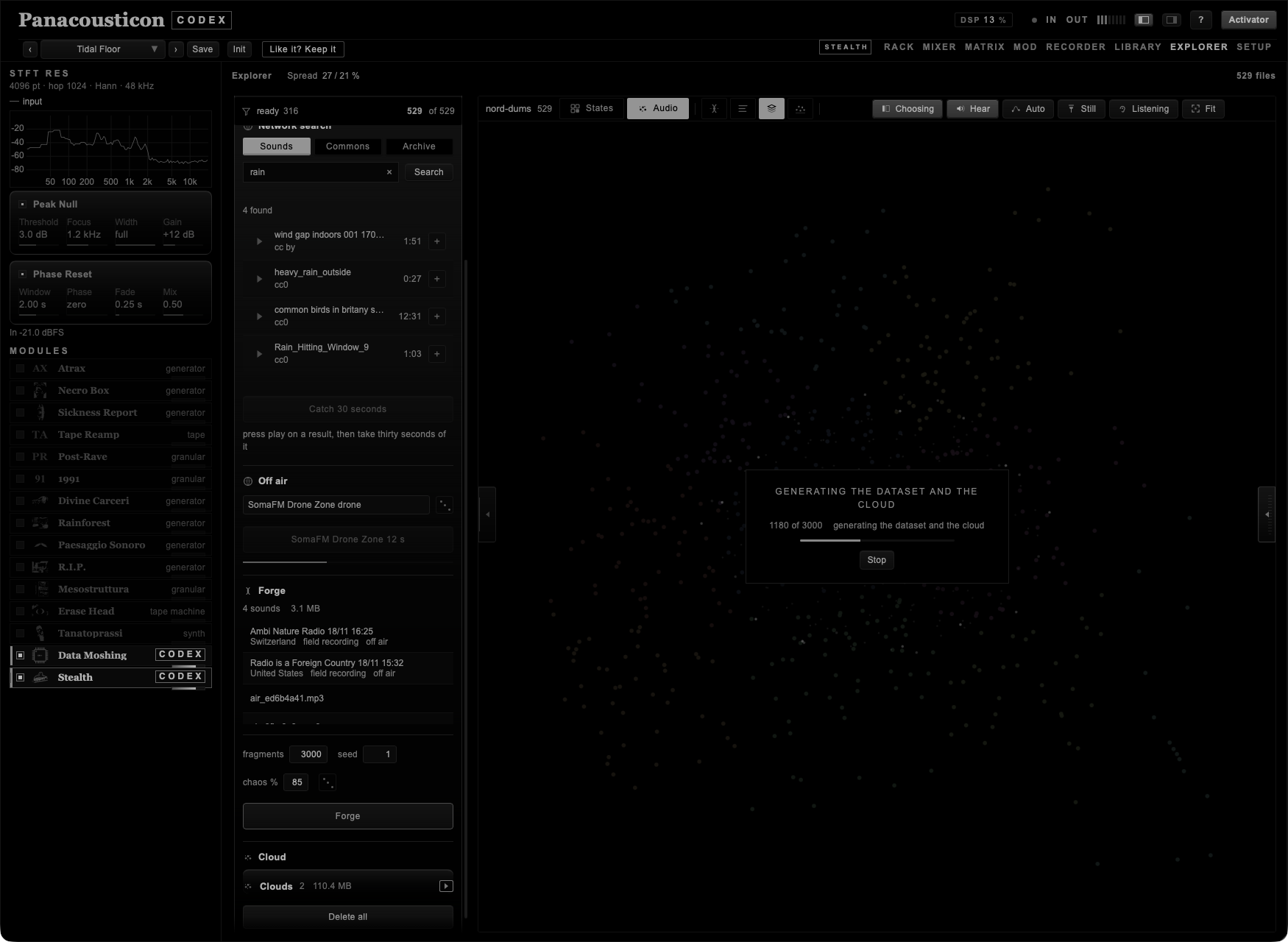
Press Forge and the map gives way to the cloud being born: the points appear one by one as the fragments are made, on the spiral a plant uses to set its seeds, growing from the middle outwards. The advancing edge is the work advancing. Over it, a line that says what is happening — generating the dataset and the cloud — the count, and Stop.
Two words, because they are two things. The dataset is what you have made: a folder of files, with its register. The cloud is how you look at it: those same files laid out on the map by how they sound.
The bar at the top stays live while it works, so you can go and do something else; the panel on the right keeps the count and the way to stop it.
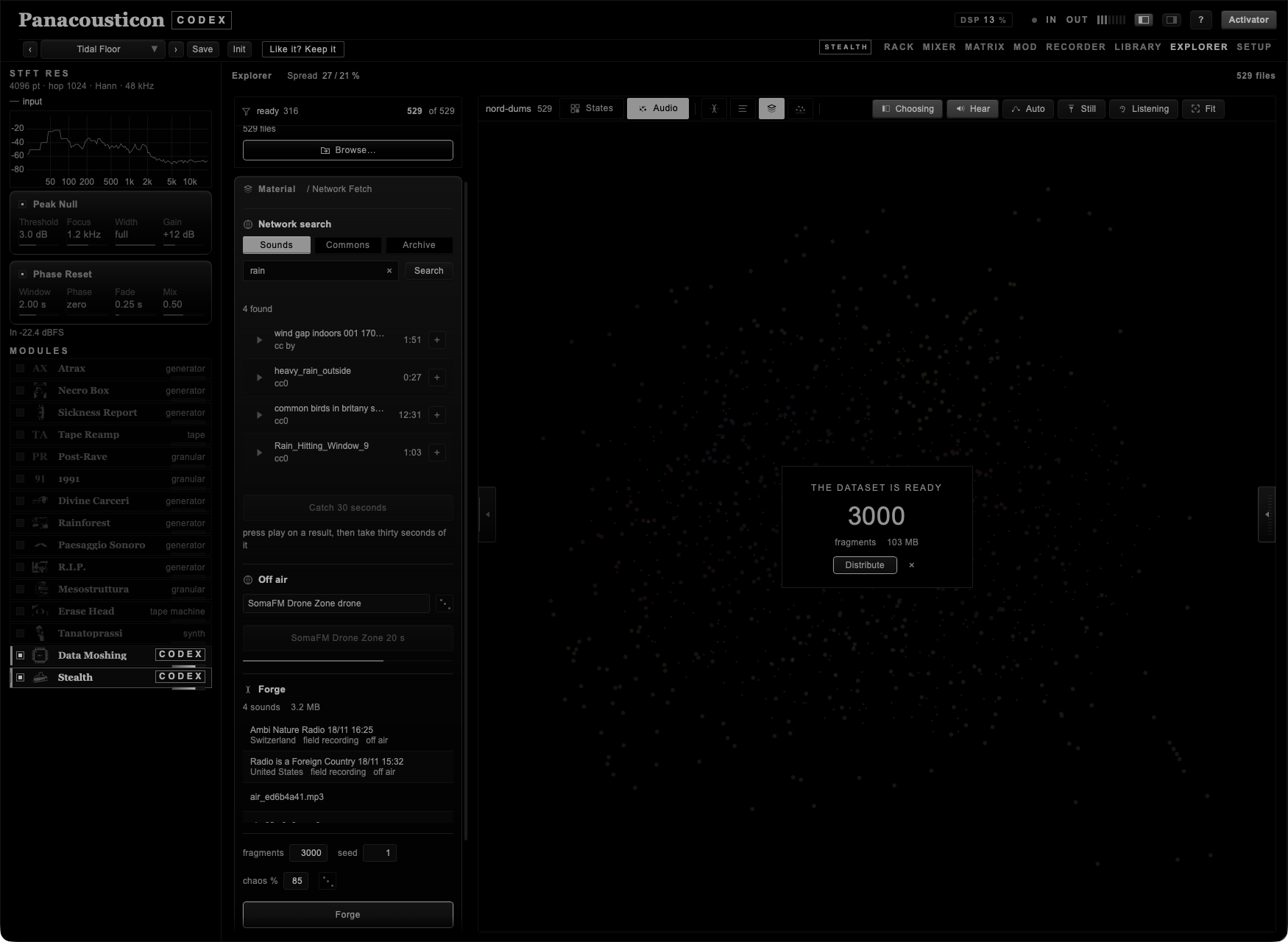
When it is done, the number is there in the middle of the map and under it Distribute. That is the gesture that lays the fragments out, where the ones that sound alike end up near each other, and from there you listen, you filter, and you take two of them to cross. It is called Distribute and not Open because nothing is being opened: three thousand files are being spread out in a space. The cross beside it leaves the cloud for later — it stays in Clouds, with its own Distribute.
The cloud is not the result: it is the material you start from.
A cloud is born provisional. Save keeps it, and writes beside the sounds a register with the seed, the sources and what was done to every fragment. Delete throws the whole folder away in one gesture. Clouds lists what is on your disk, with the room each one takes, where it is, and a way to throw away every cloud you did not save.
Delete all empties everything you have gathered: the sounds you kept, the previews on your disk, and a cloud you have made but not saved. The search goes back to an empty field, as it was the first time. It does not touch the clouds you have saved — those are corpora, and they have their own place and their own gesture.
It asks first. The first press says what is about to go and how many; the second does it. After five seconds it forgets, so it is never left armed waiting for a stray click.
This is the part I care most about. Two sounds go in and a third comes out: not a fade from one to the other, but one spectrum bent onto the other until what you hear is a sound that neither of them was.
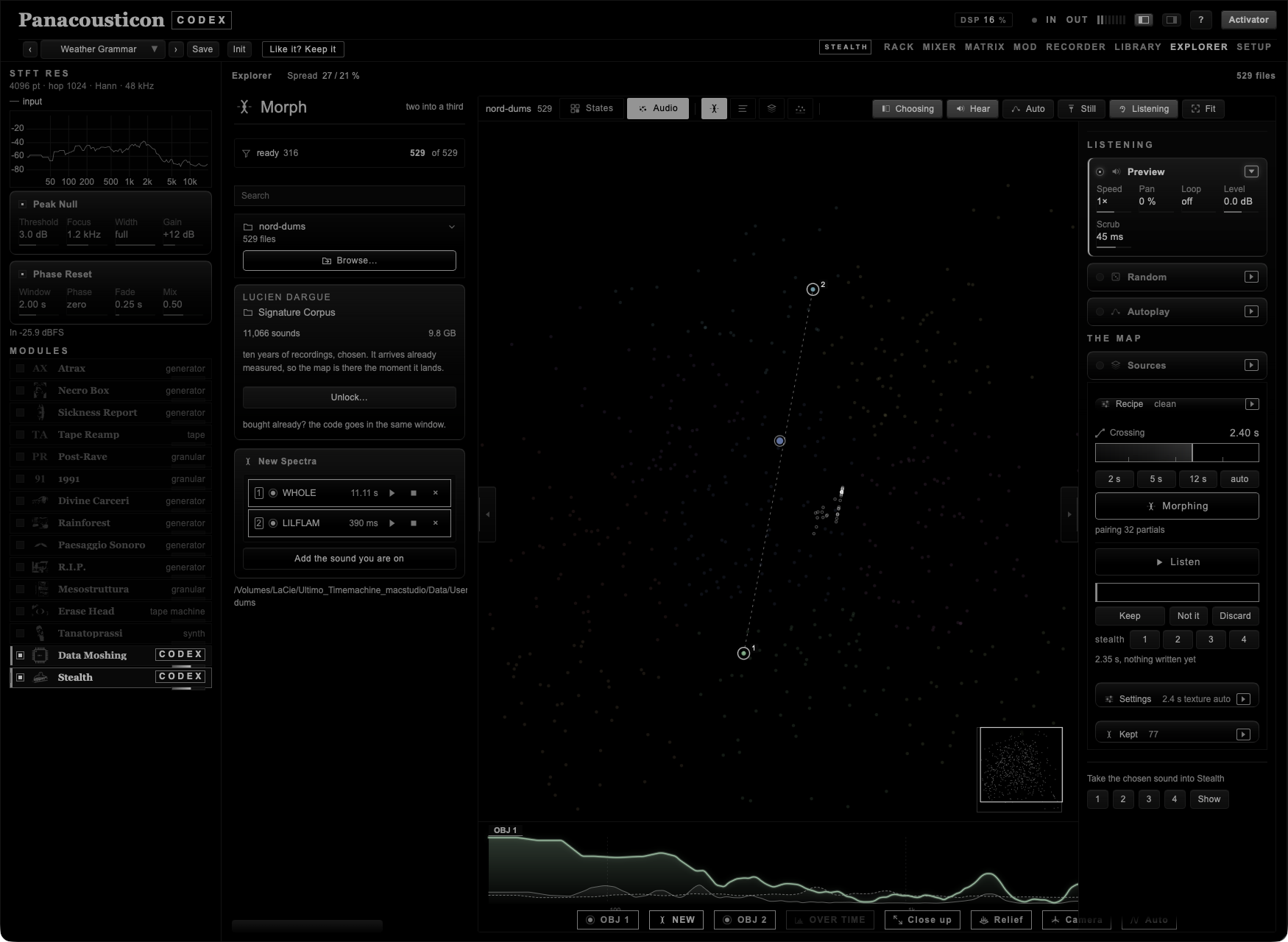
Click a point on the map and it goes into the list; click a second one and the line of the journey appears between them. Shift on a third and a fourth adds them, up to four. Add the sound you are on puts in the one you are listening to, without going back to the map.
As soon as there are two, the map moves to them on its own: the two sounds and the line between them end up in the middle of what is left uncovered by the panel on the right, whatever size the window is. You do not have to drag the map or go looking for them with the navigator.
And the panel opens itself, with Morphing breathing: two points and a line drawn is a question with one answer, and if the panel where you answer it is closed the road ends there. It happens at the second sound only — from the third on you know the way, and if you have closed the panel yourself it stays closed.
Rest the pointer on one of the chosen sounds and Codex opens its card: how long it is, what format, and the two numbers that decide how it will be crossed — whether it is pitched, mixed or noisy, and how many partials it has. At the foot there is the whole path, because a recording made by some other program often has a name longer than the panel, and a name you cannot read in full is a sound you cannot be sure you chose. Show in Finder opens it where it lives.
| Control | What it does |
|---|---|
| Crossing | How long the journey lasts, from twenty milliseconds to a minute. At the far left it is decided by the sounds; a double-click goes back there. |
| Morphing | Makes the sound. The line under it says how far it has got. |
| Listen | Plays the result and fills as it goes. Press it again for silence. |
| Keep | Writes it beside the others, at the speed you are listening at. Until then it exists only in a scratch folder. |
| Show | Shows the file in the Finder. |
| 1 · 2 · 3 · 4 | Sends the result into a slot of the Stealth sheet. |
| Discard | Throws it away. |
Under Settings there is what decides how the crossing is made. Left alone, Codex chooses from the sounds themselves, and that is how I use it.
| Control | What it does |
|---|---|
| Grain | texture hears the colour of a long sound; percussive keeps the attack of a short one. |
| Fade before | Softens the two ends before the crossing, for recordings that start or stop abruptly. |
| Method | axis carries the whole spectrum across; partials pairs the peaks one to one and makes them glide. On auto, Codex pairs partials when the sounds are pitched and carries the whole spectrum when they are noise. |
| Gesture | A movement that rides the crossing: lift an octave up, drop two octaves down, dive down and away. |
Two spectra do not always want to meet. A recording full of noise and a clean held note have nothing in common to carry across, and the crossing comes out as a smear. Recipe is where you prepare them first.
These are not effects in a chain. Each one works on the analysis itself, inside the same reading, before the two spectra are bent onto each other. Nothing is written to disk in between, there is no second pass, and the sound is never resynthesised and analysed again — which is exactly what used to cost an afternoon and a tape for every stage.
| Operation | What it does |
|---|---|
| clean | Takes away the floor of noise: everything that sits more than so many decibels under the loudest thing there. |
| align | Puts the attack of one sound on top of the attack of the other. It looks only in the first two seconds and moves by half a second at most, so it cannot run away with a long recording. |
| shift | Moves one of the two in pitch, to bring it into the register of the other. |
| tilt | Tilts the colour, in decibels per octave: it brings a dark sound and a bright one closer together. |
| trace | Keeps only the strongest lines of each instant and throws the rest away. |
| blur | Averages the spectrum over time: the shape stays, the detail goes. |
| focus | Exaggerates whatever already stands out from its neighbourhood. |
| freeze | Holds one instant still for a number of frames. |
| scatter | A thread of disorder over the amplitudes. |
The arrow at the right of a row opens it and gives you the amount. You can switch on as many as you like: they happen in the order they are listed, which is the order that makes sense — clean the material, line it up, move it, then shape it.
Some pairs cancel each other out, so Codex does not let them both be on. Switch on focus and trace goes off, because trace has already kept only the strong lines and focus has nothing left to lift. The same between freeze and align, and between scatter and clean. The line underneath always says which one was switched off and why. I would rather tell you than let you make a crossing that sounds wrong for a reason you cannot see.
Underneath, the Console writes every step it took, with the amount and which of the two sounds it was done to. copy puts the whole log on the clipboard, so a result you liked can be written down and made again.
Try this. On two recordings that have nothing to do with each other, switch on align, blur and trace. Align puts the two gestures on top of each other, blur takes away the detail that was keeping them apart, and trace leaves only the lines that matter. It is the one I come back to most often.
Crossing is the length of what comes out, in both directions. Ask for more than the sounds have and they slow down, like a bat's call under a microscope. Ask for less and they speed up until two sounds collapse into one hit.
So the time chooses what kind of object is born, not only how long it lasts. Around a second, the two sources are compressed into a splinter and what comes out is a new object with its own character. Around a minute, you hear the metamorphosis itself and you can follow it. Both are right; they are different pieces of music.
One thing to know about long sources. A three-minute recording squeezed into a one-second journey is read seventy times faster, so the arrival does not sound like the sound you chose. If you want to recognise where you land, give the crossing more time, or choose a short file for the end of the journey.
With three or four sounds the journey is divided: four sounds are three crossings, one per third, each one a crossing of its own. You hear the first become the second, the second become the third, and so on, in the time you asked for.
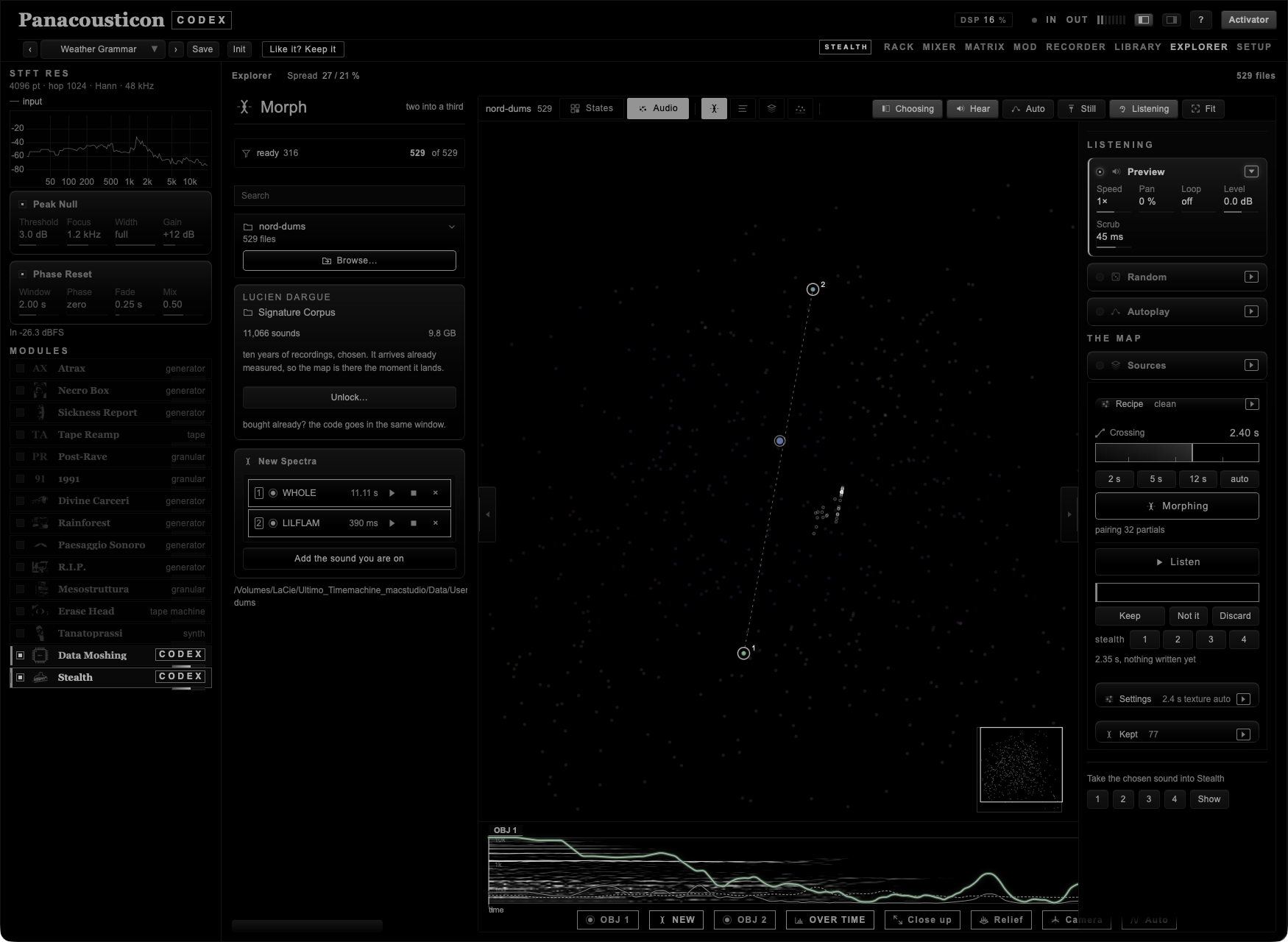
Under the map there is the analysis of what you are making. Each name is a switch, and they work together: all of them at once, any one alone, or the plate left empty.
| Switch | What it shows |
|---|---|
| OBJ 1 | The spectrum of the sound you are leaving, as a body. |
| NEW | The spectrum of the instant you are hearing. |
| OBJ 2 | The spectrum of the sound you are going to, as a dotted outline. |
| OVER TIME | The whole journey: time across, frequency up. Each band is drawn by how far it stands above its neighbours, so a partial comes out as a line and the noise under it falls to the ground. |
| Relief | The same analysis on a plane, seen from the side. One line per moment, each set back from the one before, so a ridge in front hides what passes behind it. |
| Bigger | The analysis takes half the window and the map frames the sounds of the crossing in what is left. |
| Auto · 1024 · 8192 | The window the picture is analysed with. Short reads time sharply and smears frequency; long does the opposite. Auto lets the length of the sound decide. |
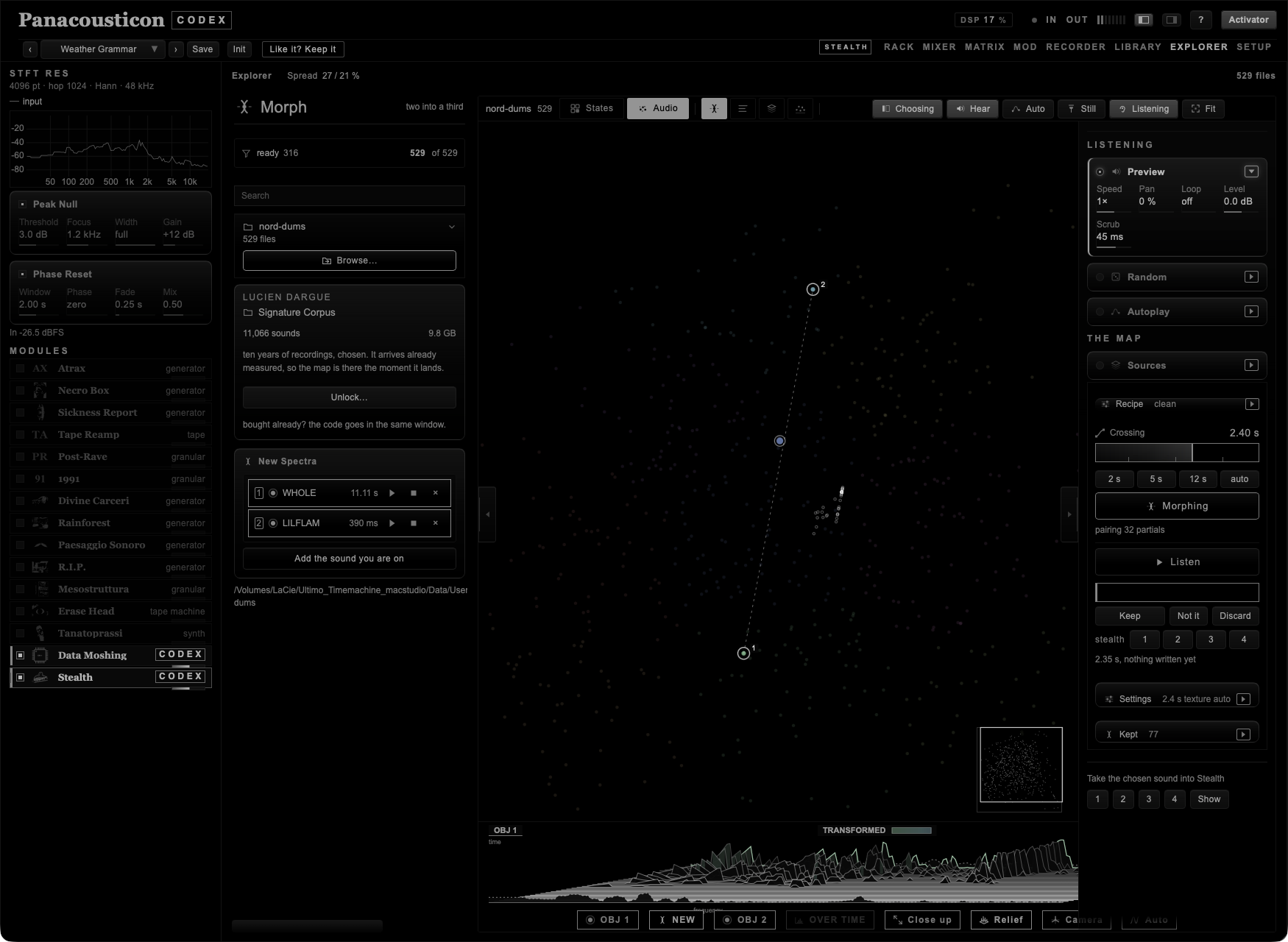
The horizontal of the picture is time, so you can drag on it and the sound follows your finger. The same gesture works on the map: with a result made, move the pointer along the line of the journey and you go through the crossing as slowly or as quickly as you like, backwards as readily as forwards. On a crossing that lasts a second it is the only way to hear what happens inside it.
Between the chosen sounds Codex draws the journey itself, one dot for each moment of the result. A dot sits along the line at the distance that moment has really travelled from one spectrum towards the other, and it is pushed off the line by how much it is not a mixture of the two.
A crossfade draws a straight string of beads: at every instant it is exactly a mixture, and there is nothing else to say about it. A crossing bulges, because in the middle there is a sound that is not a mixture of anything. The dots already passed are filled, the ones ahead are hollow, so while you listen the journey fills in front of you.
On the journey Codex writes, at each measured moment, how much of what you hear was in neither of the two sounds. The badge at the top left carries the highest figure of the whole crossing.
It works like this. For every band of the spectrum Codex looks at how strong that band ever got in each of the two sounds, takes the higher of the two, and asks whether the result goes above it. What goes above was in neither: it is new. What stays below was already there in one of them, however beautiful it sounds.
So a crossfade reads near zero, by construction: at every instant it is a mixture of things that already existed. A figure that climbs means the engine has built lines that were not in either source — a partial carried across lands, on the way, on frequencies neither sound had.
It counts lines, not loudness. A band is only counted when it stands clear of its own surroundings, the way a partial or a resonance does, so noise and hiss cannot inflate it. What it cannot tell you is whether a new line is beautiful or is a ringing artefact: that part is yours.
The glow along the journey marks the stretch where the figure stays near its peak — where the transformation is actually happening, rather than at the two ends, where the result is nearly a copy of one of the sounds. Higher is not better. A low figure with full spectra gives a hybrid you can recognise; a high figure gives something that resembles neither parent. They are two different pieces of music, and the number only tells you which one you are making.
Spectral morphing has a literature, and the ideas under New Spectra are not mine. If you want to go further:
| Reading | What you find there |
|---|---|
| Trevor Wishart, On Sonic Art (1985; revised 1996) | The frame this whole part comes from: sounds as objects that can be transformed into one another, and what that means musically. |
| Trevor Wishart, Audible Design (1994) | The practical companion: the transformations themselves, one by one, with what each one does to a sound. |
| The Composers Desktop Project (CDP) | The programs those transformations were built into, and still the reference for spectral morphing done as a chain of explicit stages. |
J. Laroche and M. Dolson, Improved phase vocoder time-scale modification of audio(1999) | Phase locking at the peaks, which is why a result reassembles cleanly instead of smearing. |
| Pierre Schaeffer, Traité des objets musicaux (1966) | Describing sounds by what they are rather than by where they came from — the idea the map and the measured words rest on. |
Trevor Wishart made sounds turn into other sounds with a studio full of machines and hundreds of passes, one for each stage of the transformation. The chain was the work. What I wanted was that chain in one gesture, on material I have not chosen by hand.
For each instant Codex takes the two spectra, works out how their energy is distributed, and builds the map that carries one distribution onto the other. Then it bends the first forward and the second backward until they meet on an axis in between, and only there does it interpolate. That is why a partial moves instead of fading: it is carried to where the other sound keeps its energy, rather than being turned down while another is turned up. The phase is rebuilt at the peaks alone, so the result reassembles cleanly, and the level is kept as a layer of its own, or a moment where one of the two is silent would come out silent.
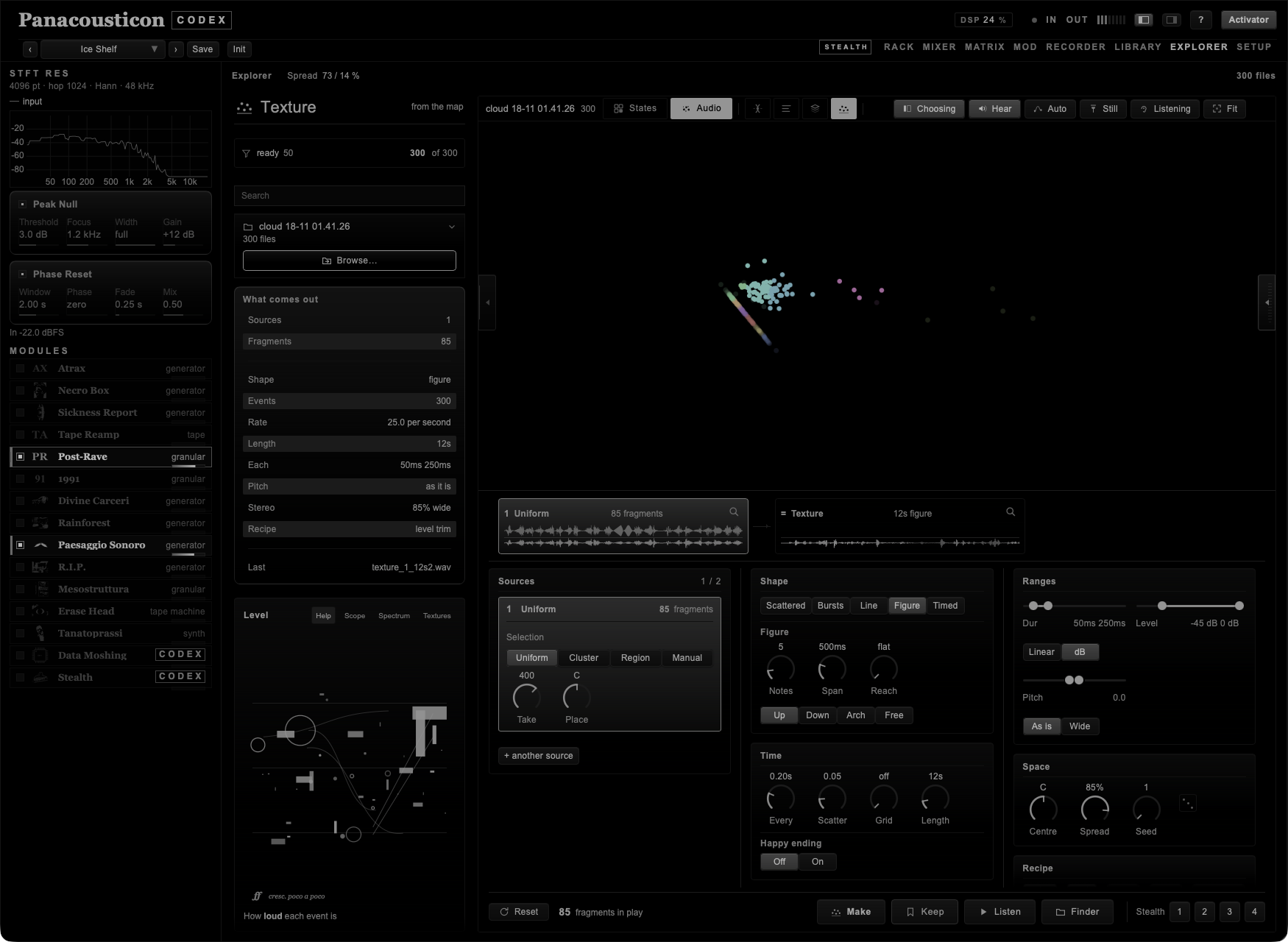
The third thing the map does. Listening is one fragment at a time, Crossing is two sounds becoming each other, and Texture is a piece of sound made out of many fragments at once: hundreds of them, placed in time by a handful of rules. You pick the area of the map, and the area is the timbre. Move it and the texture changes character without your touching a single control.
The bench opens in the lower half of the stage, under the map: the map keeps the top half so you can see where the fragments are coming from while you work on them.
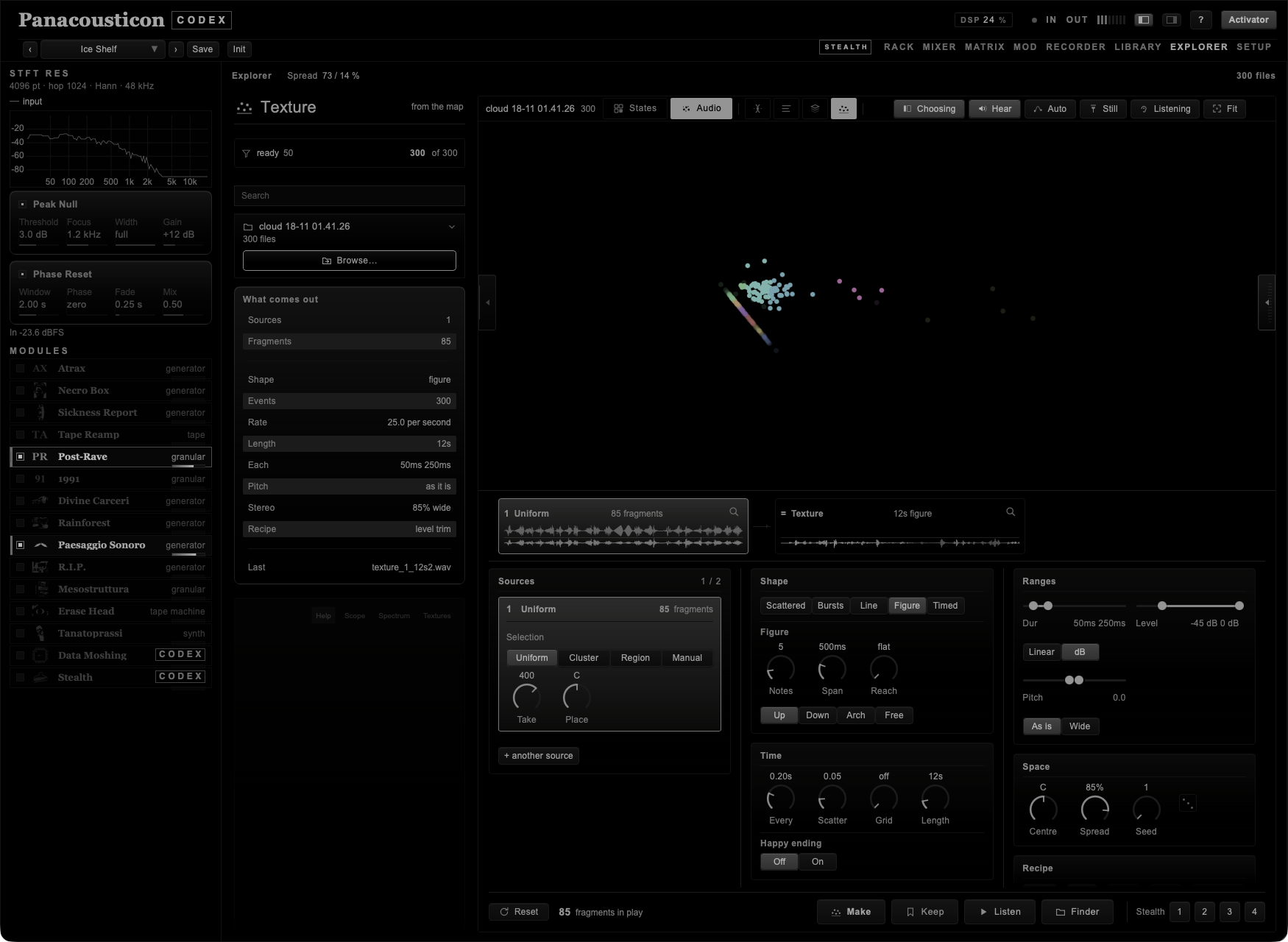
The bench is made of six panels — Sources, Shape, Time, Ranges, Space, Recipe — and they do not move. Make the window narrower and they go from three columns to two to one, but each panel keeps its column and its neighbours: Sources is always first, Recipe is always last. A bench that rearranged itself every time you changed shape would be a card trick, and nobody learns where anything is on a surface that moves while they look at it.
Up to eight. Each one picks its own fragments from the map, and has its own share of the events and its own place in the stereo, so a drone, a layer of grit and a handful of hits can sit in three different parts of the field instead of being stirred together.
| Mode | What it takes |
|---|---|
| Uniform | Fragments spread over the whole map, skipping the ones that cannot be heard. The place to start. |
| Cluster | Click a point and it takes its whole family — the map has already grouped them by likeness, so this is the timbre of that point, not one example of it. |
| Region | A circle around the point you chose. Radius is how wide. |
| Manual | Only the ones you clicked, one by one. |
| Control | What it does |
|---|---|
| Take | How many fragments that source holds out of the ones its mode found. A family of two thousand does not need two thousand: a few hundred already say what the timbre is, and the rest only make the texture slower to build. |
| Share | How many of the events that source gets — one at 10 % comes in one event in ten. It appears from the second source on, because with one source there is nothing to share. |
| Place | Where it sits, from left to right. |
Beside the heading the bench counts them: 3 / 6 is three sources out of the most this cloud can carry. That ceiling is not a round number I chose, it is the cloud divided by forty: a source with fewer than forty fragments repeats itself audibly, and eight sources sharing six hundred fragments are eight ways of hearing the same handful. On a cloud of three thousand you get all eight; on two hundred you get five, and + another source simply is not there to be pressed.
Two Uniform sources do not take the same material. The fragments are dealt out like a deck — one to you, one to me — so each one gets its own, spread over the whole map as Uniform means. Without that, two Uniform sources were two copies of one thing: the same events twice, at twice the amplitude, which is not a layer, it is a louder single source. The fragments another source has already claimed by hand are left out of the deal too.
Each source is a row of its own: its number, where it fishes, and how many fragments that comes to, with its own values underneath. Click one and it opens in place, with its controls inside it, so there is never a knob on the bench you cannot tell the owner of. Clicking a point you already chose takes it back out, and clear empties the whole list at once, which puts that source back to picking on its own. remove, which appears from the second source on, takes the source away altogether.
While the Texture bench is open the map shows what each source has got hold of: the chosen points carry a ring in that source's colour, a soft field marks the area they come from, and under it a short bar with the source's number says where that source sits between left and right. Nothing is drawn between them, because here there is no journey from one to the other: there are several places being drawn from at once.
The light is in three levels, not two. The points of the source you have open are lit, the points of the other sources are a step back, and the rest of the cloud is dimmer still — present, because you need to see where you are in the map, but out of the way. Nothing is hidden and nothing is outlined: a ring drawn round a group makes it look tidier than it is, and what you are choosing is not a shape, it is a neighbourhood.
When a point joins a source, a small disc leaves the point and flies to that source's row on the bench. It costs a third of a second and it answers the only question you have at that moment — where did that go? — which a number quietly changing from 11 to 12 does not. And when you take a cluster or a region, the map moves to frame it instead of jumping there: the same cloud, seen from closer, so you can still tell what moved.
Across the top of the bench, between the map and the controls, there is one step for each source: its number, what mode it is in, how many fragments it has, and its sound drawn twice — pale above, as the fragments come off the disk, and solid below, as the engine will use them after the recipe. The difference between the two lines is the recipe, and you can see it without anyone explaining it.
Pass over a step and the map lights up that source's points. Click it and that source opens in the panel below. A step that says nothing chosen is a source you have left empty; one that says reading is still fetching its sound off the disk.
Each one is a different way of deciding when an event falls. Same engine, same material, five different kinds of object.
| Shape | What comes out |
|---|---|
| scattered | Events scattered in time. Thin, it is a few sounds in a space; dense, it closes into a single continuous body. |
| bursts | Bursts of events separated by silence. The events inside a burst almost touch, and the burst can rise, stay flat or fall. The silence between them is what makes a burst sound like a gesture. |
| line | A line of bigger events, each one with a few small ones around it. The node holds the pitch and the decorations turn around it. |
| figure | A figure you define — how many notes, how long, which way it goes — repeated from a different pitch each time. |
| timed | Events nailed to a grid. Here the grid is not a magnet, it is the metre: every step either sounds or does not, and fill says how many of them do. |
Changing shape opens the big step as much as that shape needs to be heard — a burst of twelve events is nearly a second long, and with the step at a quarter of a second the bursts run into each other and you hear fog instead. Go back to a shape that does not need the room and your own step comes back.
| Control | What it does |
|---|---|
| every | The average step between one attack and the next. This is the density: the one control that takes you from a pulse to a mist. |
| scatter | How far each attack wanders from that step. At zero it is a metronome; a little of it is a human playing; a lot of it is weather. |
| grid | A grid in milliseconds the attacks are pulled onto. Off, nothing is quantised. |
| length | How long what comes out lasts, up to ten minutes. |
| dur · level · pitch | Ranges, not values: every event takes its own from inside them. Pitch transposes by reading faster or slower, so it moves the length too — the same thing the forge does, which is why a texture sounds like the material it came from and not like a sampler. |
| As is · Wide | How far pitch is allowed to go. As is is two octaves each way, the range in which material stays recognisably itself, and it does not change. Wide opens it to seven octaves each way and you hear it at the first Make: down there a fragment becomes a slow floor, and up there it is a few milliseconds of glass. Pressing it opens the range at once rather than only restretching the slider — a mode that leaves the sound identical is not a mode. Coming back closes it to two octaves again without turning the range inside out. |
| Linear · dB | How a level is drawn from inside the range. Linear is the old way and stays the one you start on, so everything made before sounds the same. dB draws it the way you hear it — see below. |
| centre · spread | Where the whole thing sits and how wide the events open around their source's place. |
| seed | Same seed, same texture, down to the sample. A texture you cannot make again is not material, it is luck. The die beside it throws another one. |
This one cost me an evening, so it is worth a page. Two things make the level range behave in a way nobody would guess, and both are true at the same time.
Every texture comes out normalised to −1 dB. Whatever you do to the level range, the engine measures the peak at the end and scales the whole thing so the loudest moment sits just under full scale. So setting the range to −60…−51 dB and setting it to −17…0 dB produce a file of exactly the same loudness. What the range decides is not how loud the texture is — it is how far apart the events are from each other. Read the two handles as a distance: nine decibels between them is a flat texture, forty-five is one that breathes.
And the draw is now in decibels, if you ask for it. Drawing a random level between two amplitudes puts almost every event near the top, because amplitude is not how we hear. Measured on the engine: with the range opened all the way to −40 dB, half the events still landed in the last six decibels under the maximum, and only nine per cent went below −20. Turning the same throw into decibels, the same range puts half the events below −17 and the quietest at −41. That is the difference between a wall and a landscape. The switch is Linear · dB under the slider, it starts on Linear, and a recipe made before it existed comes back on Linear by itself.
Density undoes all of it. With an event every twenty milliseconds and lengths up to six tenths of a second, thirty events overlap at any instant and their levels average into a smooth bed — the plethora is in the events but not in what reaches you. Same range, only the density changed: an event every 0.02 s gave 14 dB of real swing, every 0.08 s gave 33 dB, every 0.3 s gave 68 dB. If you want the depth, give the events room.
A practical setting to hear it: dB on, level from −45 to 0, every at 0.15–0.3 s, lengths short. Below −45 is waste: at −60 two fifths of the piece sits under −40 dB, which survives in headphones and disappears in a mix. And do not judge it on the Spectrum — its ceiling follows the loudest thing on screen, so it draws a quiet event and a loud one almost the same. Judge it on the wave.
A texture does not end: it is cut. I measured the one I made on the night of the 16th, second by second — at second 119 there were still five attacks, −27 dB, 9 kHz, exactly as at second 1. Level, brightness, how many events a second, how much the amplitudes differ: four numbers, flat for two minutes, and then silence. What you hear as an ending is the silence after it, not an ending.
Happy ending is a death, and it is not a fade. It is added after the body: you ask for three minutes and you get three minutes, full to the last, and then the thing starts to die. Inside that tail four things move at once.
| What moves | How |
|---|---|
| How often | The step between events widens in jerks, not smoothly, until there are a few seconds between one and the next. A regular thinning sounds like a rallentando; an irregular one sounds like something running out. |
| How high | The pitch descends, with a slow wander on top of the descent — the gurgle. And descending is getting longer, because transposition here is the old varispeed: a four-millisecond scale of glass at +80 becomes half a second of matter at −20. Nothing is added to make that happen; it is the same mechanism the forge uses. |
| How loud | The amplitudes open instead of falling. This is the part that matters: something alive does not get quieter as it dies, it gets irregular. Some events almost vanish, one now and then comes back full. On the bench the range measured 17 dB through the whole body and over 50 dB in the tail. |
| The shape of it | Not a ramp. The curve has plateaus, where it seems to settle, and two or three revivals, where it seems to pick up and then falls back. A ramp is a fade with more steps. |
| Control | What it does |
|---|---|
| Off · On | Off, nothing happens at all — and that is literal: with it off what comes out is identical, byte for byte, to what came out before this existed. Measured on all five shapes. |
| Ending | How long the dying lasts, as a proportion of the body, not in seconds. Shorten the texture and the tail shortens with it: forty seconds of death on ten seconds of body is not an ending, it is a second texture stuck on the back. |
| Depth | How far down it goes. Low, it only thins a little and stays where it is; high, it goes to ground and stops. |
| Ending seed | The tail has a seed of its own, with its own die. Open the lock beside it and a new one is thrown at every Make, so no two endings are ever the same; close it and this ending stays, to be made again. The body does not move either way: that is the other seed's business. |
The file comes out a little longer than the body plus the tail. The last events are low, and low means long: stopping the file at the number you asked for would cut them off, which is the same clean cut the ending exists to remove. So it runs on until the last one has finished sounding, and not a moment more — the silence at the end is trimmed away.
In CDP you prepare the files first — by hand, one pass per thing — and then you run the program. Here those passes are five switches, and they happen under the hood as each fragment is read.
| Switch | What it does before the fragment is used |
|---|---|
| level | Brings every fragment to the same energy. Without it, in a cloud where the level varies by forty decibels, half of what you placed cannot be heard and the other half covers everything. |
| trim | Cuts the silence at the edges. A fragment that starts with twenty milliseconds of nothing, repeated three hundred times, puts the whole texture out of time and nothing on screen says why. |
| tune | Transpositions land on whole semitones instead of in between. |
| even | Narrows the length range, so the events resemble each other. |
| drop dark | Leaves out the dullest fragments of the ones you chose. |
Make and the bench says where it has got to, event by event, with Stop beside it. When it is done there is Keep, Listen, Finder to go and get the file, and under stealth the numbers 1–4, which put it straight into a slot of the Stealth sheet, where it becomes material for everything else.
A texture is born provisional, like a cloud. It is a real file and you can hear it, but it sits apart until you say you want it: Keep moves it in among the ones you have kept, with its recipe beside it, and what you have not kept goes when you close Codex. An afternoon of trying things leaves forty files of thirty megabytes each, and the one that was good is impossible to find among them. The four Stealth numbers keep it for you without asking — a module pointing at a file that will not be there tomorrow is a broken module.
Kept textures live in Music / Panacousticon / Textures, and the provisional ones in unkept beside them.
The finished wave is drawn in the colours of the map. In the chain at the top of the bench the material is white; the texture under it carries the hues of the cloud laid along its own time — the same rule that gives every source its colour on the map, the same ramp that runs in the loading bar and in the playhead. Two white strips looked alike; now you see at a glance which one is the material you started from and which one is the thing you just made. The same colours are in the large viewer, where the hue follows the position in the whole file and not in the window you are looking at: zoom into a green moment and it stays green at ten milliseconds.
If none of the fragments can be read — a folder that has moved, a cloud that has been deleted — nothing is written and the bench says so. A button that cannot do anything has to say it.
Reset, at the far end of the bench from Make, puts everything back to where it starts: one source picking on its own, the scattered shape, the opening numbers, no points chosen. What you have already made stays on the disk.
Everything you pass over on the bench is drawn, not explained, on the card in the left shoulder: a field of marks that moves with the control under your finger, so you see what the parameter does to the texture before you hear it. The three buttons at the top of the card change what it shows.
| Button | What the card shows |
|---|---|
| Art | The drawn field. Marks of arbitrary size scattered in time, in the colours of the map — a graphic score rather than a diagram. The parameter you are touching moves it: how many marks, how long, how heavy, how far from the centre, on the grid or off it. |
| Scope | The output as a waveform, triggered on a rising edge so it stands still instead of sliding, with the last frames left faintly behind. The range follows the signal, so a quiet texture still fills the box. Clicking the drawing changes the window, from half a millisecond of an attack to a whole cycle. |
| Spectrum | The output as a spectrum: 480 columns from 20 Hz to 20 kHz out of a 16 384-point transform, which is about three hertz a cell, so the bottom of the sound is separate lines instead of one hill. The pale line above is the memory of the peaks. The ceiling follows the loudest part. |
| Textures | Everything you have made, newest first, with its length and its weight. The ones you have not kept are in italics and say so. Click a row and you can hear it, keep it, put it back on the bench, open it in the Finder, or throw it away — into the Trash, with the recipe beside it, so you can take it back. |
Every Make writes two files, not one: the sound, and beside it a text file with the same name holding the whole recipe — the numbers, the shape, the ending, the state of the bench, and the list of every fragment that went into it. Until this existed, pressing Make wrote the sound and threw the instructions away: they stayed in the open window and were gone the moment you touched anything. A wav cannot be made longer, cannot be made again with another seed, cannot be opened. It is a photograph.
So in Textures a row with recipe beside it carries Load, and that is the one that matters. It is not hearing the texture again — it is being back inside it, with every knob where you left it, ready to change one thing and make another.
The chosen points come back only if the cloud you have open is the one they came from. A point is an index into a cloud, and in a different cloud the same index is a different sound: putting those back quietly would be worse than not putting them back. When that happens the numbers return, the sources go back to picking on their own, and the card says so in a line.
The scope and the spectrum read the plugin's output, whatever is making it — a texture, a fragment you are auditioning, the whole rack. They cost nothing while the card is on Art: the tap is only open while you are looking at it.
In Trevor Wishart's TEXTURE programs you give the machine a few sounds and it scatters them through time following a small number of rules: how often an event falls, how irregular that is, whether the attacks lock to a grid, and the ranges each event draws its length, level and pitch from. With those few things you go from a beat to a mist of thousands of events, and the material stays recognisable or vanishes depending on the density.
What changes here is the source. In CDP the source is a file; in corpus systems the source is a map but the choice is only the nearest point
. Codex has both halves: a map where near means it sounds near, with thousands of fragments already measured. So the source of a texture is an area of the map, and Wishart's rules say how those fragments fall in time. That is the whole idea, and it is why moving the area is the strongest control on the bench.
A texture of two minutes drawn in three hundred pixels is not a drawing, it is a smear. Double-click the finished texture — or any step of the chain — and it opens across the stage, at whatever magnification you want.
| Gesture | What it does |
|---|---|
| wheel | Zoom, around the pointer. The drawing is read from the file at the magnification you are at, so ten milliseconds inside two minutes costs what ten milliseconds cost — it does not re-read the whole file at every notch. |
| drag | Draws an area, and the area starts going round the moment you let go, from its first sample. What is outside it goes into deep shadow rather than the area being painted over, so what you chose stays as readable as it was. Drag either edge afterwards and that edge moves, the other stays where it was, and the loop picks up the new bounds without stopping. |
| click | Puts the playhead where you clicked and clears the area. |
| Shift and drag | Moves the window along the sound. |
| the strip at the top | Scrub: the sound goes where your hand goes, at the speed of your hand. The slice shortens as you zoom in, because at ten milliseconds hearing forty-five of them means hearing the same thing wherever you move. |
| Listen / Stop | With an area, plays the area, once. Without one, plays from the playhead. While it plays the button says Stop and blinks: a voice that is on and cannot be seen is a voice you find on top of you half an hour later. |
| One / All | What Listen plays when the viewer holds a row of fragments: the one under the playhead, or the whole row, one after the other. |
| Loop, or Ctrl+L | Stops the round, and starts it again. Drawing an area already starts it, so this is the way back to it after a Stop. The button is there always but lights only when an area exists. |
| Wave / Spectrum | The same window of time, drawn two ways: the wave says when, the spectrum says what. Changing does not lose the place you are in, and nothing in the row moves: the analysis controls keep their place even while the wave is showing, so the switch you just pressed is still under your finger. |
An area and a row of fragments work together. If the area covers three fragments, Listen plays those three in order and stops where the area ends, not where the file ends; Loop does the same and comes back. The engine plays one file at a time — the viewer holds the row together and keeps the two marks.
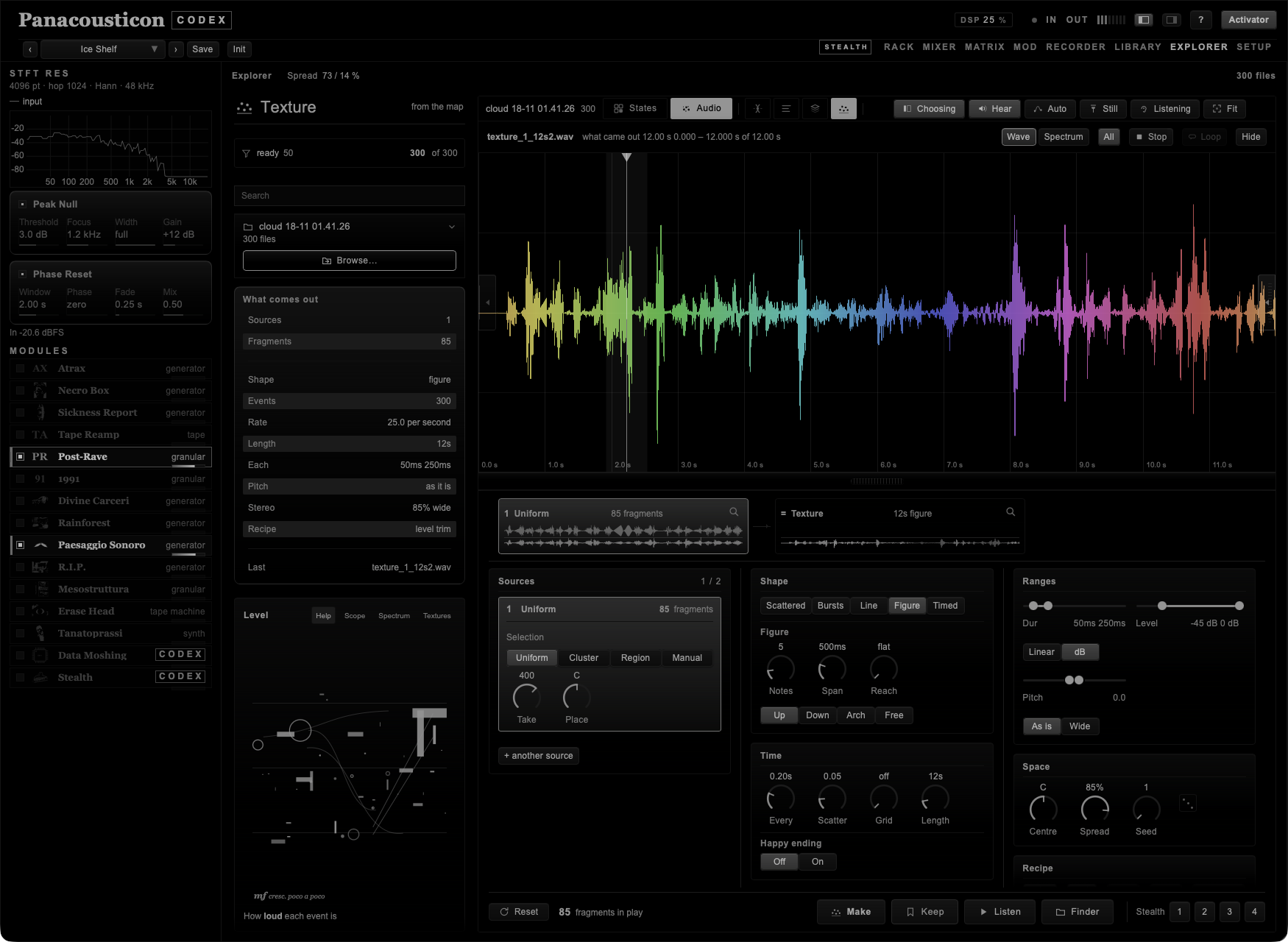
One detail that is only noticed when it is missing: while the sound is playing the playhead is easier to catch. Its grab used to be nine pixels wide, which is plenty when it stands still — but a texture of twelve seconds a thousand pixels wide walks eighty pixels a second, so between aiming and pressing it was already out of the target. Now, in play, the grab is as wide as a sixth of a second of walking, between 28 and 80 pixels, and it shows: a faint band appears around the line and the clip at the top grows. A grab that widens in secret is a grab you keep missing.