
On Windows, read Ctrl where this manual says Cmd, and Alt for Option.
Stealth has its own objects, 73 for now, grouped by what they do. Every one of them is written for feedback, and the list keeps growing.
Stealth Patching is the part of Codex closest to Max. A stereo sheet with sixty-two objects: sources, filters, delays, tape loops, combs, sequencers, logic, chaos, and the sensors of a cybernetic system. Everything runs sample by sample, every loop shows its gain, and the board of Data Moshing can be modulated from here. I made it for one thing: building noise textures and soundscapes by hand.
Stealth is the base of this instrument: patches that start from almost nothing and feed back into themselves. In the Matrix it is a very low noise that makes a loop between modules ring. Inside Data Moshing it becomes a place of its own, a level below the board where you patch feedback by hand.
You can play Codex for a long time without ever coming down here. The modules, the matrix and the board are enough. Stealth is for when you want to go further in: you do not need to know synthesis to start.
I built Stealth to study cybernetics by hand: what feedback does, and what happens when a system starts to look after itself. At the first level a loop measures itself and corrects itself. At the second level the system changes its own rules when the old ones no longer hold. Both are here as objects you can patch: envelope followers, comparators, gains and loops, and homeo~ above them. The Cybernetic and Ultrastable presets are where I started.
Feedback and non-linear behaviour are where the sound comes from: a wavefolder pushed past its limit, a loop that grows until something turns it down, an object that fails and recovers. This makes Stealth a tool for concrete techniques and for sound design. It takes a recording, a module, or nothing at all, and turns it into material.
Inside Panacousticon it does not work alone. A Stealth patch can sit as one layer among the modules, and the rest of the plugin shapes it: the EQ of its strip in the MIXER, the Spectral Dispatcher, which analyses the spectrum of every module and shares the bands between them, STFT Res on the whole mix, and the matrix that sends the result on. This way a complex timbral table built in the sheet can be spread toward the self-generating modules, which take it and keep growing it.
Stealth will also leave the plugin. I am going to release some of its objects as externals for Max and for Pd, so you can patch them in your own environment, and part of them will be open source.
This manual is about Stealth only. The board of Data Moshing, its jumpers and the code are in the Codex manual; the rest of the plugin is in the Owner's Manual.
Stealth is part of the Data Moshing module: one switch, one fader, one preset. It does not have to use the board. There are four ways it can meet it:
| Way | How |
|---|---|
| It works on the sound of the board | inlet~ brings the board into the sheet, the objects change it, dac L and dac R play it. |
| It moves the dials of the board | outlet~ → SIZE, FBK, DRIVE and the others turn the board from inside, sample by sample. |
| It writes into the RAM | inject~ writes back into the memory the board is reading. |
| It plays alone | The objects make the sound and the board stays silent. The patch then says board not in use. |
The first three bend the board, and the board is where the grain comes from: a module goes into the RAM, is rewritten at 16 bits with crush and feedback, and comes out broken. Some presets of the Stealth Board category do this, and they are noisy on purpose. When Stealth plays alone it is a clean modular patch: oscillators, filters, VCAs and loops, nothing bent. The classic patches of Stealth Board, and the Cybernetic, Ultrastable, Primitive Rhythms, Drone Voice and Pastorale presets work this way.
A fifth way goes around the board: slot~ takes one module of the rack straight into the sheet (chapter 8).
Keep your monitors low the first times. One cord can start a loop that rings on its own. The limiters stop clipping, not loudness.
There are three ways to open it, and they all open the same sheet:
| From | How |
|---|---|
| The module list | Click Stealth, the last row, under Data Moshing. |
| The opening screen | The STEALTH tile, the last one. Cmd + Shift + H brings the opening screen back at any time on the Mac. |
| The Data Moshing patch | Double-click the grey box p stealth, or press STEALTH ▶ in the top right corner of the patch. |
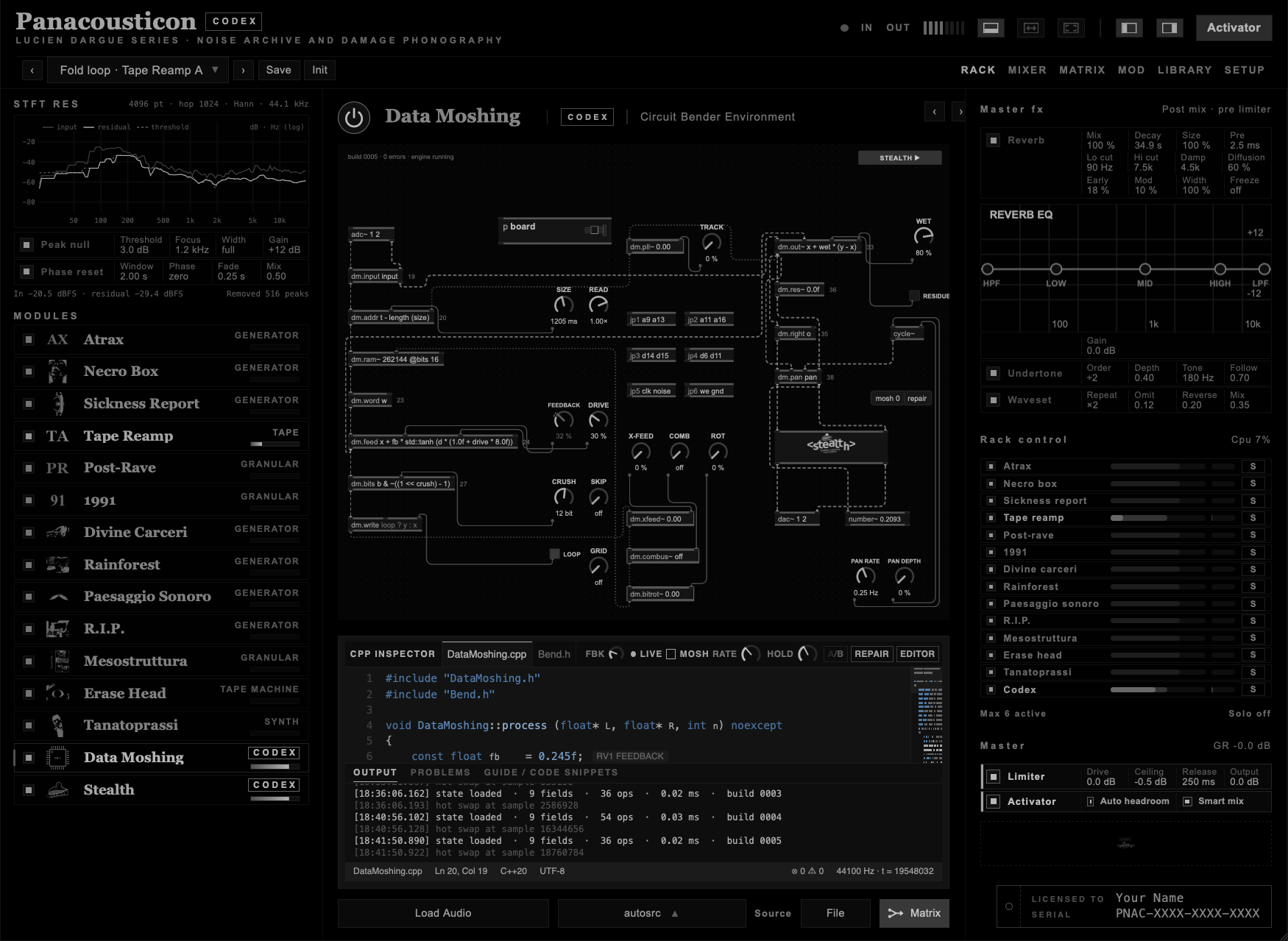
p stealth sits in the signal path, between dm.pan and dac~: everything the module plays goes through it. From Stealth, ◀ BOARD brings you back to the patch; from the circuit drawing, ◀ BACK TO PATCH.
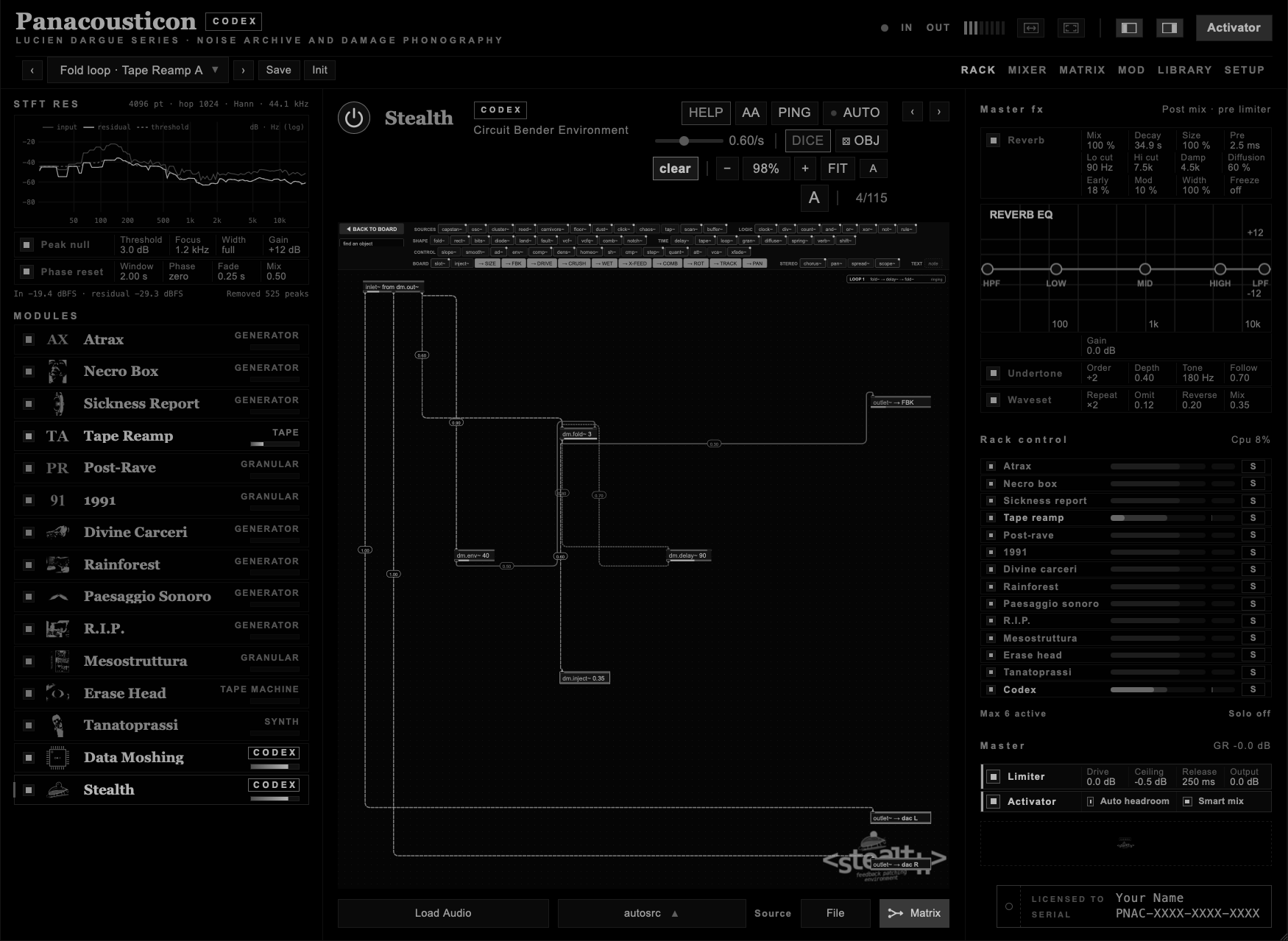
| View | What you get |
|---|---|
| Docked | The sheet in the middle column, the module list and the master on the sides. The controls sit in the header, next to the Stealth name. |
| EXPAND | The sheet takes the middle and the right column. The controls move into the bar. |
| Full patching | The full-window icon at the top right gives the whole window to the sheet. The top bar of the plugin goes away; a thin strip keeps a small CODEX badge, the two A buttons that make the objects in the bar smaller or bigger, and three icons: back to docked, EXPAND, and leave full. Esc leaves too. |
| Part | What it is |
|---|---|
| inlet~ from dm.out~ | The sound of the board: what Data Moshing is playing. The small arrow on the box chooses what the board plays: the MATRIX, your own audio, an autosrc or a recording found by interfera~ and internetarchive~; under the box you read what it is playing now. With the MATRIX chosen it carries every module the MATRIX sends into it, already mixed and coloured by the board. Three outlets: L, R and L+R. To take one module on its own, use slot~ (Modules inside Stealth). |
| outlet~ → SIZE … TRACK | Nine outlets, one for each dial of the board. They wait in the BOARD row of the bar as blue badges: drag one onto the sheet, or click it, and it is there. An outlet with a cord stays on the sheet; delete it and it goes back to the bar. What you send here moves that dial, sample by sample. On the patch the dial turns red: the needle shows where the signal takes it, the red arc how far from where you left it. |
| outlet~ → PAN | Moves the whole module between left and right, on top of the PAN dials of the board. It is the last blue badge in the BOARD row. |
| outlet~ → dac L · → dac R | The left and right outputs of the module: only what reaches them is heard. A cord straight from inlet~ passes the sound of the board as it is. A processed signal sent only to dac L plays in the centre; as soon as something processed reaches dac R, dac L is the left side only. |
| The bar at the top | ◀ BOARD, find an object, OBJECTS, then HELP, AA, PING, AUTO, DICE, OBJ, CLEAR and FOUND.NET. It keeps the same size on every screen. OBJECTS shows or hides the list of objects under the bar: with the list hidden the sheet gets all the room, and you add objects with a double-click or N. |
| The list of objects | The objects grouped by family: SOURCES, LOGIC, SHAPE, TIME, CONTROL, REAMP, BOARD, STEREO and TEXT, in rows that fill the width of the window. A white dot marks the newest. The outlets to the board are the blue badges in the BOARD group. The two A buttons in the zoom bar make the list smaller or bigger. |
| N · new object | Press N, or double-click an empty spot of the sheet, and a box opens where you are: type a few letters and the list shows the objects that match, by name or by what they do. ↑ ↓ choose, Enter or Tab creates it right there; type the arguments after the name, as in osc~ 220 0, to set them at once. Esc closes the box. |
| find an object | The field next to ◀ BOARD. As you type, the matching objects in the bar light up and the others fade; Enter adds the first one to the sheet, Esc clears the field. |
| note | The last chip of the bar, under TEXT. Drag it onto the sheet, or click it, and write: a small note sheet. Enter confirms, Shift + Enter starts a new line, Esc leaves it as it was. Double-click a note to rewrite it, drag it to move it. Click it and press Delete to remove it, or empty it. Notes are saved with the patch and the preset, and they make no sound. Every Primitive Rhythm opens with a note that tells how it is built. |
| The header | Next to the Stealth name: HELP, AA, PING, AUTO with its rate, DICE, OBJ, clear, the zoom of the sheet, FIT, the two A buttons that make the objects in the bar smaller or bigger, and the number of objects in use, up to 115. In EXPAND and FULL the header is hidden and these controls move into the bar. |
| Full patching | The full-window icon at the top right gives the whole window to the sheet. The top bar of the plugin goes away; a thin strip keeps a small CODEX badge, the two A buttons and three small icons: back to the docked view, EXPAND, and leave full. Esc leaves too. When the objects are bigger they wrap onto more rows, and the patch keeps its size. |
| HELP | Turn HELP on and click the objects one after the other: each shows its card, with an arrow on every inlet, outlet and argument. While HELP is on, nothing on the sheet moves and no cord is cut. Esc closes the card, Esc again turns HELP off. More in chapter 5. |
| LOOP | Every closed loop is listed in a box with its gain per turn: above 0 dB it is ringing, below it is decaying. The box sits wherever the sheet is free; when there is no free space it becomes a small N loops ▸ MATRIX badge, and a click shows the loops in the MATRIX tab. |
If you have never patched before, this is a good place to start. You cannot break anything. Every inlet is soft-clipped, every object keeps its own level and turns itself down when it runs too hot, and the master Limiter, on by default, catches what comes out. I tested thousands of random patches, and none of them crashed or produced an invalid sound. The worst that can happen is that something gets loud or goes silent. So connect anything to anything.
The gestures are the ones of Max:
| Gesture | What it does |
|---|---|
| Drag an object from the bar | Puts it on the sheet. A click puts it in the next free place. |
| Drag from the bottom edge of an object | Pulls a cord from its outlet. Every inlet lights up, and the cord snaps to the nearest one. Let it go anywhere on an object and it takes the inlet closest to the pointer; its name is shown while you drag. |
| Drag on an empty part of the sheet | Draws a selection box: every object it touches is selected. Shift-click adds or removes one object. Drag any selected object and the whole group moves; Backspace removes the group, Esc clears the selection. |
| Hover an inlet or an outlet | Shows its number and name, as in Max and Pd: in 3 · position, out 2 · gate. |
| Shift and drag an object under another | Connects them on release, the first outlet of the upper one into an inlet of the lower one. While you drag, the inlets of the lower object grow and the one that will take the cord lights up, with its name above: move the object left or right to choose it. A dashed cord shows the connection. It works with objects taken from the bar too. |
| Drag the number on a cord | Sets how much of the signal goes through, from 0 to 1. |
| Click a cord | Selects it. The rest of the patch dims and only that cord and the two objects it joins stay lit. A row of colours appears next to it: pick one to colour the cord, ∅ takes the colour away. The colour is saved with the patch. In the grey skins each colour also has its own sign on the cord (● ▲ ■ ◆ ✚ ◀ ▼ ○), so the cords stay apart without colour. Backspace cuts the selected cord, Esc or a click on the empty sheet lets it go. |
| Handles on a selected cord | A square on every corner, a dot in the middle of every stretch. Drag a square to move the corner, drag a dot to add a new corner there, double-click a square to remove it. The corners snap to the grid; hold Alt to place them freely. ↺ in the row of colours gives the cord back its automatic route. The shape is saved with the patch and kept when you copy and paste. |
| Right-click a cord | The cord menu. Route is the automatic path around the objects, with rounded corners. Straight is a straight line from outlet to inlet, as in Max; the handles add sharp corners. Curve is a bezier cable that leaves the outlet downwards and reaches the inlet from above; the handles become points the curve passes through, so a few of them are enough for wide loops. All cords gives one style to the whole patch (route also takes the handles away), Reset the shape removes the handles of this cord, Delete cuts it. |
| Hover a cord | Shows what is passing through it. |
| Double-click an object | Edits its arguments. Enter confirms, Esc cancels. |
| Click an object, then Backspace | Removes it. |
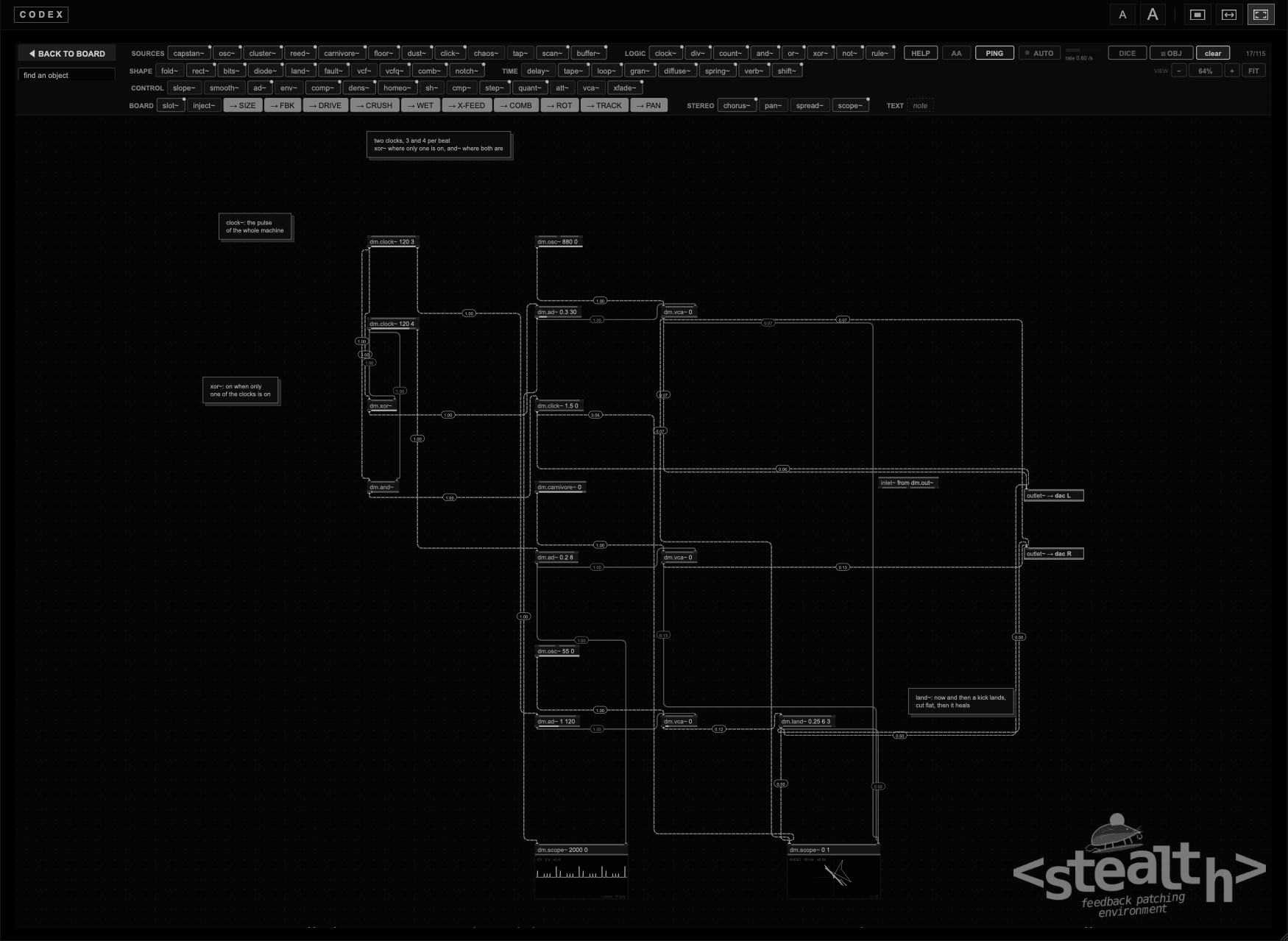
The sheet is the output of Data Moshing, in stereo. It opens with the basic connection already in place: inlet~ L → dac L and inlet~ R → dac R, the sound of the board passing through untouched, and slot~ 1, Atrax, wired to both. Whatever you put in between changes the sound; cut those two cords and the module goes silent. The outlets to the board dials (→ SIZE, → FBK and the others) move the board itself, as before.
The board needs something playing into it. Then, step by step:
1. Press clear: Atrax plays through slot~ 1. 2. In the MATRIX send Atrax to Data Moshing, then come back. 3. Drag env~ onto the sheet. 4. inlet~ L+R → env~. 5. env~ → outlet~ → FBK. 6. ◀ BOARD.
Now the FEEDBACK dial is red and moves with the sound: the louder the board plays, the more it feeds back, and the more it feeds back, the louder it plays. That is already a loop, through the board. From here, add one object at a time and listen to what each one changes.
A slow cycle. Drag slope~ onto the sheet. Patch its second outlet, end, back into its own first inlet: it starts to cycle. A cord from end starts at 0.90; at 0.50 or lower the cycle stops. Send its first outlet to → SIZE. The memory gets longer and shorter, again and again.
A loop that rings on its own. Drag vcf~ and delay~. vcf~ → delay~, and delay~ back into the first inlet of vcf~. Double-click vcf~ and type 600 18. Send delay~ to → dac L. With a high q the loop rings even with nothing playing; the LOOP box at the bottom says ringing.
Random panning. Drag pan~ and chaos~. inlet~ → the first inlet of pan~. chaos~, first outlet → the second inlet of pan~. pan~ left → dac L, right → dac R. The board drifts from side to side without a pattern. Double-click chaos~ and type 0.1 to slow it down.
A wide fold. Drag fold~ and spread~. inlet~ → fold~, fold~ → spread~, then spread~ left → dac L and right → dac R. A folded mono sound opens up into a wide one. Patch the second outlet of chaos~ into the second inlet of spread~ and the width changes slowly.
Move the whole module. Drag chaos~ and send its third outlet to → PAN. Everything Data Moshing plays, not only the patch, moves in space. Lower the cord to 0.3 for a slow, small movement.
A loop sounds on its own only when it gives back more than it receives: a vcf~ with a high q, a fold~ with 3 folds or more, or a path through inject~ and the board. A loop that gives back less decays, and it waits for something to play into it.
Keep your monitors low the first times. Loops that ring on their own start as soon as the patch is complete, before you have heard them.
Click an empty spot of the sheet first, so that the keys reach Stealth and not the rest of the plugin.
| Gesture | What it does |
|---|---|
| Mouse wheel, or two fingers on the trackpad | Moves the sheet. |
| Cmd + wheel, or pinch | Zooms in and out, around the pointer. |
| Space + drag, or drag with the middle button | Moves the sheet. |
| − and + | Zoom out and in. |
| Click the zoom percentage | The automatic view: docked, the patch fills the sheet; in EXPAND and full patching it is at 100 %. |
| FIT | Frames the whole patch. |
| Gesture | What it does |
|---|---|
| Click an object | Selects it. |
| Drag on an empty part of the sheet | A selection box: every object it touches is selected. |
| Shift + click · Shift + drag on an empty part | Adds to the selection, or takes an object out of it. |
| Cmd + A | Selects every object. |
| Drag a selected object | Moves the whole group. |
| Backspace or Delete | Removes the selection. |
| Esc | Clears the selection. |
Right-click an object on the sheet, or Ctrl-click it on the Mac. If several objects are selected and you right-click one of them, the menu acts on all of them.
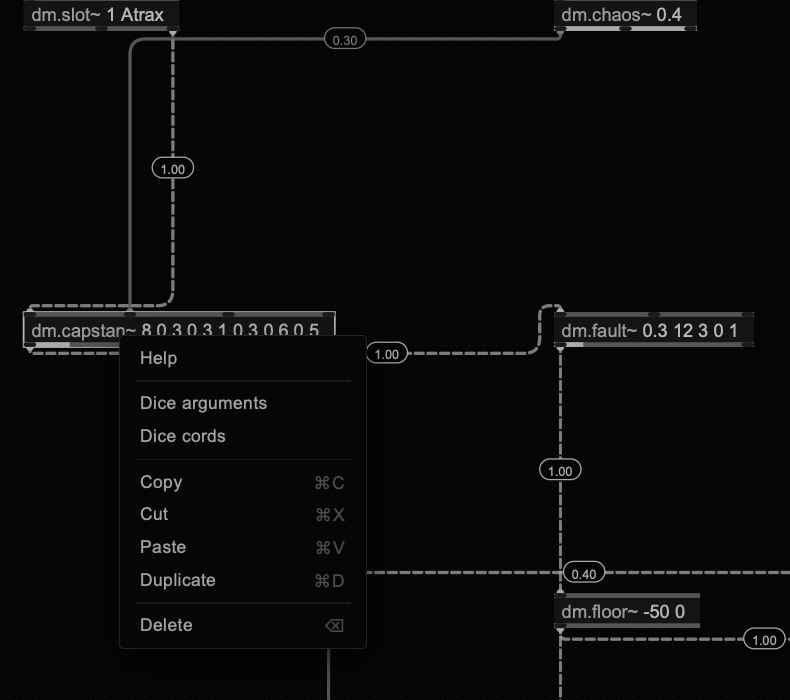
| Item | What it does |
|---|---|
| Help | The card of the object (chapter 5). |
| Copy · Cmd + C | Copies the object, or the selection, as text. |
| Cut · Cmd + X | Copies and removes. |
| Paste · Cmd + V | Pastes what you copied. |
| Duplicate · Cmd + D | A copy right next to it, with the cords between the copied objects. |
| Delete · Backspace | Removes it. |
| Dice arguments | Rolls new arguments, inside the range that suits each one. Locked objects are left alone. |
| Dice feedback | The opposite: it closes a loop through the object on purpose. A cord comes back into its input from an object further down the chain, at a low level, between 0.25 and 0.55; on a source it goes into a control inlet instead, between 0.1 and 0.3. With nothing further down, the object feeds itself. |
On inlet~ and the outlets a right-click opens the card directly: they have no menu.
Right-click an empty spot of the sheet.
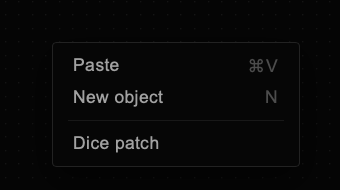
| Item | What it does |
|---|---|
| Paste · Cmd + V | Pastes right where you clicked. |
| New object · N | Opens the box for a new object right there: type a few letters, ↑ ↓ to choose, Enter or Tab to create it. Type the arguments after the name, as in osc~ 220 0. |
| Dice patch | A new random patch, the same as DICE (chapter 11). |
Stealth copies to the clipboard of the system, as text. You can paste a patch into a message, a note or a text file, and paste it back later.
| You copy | The clipboard holds |
|---|---|
| One object | A line with its name and arguments: capstan~ 8 0.3 0.3 1 0.3 0.6 0.5. |
| Several objects | The objects, their positions and the cords between them, in one block of text that starts with stealth:, followed by one line per object. |
When you paste, a block that starts with stealth: comes back with its cords. Any other text is read line by line: every line that starts with the name of an object becomes that object, with those arguments. So you can write a list of objects by hand, one per line, and paste it.
The text boxes, the one for a new object and the one for the arguments, have their own menu on the right click: Cut, Copy, Paste, Select all. Long lines paste whole.
Cmd + Z takes back, one step at a time, up to forty steps:
| Taken back | Not taken back |
|---|---|
| Deleting objects | Moving objects |
| Cutting a cord | New objects and new cords |
| clear and DICE | New arguments |
| OBJ and the DICE items of the menu | The level of a cord |
| Paste, duplicate, cut | |
Opening a .sthl file |
Undo brings back the sheet only. After clear or after opening a file, the modules and the board stay as they are now.
In a DAW, Cmd + Z may go to the DAW instead. See chapter 13.
Every object has a card: the box drawn large, with an arrow on every inlet and outlet and on every argument, and one line that says what to try.
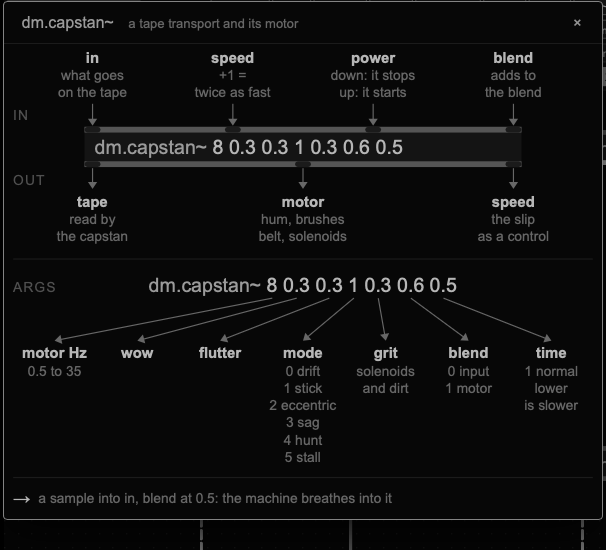
| Gesture | Result |
|---|---|
| Right-click an object in the bar | Its card, before you place it. |
| Help in the menu of an object on the sheet | Its card, with its current arguments. |
| Right-click inlet~ or an outlet | Its card. |
| HELP on, then click objects | One card after the other. Nothing moves and no cord is cut while HELP is on. |
| Esc · a click elsewhere · × | Closes the card. Esc again turns HELP off. |
Hover an inlet or an outlet on the sheet and its number and name appear, as in Max and Pd: in 3 · position.
The objects are listed in the order of the bar, family by family. For every inlet, the note in brackets tells how much a signal moves it: +0.25 = an octave up means that a signal of 0.25 on that inlet raises the pitch by one octave. Inlets that add to an argument start from the argument.
What makes a sound, or reads one: oscillators, noise, impulses, the memory of the board, a sample.
| Object | What it does | In · out · args |
|---|---|---|
capstan~ | A tape transport with its own motor. What goes in is read by a capstan that slips, never twice the same way; with nothing in, the motor itself goes on the tape. The motor sounds on its own outlet: hum, the clicks of the brushes at every turn, the belt, the solenoids. What goes in is not added clean: it is mixed with the motor before the tape. With blend at 0 the input passes almost as it is, dragged by the capstan; toward 1 the motor pumps it at every turn and every click of the brushes, the two saturate into each other, and a loud input slows the motor down. time slows the whole motor down, as a recording played at a lower speed: the clicks get fewer and lower, the crackle slower. Power down and it spins down in three seconds, the tape falling in pitch; power up and it starts again. mode picks how the transport goes wrong: 0 drift, 1 stick (it sticks, then jumps), 2 eccentric (the wow follows the turns of the motor), 3 sag (the louder the input, the slower it runs, with mains ripple), 4 hunt (the servo overshoots and swings), 5 stall (now and then it nearly stops). | in in · speed (+1 = twice as fast) · power (down stops, up starts) · blend (adds to it) out tape · motor · speed (the slip, as a control) args motor Hz (0.5 to 35) · wow (0 to 1) · flutter (0 to 1) · mode (0 to 5) · grit (0 to 1) · blend (0 the input, 1 the machine) · time (1 normal, 0.05 twenty times slower) |
osc~ | Oscillator: sine, triangle, saw or pulse. The second inlet bends its phase, for FM-like timbres; slow, it is an LFO. A signal on the third inlet morphs the shape continuously from sine to triangle, saw and pulse. The pulse goes from 0 to 1, so it works as a clock for sh~, step~ and slope~, like the pulses of an old function generator. For a pitch above about 200 Hz this is the one to use: slope~ in feedback stops there. | in pitch (+0.25 = an octave up) · phase (phase mod) · shape (morphs the wave) out out args frequency (Hz) · shape (0 sine, 1 triangle, 2 saw, 3 pulse) |
cluster~ | Up to eight oscillators around one pitch, each detuned by its own fixed offset: the base of a drone voice. Spread sets how far apart they are. Scan crossfades through the cluster, so you hear a few of them at a time. Warp makes each oscillator bend the pitch of the next. Two outlets, left and right. | in pitch (+0.25 = an octave up) · spread (adds octaves) · scan (which ones you hear) · warp (each bends the next) out L · R args pitch (Hz) · voices (2 to 8) · spread (0 to 2 octaves) · wave (0 sine, 1 saw) |
reed~ | A reed pipe, the voice of the zampogna and the ciaramella: a buzzing reed through three formants. Breath pushes the reed harder and adds air; formant moves the vowel. Three voices: chanter, a round drone and the bright ciaramella. | in pitch (+0.25 = an octave) · breath (adds to it) · formant (+0.5 = an octave up) out out args Hz (55 to 1760 sounds like a pipe; it goes from 8 Hz up) · breath (0 to 1) · tone (0 to 1) · voice (0 chanter, 1 drone, 2 ciaramella) |
carnivore~ | Noise generator, from white to pink. | in colour (adds to it) out noise args colour (0 white, 1 pink) |
floor~ | The noise floor of the machine: a very low hiss, the hiss of a machine left on. At its default, −80 dB, it is the hiss you hear under the Primitive Rhythms when their level is turned up. Send it to a dac at 1.00 to lay it under a beat. | in level (+1 = twice as loud) out out args level (dB) · colour (0 white to 1 pink) |
dust~ | Random impulses, from a few a minute to thousands a second: small electric discharges. The second outlet is a short gate, a clock without a pattern for sh~ and step~. | in density (+0.25 = twice as many) out impulses · gate (a pulse per hit) args density (per second) · tone (0 dark, 1 bright) |
click~ | A click at every pulse: one sample at length 0, otherwise a short burst of noise, or of a tone if tone is set. The sound of a grid made audible. | in trig (a pulse) · tone (+0.25 = an octave up) out out args length (ms, 0 = one sample) · tone (Hz, 0 = noise) |
seg~ | A waveform made of micro-segments. It goes through levels in a fixed order, A, −A, then −B on L and +B on R, and each step lasts a few samples, chosen at random between dur min and dur max. In mode 1 it climbs a ramp of steps instead: A is the size of a step, B how many steps. walk above 0 turns the random durations into a random walk. With steps of one or two samples it is a hard digital buzz; with longer steps it slows down into a rough tone. Alone it is raw: it is made to go into bound~ (chapter 9). | in rate (+0.25 = twice as long) · level B (adds to it) out L · R args level A · level B · dur min · dur max (samples) · mode (0 or 1) · walk (0 to 1) |
blip~ | A train of impulses with N harmonics of the same strength, band-limited: it never goes above half the sample rate. At 10 to 40 Hz with a hundred harmonics it is a fast click; higher, a buzz. | in pitch (+0.25 = an octave) · harmonics (+1 = twice as many) out out args Hz · harmonics |
chaos~ | A Lorenz attractor: three slow outputs, x, y and z, that move without ever repeating. A control source, not a sound. | in rate (+0.25 = twice as fast) out x · y · z args rate (Hz, 0.01 to 4000) |
tap~ | Reads the RAM of the board. | in offset (+1 = 4410 samples back) out RAM (what it reads) args offset (samples back) |
scan~ | Plays the RAM of the board as a wavetable, at a pitch. | in pitch (+0.25 = an octave up) · position (where it reads) out out args frequency (Hz) · length (samples) |
buffer~ | Looping sample player. Click the arrow on the object to load a file, an autosrc or an Interfera recording into buffer 1 to 4; the buffer is saved with the preset. Speed is in octaves on the inlet, a negative speed plays backwards, and loop start and length cut a piece out of the file. The third outlet fires at every turn of the loop. | in speed (+1 = an octave up) · start (moves the loop) · restart (a pulse: from the top) out L (left) · R (right) · end (a pulse at every turn) args slot (1 to 4) · speed (2 = an octave up, −1 = backwards) · start (0 to 1) · length (0 to 1) |
Clocks and gates, from 0 to 1. Rhythm made the way the old modular systems made it.
| Object | What it does | In · out · args |
|---|---|---|
clock~ | A steady pulse, the clock of a rhythm: beats per minute and a division, 4 for sixteenths. The gate outlet is half on and half off, for counters and logic; trig is a 1 ms pulse on every beat, for click~ and ad~. | in rate (+1 = twice as fast) · reset (a pulse: from the top) out gate (half on, half off) · trig (1 ms per beat) args bpm (beats per minute) · division (4 = sixteenths) |
div~ | Lets one pulse in N through. Two dividers on the same clock, by 3 and by 4, or by 5 and by 7, give a polyrhythm. | in clock · reset (a pulse: from the top) out out (one pulse in N) args every (N pulses) · offset (which one of the N) |
count~ | A binary counter. Every pulse adds one, and the four outlets are its bits: bit 0 changes every 2 pulses, bit 1 every 4, bit 2 every 8, bit 3 every 16. Mixed with the logic objects, one counter gives many rhythms. | in clock · reset (a pulse: back to 0) out bit 0 (every 2) · bit 1 (every 4) · bit 2 (every 8) · bit 3 (every 16) args length (2 to 16 then it restarts) |
and~ | On when both gates are on. | in a (gate) · b (gate) out out (on when both are on) |
or~ | On when either gate is on. | in a (gate) · b (gate) out out (on when either is on) |
xor~ | On when only one gate is on. The XOR of two bits of a counter is the most useful rhythm of all. | in a (gate) · b (gate) out out (on when only one is on) |
not~ | Turns a gate around: on becomes off. | in a (gate) out out (the opposite) |
rule~ | A cellular automaton: fifteen cells in a ring, and at every pulse a new generation by the rule. Rule 30 is chaotic, 90 draws a pattern that folds on itself, 110 is somewhere in between. Four cells come out as gates. | in clock (a new generation at every pulse) · reset (a pulse: back to the seed) out cell 7 (gate) · cell 4 (gate) · cell 10 (gate) · cell 1 (gate) args rule (0 to 255, 30, 90, 110) · seed (the first generation) |
What changes the colour of a sound: folds, grit, filters, and the two objects that make it fail.
| Object | What it does | In · out · args |
|---|---|---|
fold~ | Wavefolder. | in in · amount (+1 = twice the folds) out out args folds (0.5 and up) |
bound~ | Folds, wraps or clips what comes in between −limit and +limit. The limit is taken with its sign: put a slow osc~ on the limit inlet and, when the sine goes negative, the edges swap and the output follows the sine. The deep, slow waves of the stochastic patches come from there (chapter 9). | in in · limit (adds to it) out out args limit · mode (0 fold, 1 wrap, 2 clip) |
sat~ | Soft saturation (tanh). More drive, closer to a square. | in in · drive (+1 = twice) out out args drive · output level |
rect~ | Rectifier: half wave or full wave. An octave up and a soft grit. | in in · amount (adds to it) out out args amount (0 half wave, 1 full wave) |
bits~ | Fewer bits and a lower sample rate. | in in · bits (+1 = 8 bits more) out out args bits (1 to 16) · rate (divider, 1 to 64) |
diode~ | Diode waveshaper: the negative side clips sooner than the positive one, so it adds even harmonics and a warm, uneven grit. | in in · drive (+1 = twice the drive) out out args drive · asymmetry (0 to 1) |
land~ | Every time a preset loads, the plugin brings the sound in under a ceiling that starts low and climbs back up. The first hits are cut flat and drop in level, then they recover. land~ does that on purpose: now and then it lands a hit, and the next one is still a little lower. Put it after the vca~ of a kick and the kick is never the same twice. With chance 0 it only lands on the drop inlet; at rest it lets the sound through untouched. | in in · drop (a pulse lands it now) out out · ceiling (1 just landed, 0 recovered) args chance per hit (0 to 1) · depth (dB under the peak) · rise (dB per second) |
fault~ | A component that fails the way real ones do. Its failure rate grows with stress and with heat, as in real parts, and after a failure it stays weak for a few seconds, so failures come in small clusters with long calm between them. A chaotic map, not a random generator, draws the moments. Every failure picks how it fails: a flat cut, a supply sag that drops the level and darkens the sound, a leaking capacitor that bends the wave and buzzes, a contact that crackles on and off, a digital stage that starves into grain. Then it recovers at the rise rate, with a small settling. A loud, sustained sound heats it and makes it fail more often. At stress 0 it fails about once every half minute or less; at 1 it never recovers. It is made for drones and long sounds; on hits use land~. At rest it lets the sound through untouched, and the same seed always gives the same failures. | in in · drop (a pulse fails it now) · stress (adds to it) out out · fault (1 failed, 0 recovered) args stress (0 rare to 1 constant) · depth (dB) · rise (dB per second) · mode (0 the chaos picks, 1 cut, 2 sag, 3 leak, 4 crackle, 5 starve) · seed |
vcf~ | Resonant low-pass. With a high q it rings on its own. | in in · cutoff (+0.25 = an octave up) · q (+0.5 = twice the q) out low-pass args cutoff (Hz) · q (0.5 to 25) |
vcfq~ | Stereo resonant filter with a PING input, as on the Serge. A jump above 0.5 on ping strikes it with a short pulse, and it answers like wood: a knock that drops a little in pitch when struck hard, then rings out. A higher q rings longer. | in L · R · ping (a pulse strikes it) · cutoff (+0.25 = an octave up) out L · R args cutoff (Hz) · q (0.5 to 40) · mode (0 low, 1 band, 2 high) |
comb~ | A tuned comb, a string. Excite it with dust~ and it rings. | in in · pitch (+0.25 = an octave up) out out args pitch (Hz) · feedback (0 to 0.995) |
notch~ | Multi-notch: a stack of allpass stages mixed with the dry sound, which cuts deep notches spread over the spectrum. Move the frequency slowly and they sweep like a phaser; with feedback they start to ring. | in in · frequency (+0.25 = an octave up) · feedback (adds to it) out out args frequency (Hz) · stages (2 to 12) · spread (0 to 1) · feedback (−0.95 to 0.95) |
Memory: delays, tape, grains, rooms. Most loops go through one of these.
| Object | What it does | In · out · args |
|---|---|---|
delay~ | Delay line, up to six in one patch. | in in · time (+1 = twice as long) out out args time (ms, 1 to 1000) |
tape~ | Tape echo with wow and flutter. Every repeat is a little darker; with high feedback the repeats blur together. | in in · time (+1 = twice as long) out out args time (ms) · feedback (0 to 0.95) · wow (0 to 1) |
loop~ | Tape loop, the four-track recorder of the old electronic studios. What goes in comes back after the loop time, up to 8 seconds, a little darker at every pass. With hold above 0.5 the tape keeps playing what it has and records nothing new. Several loop~ in a row, each feeding the next, is the tape chain of the classic studio feedback patches. | in in · time (+1 = twice as long) · hold (above 0.5: records nothing) out playback args time (seconds, 0.05 to 8) · feedback (0 to 0.98) · wow (0 to 1) |
gran~ | Granular resampler, after the gr8 of Agostino Di Scipio: what comes in is written into a memory of a few seconds and read back in small grains. Scan moves the reading point through the memory; at 0 it freezes. A pitch ratio of 2 reads an octave up. | in in · scan (0 freezes) · size (0 short, 1 long) · pitch (+1 = an octave up) out grains args memory (seconds, 0.25 to 8) · grain (ms) · pitch (ratio) · scan (Hz) |
diffuse~ | Four allpasses in a row: space without a reverb tail. In a loop it adds diffusion at every pass. | in in · size (+1 = +0.5) out out args size (0 to 1) · density (0 to 0.85) |
spring~ | Spring reverb, old style: two springs, one per side, with the drip and the boing. Excite it with dust~ for metallic drips. | in in · decay (+1 = +0.5) out L · R args decay (0 to 1) · tone (Hz) |
verb~ | Reverb, a room with a long tail: eight delay lines that feed each other. In a feedback loop it adds reverb at every pass. | in L · R (empty: L) · size (+1 = +0.5) out L · R args size (0 to 1) · decay (seconds, 0.2 to 30) · damping (0 to 1) |
shift~ | Frequency shifter. Two outlets, shifted up and shifted down: in a loop it gives spirals that rise or fall for ever. | in in · shift (+1 = +200 Hz) out up · down args shift (Hz) |
Slow signals and level detectors: envelopes, followers, comparators, sequencers, gains. They move the other objects.
| Object | What it does | In · out · args |
|---|---|---|
dial | A knob on the sheet: a value from 0 to 1, without a tilde because it is a control, not a sound. Drag the small knob on the right of the box up or down; with Shift it moves in steps of 0.001, with Alt + Shift in steps of 0.0001. Drag the rest of the box to move it, double-click it to type a value. The output glides to the new value in 20 ms, so a vca~ rises and falls without clicks. It works in the plugin too. | in add (a signal added to the value) out value args value (0 to 1) |
number | Shows the value of whatever reaches it, in a small readout on the right of the box. It has one inlet and no outlets, so patching it in never changes the sound: use it to read a level, a control or the output of a dial. Three readings: the last value, the peak, or the rms. Without a tilde, because it makes no sound. | in in args mode (0 value, 1 peak, 2 rms) · every (ms) |
fire~ | A pulse. Click the diamond on the box and it fires once; patch anything above 0.1 into it and it fires at every pulse, so a cord at 0.50 is enough. count turns one pulse into a short burst, gap spaces that burst out in time, chance lets some of them fall at random, and length turns the pulse into a gate that stays open. | in in out out args count (1 to 16) · gap (ms) · chance (0 to 1, 1 always) · length (ms, 1 = a short pulse) |
slope~ | A slew that can cycle. A jump above 0.5 fires a full rise. Patch end into its own in and it becomes an oscillator: a cord from end starts at 0.90; at 0.50 or lower the cycle stops. rise and fall together set the speed, their ratio sets the shape: 0.9 0.9 is one cycle in about eight seconds, 0.05 0.1 about 110 Hz, 0 0 about 200 Hz, the fastest it goes. Above that, use osc~. | in in (a jump above 0.5 fires a rise) · rise (adds to rise) · fall (adds to fall) out out (the slope) · end (a pulse at the end) args rise (0 fast, 1 slow) · fall (0 fast, 1 slow) |
smooth~ | Smooth and stepped, as on the Serge. With nothing in its first inlet it makes random voltages: smooth on the first outlet, stepped on the second. Patch a signal in and it follows it: the smooth outlet softens it like a low-pass gate, slower and darker as the rate goes down, and the stepped outlet samples it at the rate. It works the same on audio and on control signals. | in in (empty: random) · rate (+0.25 = twice as fast) out smooth (glides) · stepped (holds) args rate (Hz) |
rnd~ | A new random value at a rate, from −1 to +1: held steps, straight lines from one value to the next, or jumps between −1 and +1. Use it to move a filter or a notch. | in rate (+0.25 = twice as fast) out out args Hz · mode (0 steps, 1 lines, 2 jumps) |
ad~ | A percussive envelope, attack and decay in milliseconds. Patch it into the gain inlet of a vca~ at level 0 to cut a sine or a noise to the length of a beat. | in trig (a pulse) · decay (+1 = twice as long) out env (0 to 1) args attack (ms) · decay (ms, to silence) |
env~ | Envelope follower: turns loudness into a control. | in in (any sound) out envelope (its level) args release (ms) |
comp~ | Compander with its own detector. It listens to the side inlet, or to its input when side is empty, and turns the level down above the threshold (ratio above 1) or up and down below it (ratio below 1, an expander). The second outlet is the gain itself, from 0 to 1: patch it into other objects and the system regulates itself by listening to what it plays. | in in · side (what it hears, empty: the input) out out · gain (0 to 1) args threshold (dB) · ratio (above 1 compresses, below 1 expands) · time (ms) |
dens~ | Event density: how many attacks per second it hears, as a control from 0 to 1 (20 per second is 1). The second outlet fires a short gate on every attack. Turned upside down with att~, it lowers the level when there are many attacks and raises it when there are few. | in in out density (20 per second = 1) · onset (a pulse per attack) args window (seconds) · sensitivity (2 = twice the background) |
homeo~ | Homeostat, after W. Ross Ashby. It watches one variable, the level of what comes into it, and keeps its three outputs still while that level stays between the limits. If the level stays outside for longer than the tolerance, the outputs jump to new random values and it tries again, until the system settles. Patch the outputs into thresholds, gains and times, and the patch changes its own way of regulating itself. The fourth outlet fires on every jump. | in watch (the level it guards) out A · B · C · jump (a pulse) args low (limit) · high (limit) · tolerance (seconds) · range (0 to 1) |
sh~ | Sample and hold. | in in (what it samples) · clock (a pulse: takes one) out held (the last one) |
cmp~ | Comparator: 1 above the threshold, 0 below. With a rate above 0 the input is first slowed down and measured against its own level, as when you patch noise through a slew into a comparator on a modular: white noise then gives rare, uneven gates. Threshold 1 fires often, 2 rarely, 2.5 every few seconds or more. A higher rate makes them a little denser. Rate 0 is the raw, fast comparator. | in in · threshold (+1 = +0.5) out gate (0 or 1) args threshold · rate (Hz, 0 = raw, fast) |
step~ | Step sequencer: each clock moves to the next value. As many steps as values, up to 16. The second outlet is a short gate on every step. | in clock (a pulse: next step) · reset (a pulse: back to 1) out value · gate (a pulse per step) args up to 16 values, one per step |
quant~ | Pitch quantiser: snaps a pitch voltage to a scale, so a cluster or an oscillator plays notes. For exact notes use one cord at 1.00 into the pitch inlet. | in pitch out quantised (in tune) args scale (0 chromatic, 1 major, 2 minor, 3 minor pentatonic, 4 dorian, 5 in, 6 mixolydian, 7 lydian, 8 major pentatonic) · root (0 to 11) |
att~ | Attenuverter: scales, inverts and offsets. | in in · scale (adds to scale) out out args scale (−1 flips it) · offset (added after) |
vca~ | VCA and gain. Alone it is a gain control: its argument is the level, 1 leaves the sound as it is. A signal on the right inlet adds to the level; set the level to 0 and it becomes a ring modulator. | in in · gain (adds to level) out out args level (1 = unchanged, 0 = ring mod) |
xfade~ | Crossfades between two signals with constant power. | in A · B · position (adds to it) out out args position (0 = A, 1 = B) |
Microphones and pickups modelled after real ones, with their faults. They make a sound of their own, and they colour what you send through them. Non-linear on purpose.
| Object | What it does | In · out · args |
|---|---|---|
contactmic~ | A contact microphone, in stereo: two discs that never agree. With nothing in, it listens to a small world: insects moving in the soil, woodworm chewing and tapping inside wood, a hand rubbing a surface, the thumps and crackle of handling. What comes in is played through the same contact, so a sound takes on the voice of the pickup. model picks the pickup, after real ones: 0 a raw 27 mm piezo disc on a line input, thin, with no lows and a ring at 4.6 kHz; 1 the same disc on a high-impedance preamp, full down to the lows; 2 a condenser vibration pickup, smooth, 10 Hz to 18 kHz; 3 a geophone, the sensor that listens to the ground, only lows up to about 240 Hz. contact sets how firmly it sits: firm, it is clean; loose, it rattles when the sound is strong and now and then lifts off for a moment. The louder it plays, the higher its resonance. gain drives the preamp, which saturates unevenly and drifts with the level. width makes L and R two different microphones, with their own resonance, contact and events; at 0 they are one. | in L · R (empty: L) · press (adds to contact) · density (adds to it) out L · R · hit (a pulse per event) args model (0 disc, 1 piezo, 2 condenser, 3 geophone) · world (0 none, 1 soil, 2 wood, 3 rub, 4 handling) · density (0 to 1) · gain (0 to 1) · contact (0 loose, 1 firm) · width (0 one mic, 1 two) |
reamp~ | Plays what comes in back into a space: through a microphone or a cabinet, recorded with a stereo pair, in a room. It is the same engine as the Reamp block of Tape Reamp, so a sound of the sheet can take the same treatment without leaving Stealth. mic picks the microphone or the cabinet: 0 dynamic close, 1 ribbon, 2 condenser far, 3 small cab, 4 big cab, 5 contact. stereo picks how the pair is set up: 0 one microphone, 1 XY, 2 ORTF, 3 spaced omnis, 4 splayed off axis, 5 M/S. room goes from the smallest to the largest: 0 closet, 1 car, 2 booth, 3 bathroom, 4 garage, 5 live room, 6 basement, 7 stairwell, 8 hall. The small ones do not sound like reverb: they change the colour and the body of the sound. mix is how much room you hear, size makes the room smaller or larger. Try it after internetarchive~ with room 7: an old broadcast heard in a stairwell. | in L · R (empty: L) out L · R args mic (0 to 5) · stereo (0 to 5) · room (0 to 8) · mix (0 dry, 1 all room) · size (0 smaller, 1 larger) |
vlf~ | A receiver of natural radio: the very low frequencies, below 30 kHz, where the Earth makes sound by itself. A lightning stroke arrives as a sferic, a dry crack. Carried round the planet between the ground and the ionosphere it becomes a tweek, a ping that falls onto 1.7 kHz with a second harmonic above. Thrown out along the magnetic field of the Earth and back it becomes a whistler, a soft breath that falls for about a second behind the crackle, sometimes followed by its echoes, each longer and softer. At dawn the chorus rises in short calls, like birds; near the poles comes the hiss of the aurora. And the city: the 50 Hz of the mains and the beacons of an old navigation system. I modelled each one on its physics: the tweek on the cutoff of the waveguide, the whistler on Eckersley's law of dispersion. The work of Marta Zapparoli, who records these signals with her own antennas, was the reference for the listening; the recordings Zach Poff made at Grand Manan were the reference for the balance. Inlets: in (what the antenna also picks up), activity, tune (+0.25 = an octave). Arguments: world (0 everything, 1 sferics, 2 tweeks, 3 whistlers, 4 dawn chorus, 5 hiss and aurora, 6 electrosmog), activity 0 to 1, distance 0 to 1 (near: loud cracks; far: tweeks and long whistlers), mains 0 to 1, variation 0 to 1 (how much the activity wanders on its own: calm spells and bursts, as a real storm comes and goes), resonance in dB (the level of the ringing alone: 0 is as modelled, toward −40 it is barely there, up to +12 it comes forward; the cracks and everything else stay as they are). Outlets: L and R (two antennas), event (a pulse at every crack, tweek or whistler). Patch the event into ad~ or a vcfq~ ping and the storm plays the patch. | |
interfera~ | A field recording from somewhere in the world, drawn at random from the radio aporee ::: maps archive on the Internet Archive, the same source my Interfera device has used for a year. It arrives without its name and without its author: what you see on the box is env_ and eight hex digits, the way my Envion research de-authors what it finds. It plays as a loop, 30 seconds taken at a random point of the recording, and its level is matched to the sheet. A new recording fades in when a pulse reaches next, when you change the world, or by itself with drift. Inlets: next (a pulse draws another), speed (+1 = an octave up). Arguments: world (0 anywhere, 1 water, 2 city, 3 birds, 4 night, 5 machines, 6 voices, 7 weather, 8 bells, 9 transit), drift 0 to 1 (0 only on next, 1 a new one about every 20 s), speed (1 as recorded, from 0.01 for slow textures up to 64; above 8 it breaks into grains), fade in seconds between two recordings, lock (1: it keeps the recording it has and Codex keeps the file in the pinned folder). Outlets: L, R, event (a pulse when a recording arrives). It needs the internet. Without it, it plays the recordings it already found, and with none of those, one of the autosrc of Codex. A preset keeps the code of its recording: on your computer it comes back the same, on another one a new one is drawn from the same world. Up to four on a sheet, counting internetarchive~ too. The recordings are kept in ~/Library/Panacousticon/Interfera, with a list of where each one came from and its licence, in case you need to credit it. In SETUP, the Interfera panel keeps them or deletes them when Codex closes (Setup). The whole story, de-authoring included, is on a page of its own. | |
internetarchive~ | A fragment of old audio drawn at random from the Internet Archive: radio plays and newscasts, shortwave and airchecks, historic field recordings, interviews and oral histories, numbers stations, music in the public domain. It takes only items in the public domain or under Creative Commons, and never the 78 rpm collection. It works like interfera~: env_ and eight hex digits on the box, 20 seconds from somewhere inside the recording played as a loop, the level matched to the sheet. It downloads only the bytes of those 20 seconds, so a seven-hour broadcast costs the same as a song. Inlets: next (a pulse draws another), speed (+1 = an octave up). Arguments: world (0 anything old, 1 old-time radio, 2 shortwave and airchecks, 3 field recordings, 4 voices and oral histories, 5 numbers stations, 6 public-domain music, 7 strange radio: amateur nets, jammed frequencies, VLF, air traffic, radioteletype), era (a decade such as 1940; 0 any), drift, speed, fade and lock as in interfera~. Outlets: L, R, event. Its fragments go to the same folder, library and Sources list as the recordings of interfera~. More on the Interfera page. |
The way in and out of the rest of the plugin. The outlets to the dials of the board are in chapter 7.
| Object | What it does | In · out · args |
|---|---|---|
slot~ | The sound of one module of the rack, taken right after the module and before its mixer strip. The argument is the SLOT number printed on the module panel: 1 Atrax, 8 Rainforest, 12 Erase Head. The box shows the name of the module. On the sheet, the module is heard only through Stealth. | in level (+1 = twice as loud) out L · R · L+R args slot (1 to 13) · level (dB) |
rec~ | A track of the Recorder. What comes in is recorded together with the others, in the group of its argument, and the track is named after the object that feeds it. Nothing is recorded until you arm it in the Recorder. | in L · R (empty: L alone) args group (1 Stealth A, 2 B, 3 C, 4 D) |
inject~ | Writes into the RAM of the board, which reads it back, breaks it and sends it around again. | in to RAM args amount (0 to 1) |
Two outlets, left and right, and the scope.
| Object | What it does | In · out · args |
|---|---|---|
chorus~ | Stereo chorus: two moving taps a quarter of a turn apart, one per side. | in in · rate (+0.25 = twice as fast) out L · R args rate (Hz) · depth (ms) · mix (0 to 1) |
pan~ | Places a sound between left and right, with constant power. Two outlets, left and right: send them to dac L and dac R. | in in · position (adds to it) out L · R args position (−1 left, 1 right) |
spread~ | Makes a mono sound wide, with two short delays on the side. Two outlets, left and right. | in in · amount (adds to it) out L · R args amount (0 to 1) |
scope~ | A stereo scope drawn right on the sheet. It tells audio from control signals on its own: audio is shown over 20 ms and scaled to fit, a control signal over 2 seconds on a fixed ±1 scale, so you see where it really is. The top line says which, the time and the scale. In wave mode L is green and R grey; in goniometer mode a mono sound is a vertical line and a wide one a cloud. It makes no sound. | in L · R args time (ms, 0 = auto) · mode (0 wave, 1 goniometer) |
cmp~ with one cord. Leave its second inlet empty and the threshold is its argument. carnivore~ into cmp~ with 2 2 gives a gate every few seconds, never on a grid: patch it into the ping of vcfq~, the restart of buffer~ or the clock of step~. With 0.3 0 you get the raw comparator, for clean triggers out of spikes.
Some objects keep a memory, and the memory is reserved for a fixed number of them. Beyond the limit an object lets its input through untouched.
| What | How many in one patch |
|---|---|
| Objects | 115, shown in the header (14/115). inlet~ and the outlets do not count. |
| Cords | 384 |
| delay~ and tape~ | 6 together |
| spread~ and chorus~ | 4 together |
| capstan~, contactmic~, vlf~, comb~, diffuse~, spring~, loop~, verb~, scope~ | 4 each |
| gran~ | 3 |
| buffer~ | Four buffers, 1 to 4. Several buffer~ can read the same one. |
Thirteen objects belong to the sheet: one inlet and twelve outlets. They cannot be copied. dac L and dac R always stay. inlet~ and the outlets to the board can be put away: select one and press Backspace, and it goes back to the BOARD row of the bar as a badge, with its cords removed. Click the badge, or drag it onto the sheet, to bring it back. Cmd + Z brings it back with its cords.
| Object | What it does |
|---|---|
| inlet~ from dm.out~ | The sound of the board, with three outlets: L, R and L+R. What it carries depends on the MATRIX: every module you send to Data Moshing. A patch that works only with slot~ and its own objects does not need it: put it away in the bar. |
| outlet~ → SIZE · FBK · DRIVE · CRUSH · WET · X-FEED · COMB · ROT · TRACK | Nine outlets, one for each dial of the board. What you send moves that dial, sample by sample, from where you left it. They wait in the BOARD row as blue badges: drag one onto the sheet, or click it. An outlet with no cord goes back to the bar when you delete it. |
| outlet~ → PAN | Moves the whole module between left and right, on top of the PAN dials of the board. |
| outlet~ → dac L · → dac R | The two outputs of the sheet, and of the module. Only what reaches them is heard. A processed signal sent only to dac L plays in the centre; as soon as something reaches dac R, dac L is the left side only. |
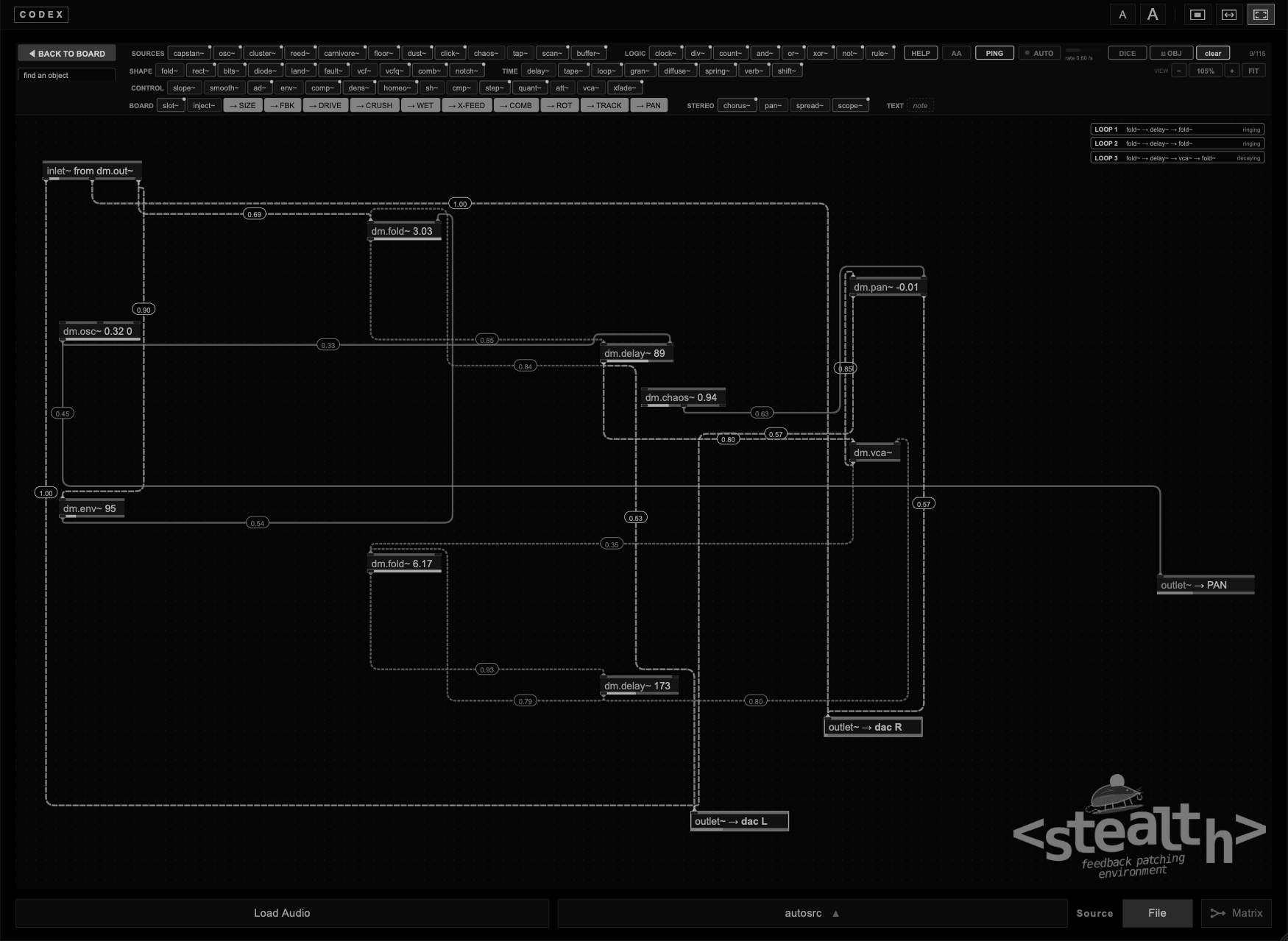
For stereo, use the objects with two outlets: pan~ places a sound, spread~ widens it, chorus~ moves it, verb~, spring~, cluster~ and vcfq~ are stereo by nature. chaos~ is the usual hand that moves them.
Below 15 Hz the sheet is always filtered while a patch is on, so loops cannot push the speakers with sub energy you cannot hear. Cords go around the objects instead of through them. When a preset with a Stealth patch loads, the patch is run ahead in silence and then fades in, so loops that take a while to find their timbre start already there.
The sound of Panacousticon can come into the sheet in two ways.
| Way | What you get |
|---|---|
| Through the board | In the MATRIX send a module to Data Moshing. inlet~ gives you the board: every module sent there, mixed, written into the RAM and played back by the board. With FEEDBACK at 0 and WET at 100 % the board passes them almost clean. |
slot~ | One module, straight from the rack, before the board and before its mixer strip. Put a slot~ for each module you want and give each its own chain: slot~ 1 through a diode~, slot~ 8 through a comb~, and so on. |
A new sheet, and a sheet after clear, starts with slot~ 1 wired to dac L and dac R: Atrax sounds as before, but it already passes through the sheet, ready for objects in between. Delete it and Atrax plays straight again. slot~ is in the BOARD row of the bar.
Putting a slot~ on the sheet takes the module into Stealth. If the module was off, it switches on. Its direct sound to the master goes quiet: from now on you hear it only through what you patch, so a slot~ with no cords is silent. To keep the dry sound as well, patch one outlet of slot~ straight to dac L and dac R.
Remove the last slot~ of a module and the module goes back as it was: its direct sound returns, and if slot~ had switched it on, it switches off again. Patches and presets remember which modules slot~ switched on. If you switch the module off yourself from the rack, the box shows · off and stays silent.
A module can also listen to Stealth and be taken back by slot~ at the same time: Data Moshing into a module in the MATRIX, that module into the sheet with slot~. It is a loop, one block long, and it behaves like the other loops of the sheet.
Try this. Put slot~ 1 and slot~ 8 on the sheet: Atrax and Rainforest switch on and go quiet. Send Atrax through a diode~ to dac L and Rainforest through a comb~ to dac R.
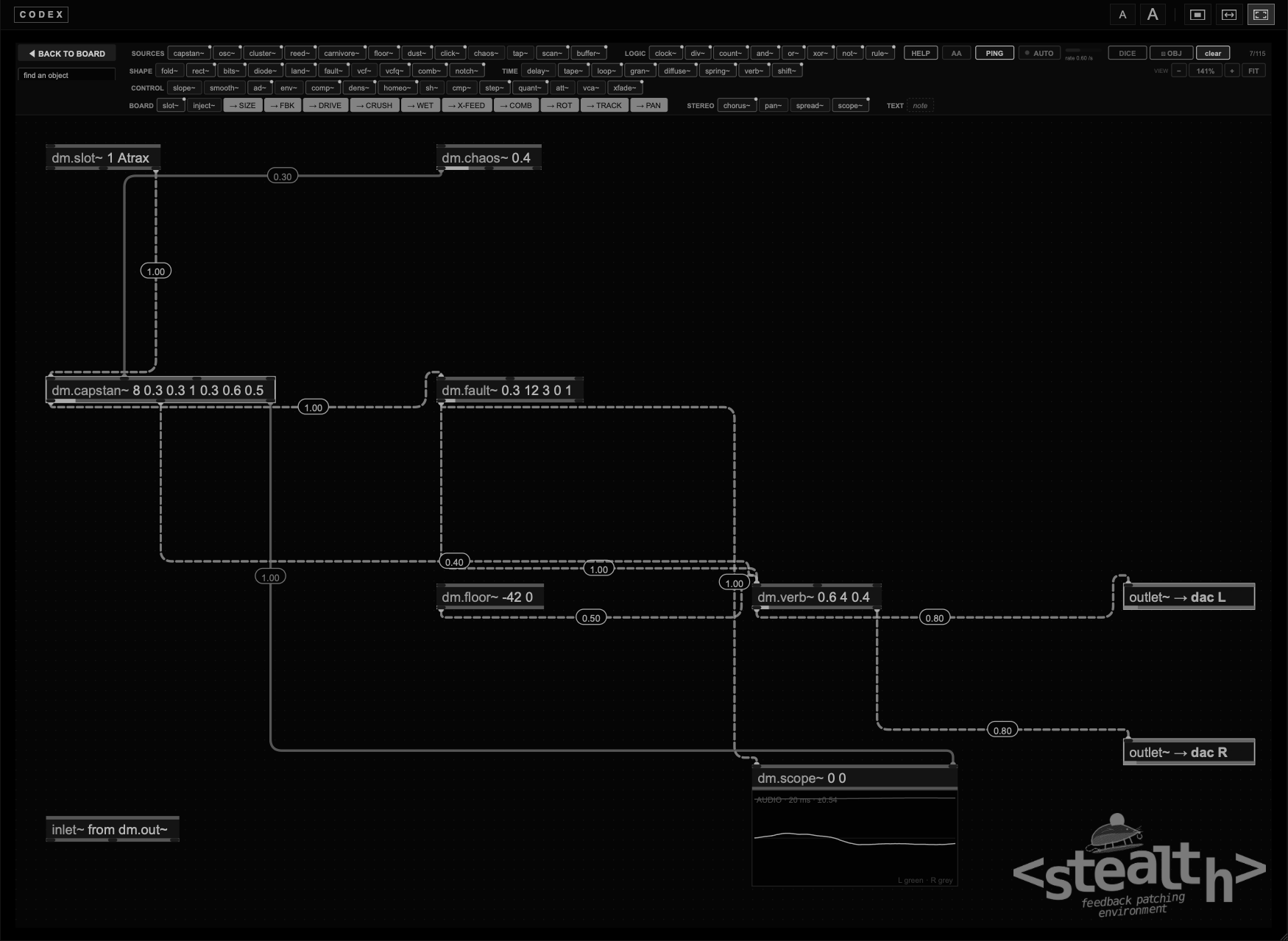
Most of Stealth starts from oscillators and noise. Five objects start from the waveform itself: I describe it a few samples at a time and let chance pick the numbers, how long each step lasts and where it goes. It is the line of the programs of the 1970s, the SSP of Gottfried Michael Koenig and the dynamic stochastic synthesis of Iannis Xenakis. What comes out is never the same twice: rough, grainy, very wide in stereo.
| Object | Its job in the patch |
|---|---|
seg~ | The raw material: a waveform of micro-segments, steps of a few samples at random lengths, L and R different. |
bound~ | Gives it a shape: folds or wraps it inside a limit that a slow sine moves. With the sign of the limit kept, the slow waves appear. |
blip~ | Impulses with many harmonics, the low part once folded. |
sat~ | Saturation, to glue it together. |
rnd~ | Random movement for the filters: the band-stops that wander. |
This is the patch that chapter 5 of Discover builds in front of you.
seg~ 0.1 0.3 0.9 1.5: steps of about one sample, a hard digital buzz. Its L and R go into two bound~ 0 1 (wrap), with an osc~ 0.01 on the limit of the first and an osc~ 0.011 on the second: sines a hundred seconds long. While the limit is small the buzz wraps around many times; when the sine crosses zero it turns over.sat~ 10 0.8 after each bound~, with the cord at 0.10. Then a band-stop that moves: the signal goes to the dac at +0.35 and, through vcfq~ 126 0.5 1 (band-pass), at −0.35. A rnd~ 20 1 on the cutoff moves the band between about 40 and 400 Hz.blip~ at 20, 30, 25 and 35 Hz with 120 harmonics, each into a bound~ 0 0 (fold) with an osc~ at 5, 20, 12.5 and 27.5 Hz on the limit. This is the low part: when a sine goes negative the fold turns over and the output follows the sine. Then vcf~ 12000 0.7.vcfq~ 900 0.6 1 and rnd~ 5 1: a notch that wanders from 100 Hz to 8 kHz.osc~ 400 0 with osc~ 25 1 on its pitch, very low (cord at 0.02).Try this. Open Discover, chapter 5, and let it build the patch. Then press Play with it and change dur min and dur max of seg~: 0.9 to 1.5 samples is a buzz, 20 to 40 a slow grain.
bound~ at 0 and let the sine move it: most of the character comes from the moments when it is close to zero.vcfq~ mode 1 at −g.A loop is any path that comes back to where it started. Stealth finds every loop on the sheet and lists it in the LOOP box, with the objects it goes through and its gain per turn. Above 0 dB a loop is ringing: it grows on its own until something in it holds it. Below 0 dB it is decaying: it fades out until something plays into it.
The box sits wherever the sheet is free. With many loops the wheel over it scrolls them. When there is no room it becomes a small N loops ▸ MATRIX badge: click it to see the loops in the MATRIX tab, under Stealth loops, measured from the running engine.
A loop sounds on its own only when it gives back more than it receives: a vcf~ with a high q, a fold~ with three folds or more, a comb~ near 1, or a path through inject~ and the board.
| Control | What it does |
|---|---|
| PING | Sends one short click, 2 ms, into the patch. It wakes loops that have gone quiet. |
| AUTO | Pings by itself at a random rate, around the rate shown next to it, from about once every ten seconds to eight times a second. Drag the rate to change it, double-click it to go back to 0.60/s. It is saved with the patch. |
| AA | Anti-aliasing. fold~ runs four times faster inside and the output is softened above 14 kHz. Off by default; turn it on when folds sound glassy and harsh. It is saved with the patch. |
The loops of the sheet are also shown in the MATRIX tab, under the loops between modules, in the part called Stealth. There they have more room: one row per loop, with every object and its arguments, the gain per turn, a bar with the level, and the state. EXPAND FLOW ▴ gives them the whole middle column. Click a row to come back to the sheet.
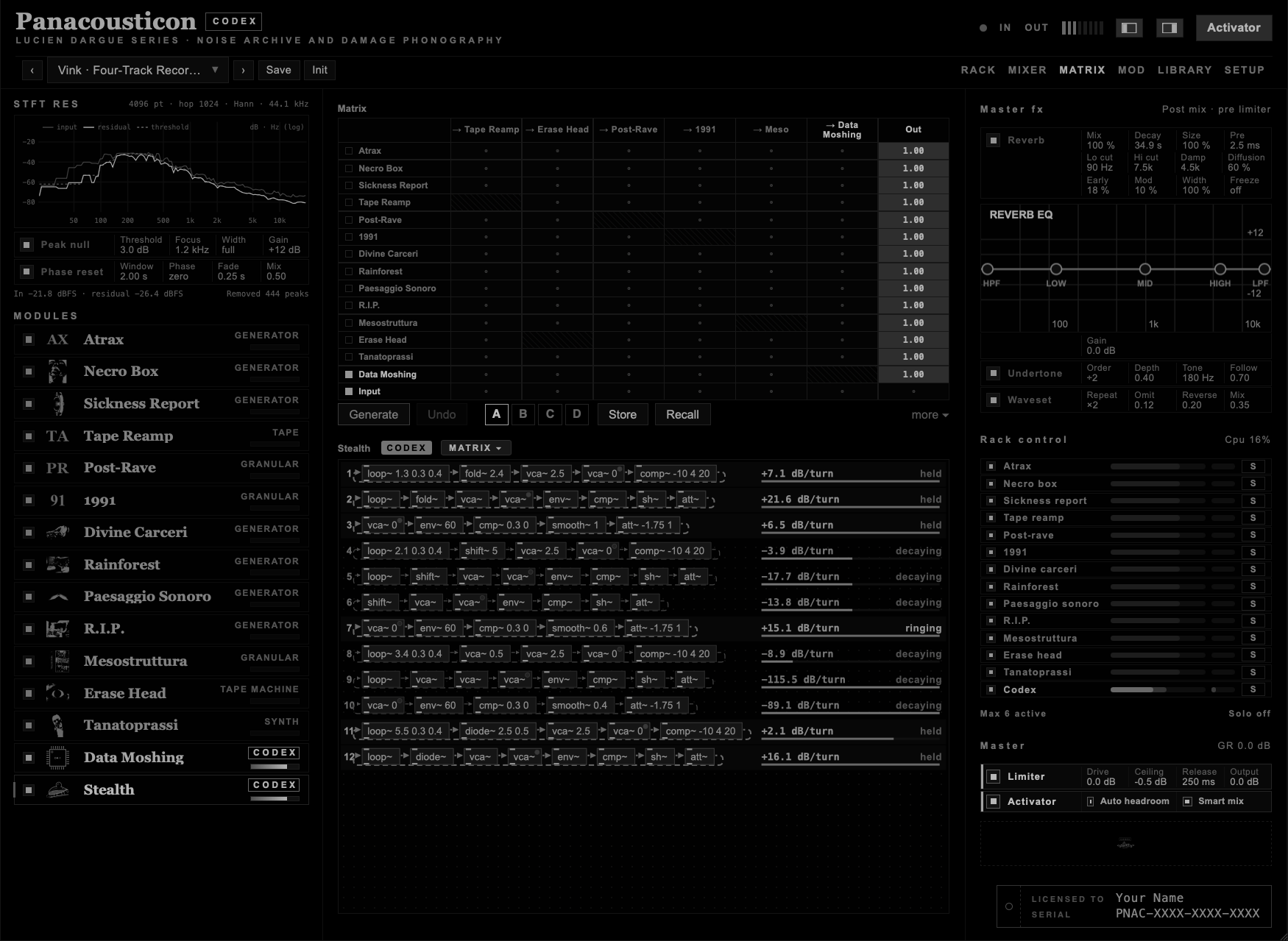
| State | What it means |
|---|---|
| ringing | The gain per turn is above −3 dB: the loop sustains itself or grows. |
| decaying | The loop gives back less than it receives and fades out. |
| held | The loop has a sensor (env~, cmp~, smooth~ and att~ on the gain of its vca~) and the sensor is turning it down right now. |
| cycling | The loop passes through the second outlet of an object, as when slope~ is patched into itself: it runs as an oscillator or a clock. |
| waiting | One object of the loop gets no signal, so the loop is not running. |
I made Stealth to study feedback, and feedback is the subject of cybernetics: a system that measures what it does and changes because of it. This is why the sheet shows every loop it contains, and the MATRIX shows how each one is behaving. The numbers are read from the running engine many times a second, not estimated. In the Cybernetic and Ultrastable presets you can watch a loop ring, get held by its sensor, decay and grow back.
The STEALTH switch on the loops between modules, in the same tab, comes from the same idea: a noise at −72 dBFS goes into every module of a matrix loop, so the loop starts by itself even when nothing is playing.
DICE builds a new patch every time you press it, and every patch it builds sounds, with or without an input. It always contains at least one loop that sustains itself: a resonant filter or a wavefolder around a delay, or a path that reads the RAM and writes it back. Around it, from one to three slow sources move the loop and the dials of the board. When a roll is close to what you want, stop pressing and change it by hand: move one cord, raise one number. Cmd + Z brings back the patch before the roll.
OBJ rolls one object at a time. Turn it on and the sheet gets an orange frame; hover an object and a small die and a panel show what a click would change.
| In OBJ | What it does |
|---|---|
| Click an object | New arguments, inside the range shown in the panel. |
| Shift + click | New cords into its control inlets. |
| Option + click | Both. |
| L | Locks the object under the pointer: OBJ and the DICE items of the menu leave it alone. L again unlocks it. |
| Cmd + Z | Takes back the last roll. |
| Esc | Leaves OBJ. |
A rolled cord never closes a new loop unless the loop passes through a comp~, so a roll cannot run away.
clear starts from zero: the whole machine goes back to Init, every module and every master effect off, the memory of the board emptied, and the sheet starts again with slot~ 1 wired to the outputs, so Atrax plays through the sheet. Cmd + Z brings the sheet back, not the modules: to keep something of a preset, start from the preset instead.
Cmd + N does the same, but leaves the sheet empty: no slot~ 1 and no cords from inlet~, only dac L and dac R. inlet~ goes back into the bar, ready if you want the board.
A Stealth patch can be saved as a file of its own, with the extension .sthl, as you would save a patch in Max or Pd. Click an empty spot of the sheet first, so that the keys reach Stealth.
| Gesture | Result |
|---|---|
| Cmd + S | Saves the sheet. The window opens in Documents → Panacousticon → Stealth. The name you give the file becomes the name of the patch. |
| Cmd + O | Opens a .sthl file. The machine starts from zero, as with clear, and then plays the file. Cmd + Z brings the previous sheet back. |
The file keeps the objects, their arguments, the cords, the positions, the notes, AUTO and AA. It also keeps the settings of the board of Data Moshing and of every module the patch takes with slot~, so that it opens sounding as it did. When you open it, everything else stops: the machine goes back to Init, the other modules are switched off, and only the board and the modules of the patch play.
A patch file is plain text. You can send it to someone, keep it next to a project, or open it in a text editor and read it.
A preset keeps the patch too, together with the whole machine. Use a file when you want to keep or share the patch on its own.
In the plugin the sheet opens fitted to the window, with a single row of controls: HELP, clear, the zoom with FIT, PING, AUTO, AA, DICE and OBJ. The object bar is not there, to leave the space to the patch. You play the patch from the plugin; you build it in the standalone. Everything else works in the plugin, the code editor included.
For building large patches I use the standalone: it opens fullscreen, all the keys reach Stealth instead of the DAW (Space, Cmd + Z, Cmd + A, Cmd + S), and the graphics don't weigh on the session. Then I save the patch as a preset, or as a .sthl file, and load it in the plugin, where I play it and automate it with the rest of the project.
The patch is part of the state: it is saved with every preset and with your DAW project. Many categories of the Library are made in Stealth, The Planets and Autogenic Training among them.
The Autogenic Training presets, for study and sleep, put a module into a slow capstan~ through slot~, with a low fault~: they are described in the Owner's Manual.
In the Library there is a category, Stealth Board. Nine of its presets are classic patches that play alone, with no module behind them: a sequencer, a few voices, an echo, a room. They show what Stealth can do as a plain modular: ambient, dub, acid, IDM, plucked strings, FM bells. Open them and read them from the clock down. The other five bend the board or listen to it, and they are noisy on purpose.
| Preset | What happens |
|---|---|
| Pentatonic Rain | dust~ decides when a note falls, chaos~ decides which one, quant~ keeps it in A minor pentatonic. |
| Dub Chord | A minor seventh on the offbeat through a filter and a tape echo, a kick on every beat. |
| Acid Step | Sixteen steps into a resonant filter opened by an envelope at every step, then a diode. |
| Comb Gamelan | Three plucked strings on clocks divided by 3, 4 and 5, a low gong every sixteen steps. |
| Glass FM | Two FM bells, struck by a cellular automaton, in lydian on D. |
| Slow Progression | Four chords, one every eight seconds, three voices that glide between them. |
| IDM Lattice | Rule 110 plays kick, knock, hat and ping; the bass walks in threes; the echo jumps in time. |
| Seven Loops | Seven notes on seven clocks of 17 to 37 seconds: they never meet twice in the same order. |
| Like Semantica | A sixteen-step arpeggio in C minor, two saws, a bass on the beat, a dotted echo. |
| Slow tide · Tape Reamp B | A slope patched into itself cycles and stretches the memory. |
| Ring ghost · R.I.P. | The board multiplied by its own echo, which adds inharmonic partials. |
| Ecosystem · no input | Two slopes chase each other and drive a delay into the memory. Nothing plays into it. |
| Cybernetic Network | A cybernetic patch that listens to the board. |
| Di Scipio · Ecosystem | A cybernetic patch that listens to the board. |
Every preset with a Stealth patch has a rec~ on each sound that reaches the dac, voices in group A and effects in group B, so each one is a track of the Recorder. Nothing is armed when the preset loads: arm the tracks you want in RECORDER.
In the classic patches the sequences are written in semitones. The cord into quant~ at 0.0208, one forty-eighth, turns them into pitch.
Like all my instruments, Codex does not play a preset back as a recording. A preset stores every setting exactly: the dials, the code, the matrix, the mixer, the Stealth patch with its cords and arguments, AUTO and AA. What it cannot store is what the patch was doing when you saved it: what was in the RAM and in the delay lines, how far each loop had grown, where chaos~ and smooth~ were in their motion, when AUTO was about to strike, and where the source module was in its own sound.
Feedback loops are chaotic: a tiny difference at the start keeps growing. Load the same preset twice and you hear the same patch, with the same character and the same range of colours, but never the same seconds of sound. I consider this part of the instrument.
To shorten the wait, when a preset with a Stealth patch loads, Codex silently runs the patch forward for twelve seconds of sound before you hear it, then fades it in over half a second. Patches that sound on their own reach their full sound in about a second. Patches that follow their source still need the source to start, which takes a few seconds more. If a particular moment matters to you, record it.
Try this. Load a Stealth Board preset, go into p stealth and cut one cord at a time. You hear what each cord was doing, and you understand how the patch works.
In the 1960s and 70s the Institute of Sonology in Utrecht had one of the great analogue studios: rows of modules built in house, function generators, ring modulators, voltage-controlled filters and amplifiers, and tape recorders, all patched by hand. Jaap Vink worked there for decades. He did not write notes for these machines. He connected them to each other, in circles, and listened to what the circuit did by itself: feedback held at the edge, ring modulators multiplying one loop by another, tape carrying the sound around again. The schematics of his patches are the starting point of these presets.
Roland Kayn, who worked closely with Vink in the 1970s and 80s, took the same studio, and others, further. He called it cybernetic music: he built a network of modules that controlled each other and let it run, choosing the rules but not the events. Some of his longest pieces came out of these networks.
Agostino Di Scipio moved the idea into the room. In his Audible Ecosystemics the system listens through microphones to the space it plays in, measures its own loudness and density, and changes its gains and times according to what it hears. The sound and the room keep each other in balance.
These patches are not loops that repeat. Vink worked with recursive processes: a sound and what comes out of it are sent around again and laid on top of each other, until the texture is far from where it started. He used feedback to break the regular periodicity of electronic sound. The Cybernetic presets work the same way: a texture builds up, collapses and comes back different. Give them time. Let a preset run for a few minutes before you judge it, and turn the dials slowly.
Stealth is my way of patching these ideas inside a plugin: loops with no oscillators, compressors and envelope followers as sensors, and a sheet where you can follow every cord. The nine presets are where I started.
I am working on more of this: further patches after Vink, Kayn and Di Scipio, and the tools I use to grow them. If it comes out, it will be an expansion. Codex is complete without it.
The presets in the Cybernetic category are feedback patches with no oscillators, after the studio patches of Jaap Vink at the Institute of Sonology and the audible ecosystems of Agostino Di Scipio. Every sound comes from the feedback itself.
Each patch is a few loops. A loop is one or two elements (a filter, a frequency shifter, a folder, a diode, a bit reducer), a makeup gain that pushes it past the edge, a vca~, a comp~ and a delay, a tape~ or a loop~ back to the start. Each loop has a sensor: env~ measures the level after the vca~, cmp~ decides when it is too loud, smooth~ holds the decision for a moment, and att~ turns the vca~ down. The loop goes quiet, the vca~ opens again, the loop grows back. On every switch, sh~ reads another loop and moves a cutoff, a shift or a tape time, so the loops steer each other.
The Di Scipio presets listen to a room instead: verb~ is the room, and its level and density, read by env~ and dens~, set the gains and the times of the loops.
To make new ones, pick the cybernetic tag in Generate a preset.
What makes them cybernetic. Each loop measures itself and corrects itself: env~ is the sensor, cmp~ the decision, vca~ the actuator. The loops are coupled, so the state of one loop steers another. This is first-order cybernetics, the kind of self-regulating network Ashby built as the homeostat and Kayn built in the studio: the systems keep themselves in balance, but they do not learn. The Di Scipio presets listen to a room inside the sheet, not to your room. And they are deterministic: from the same start they take the same path; they change because they never start from the same place.
A model you can rebuild. The patches are also a working benchmark to reproduce outside Codex. Every object has a counterpart on a modular or in a studio: env~ is an envelope follower, cmp~ a comparator, smooth~ a slew limiter, vca~ a VCA, comp~ a compressor, loop~ a tape loop, verb~ a reverb, or a real room with a microphone and a speaker. The flows in MATRIX, under Stealth loops, are measured from the running engine, not drawn for effect: the loop gain per turn, the state of each loop and the moment a sensor turns it down are the real values of the patch you are hearing.
The Cybernetic presets regulate themselves with fixed rules. The presets in the Ultrastable category go one step further: when the rules are not enough, they change them. W. Ross Ashby called this ultrastability and built it into his homeostat in 1948.
In these patches a homeo~ listens to how many attacks per second the patch makes, through dens~. While the activity stays inside a range, nothing changes. When it stays outside, homeo~ moves the gains, the thresholds of the sensors and the times of the loops to a new random setting, and waits. If the new setting keeps the activity inside the range, it stays; if not, it tries again. A slow chaos~ plays the part of a changing environment and pushes the patch out from time to time.
What you hear are long stable stretches, then a crisis: the patch searches, jumps from one sound to another, and settles somewhere new. Ashby · Homeostat finds its balance early and defends it. Ashby · Storm runs in a rougher environment and spends more time searching. Ashby · Glass is bright and restless, with long calm stretches broken by sudden crises. Ashby · Undertow is dark and slow: it searches for a minute or so, then holds its current for a long time. This is adaptation by trial and error, not learning: the patch keeps no memory of what worked.
The presets in the Primitive Rhythms category build rhythm out of logic, the way the old modular systems did: a clock~ feeds a count~, its bits are mixed with xor~, and~ and or~, or a rule~ lets a cellular automaton decide. The gates fire click~ and ad~, and the envelopes cut pure sines, sub tones and bursts of noise. Everything is dry and close, the stereo hard left or hard right, the board silent. The kick of every preset, or the lowest tone in Rule 90 Lattice, goes through land~: now and then a hit is cut flat and comes back slowly, so no two bars are the same. In Binary Count, Noise Gate and Pulse Code each channel also goes through its own fault~: now and then one of the two speakers fails on its own, and the slowest bit of count~ moves the stress from one side to the other. A scope~ on the sheet shows the envelopes as they fire. Noise Gate, Rule 90 Lattice and Xor Field, the three with a real stereo image, have a second one, a goniometer on the output.
| Preset | What happens |
|---|---|
| Sine Grid | The XOR of the first two bits plays a sub sine; the third bit clicks on the left, every beat ticks high on the right. |
| Data Pulse | Rule 30 at 140 bpm: clicks, noise, a high blip and a sub, each on its own cell. |
| Binary Count | Four bits of one counter, four sounds: left, right, a deep sine and a very high one. |
| Xor Field | Two clocks, three against four. Their XOR plays a sine, their AND a click, one of them a sub. |
| Rule 90 Lattice | Rule 90 plays four sines, 220 to 660 Hz, spread across the stereo. |
| Sub Clock | One beat a second: a 40 Hz sine and a click, with a high tone on one sixteenth in three, on the left. |
| Noise Gate | White noise chopped by the clock: left while the third bit is on, right while it is off. |
| Crystal Ticks | Five against seven: tone clicks at 3 kHz and 8 kHz, a click where they meet, a sub under the sevens. |
| Pulse Code | A step~ sequence, clocked by the counter, plays a pure sine melody over a sub. |
| Rule 110 Machine | Rule 110 drives a click, a noise burst, a sub and a high sine. |
| Sixteen Against Twelve | The showcase: one clock~ and some forty objects. count~ 12 runs against count~ 16, a polymeter that lines up again every 48 steps; div~ 3, 5 and 7 add a rim in three against four, quiet ghost notes and pushes of the kick off the beat. Every fourth bar the hats and the snare rest. The kick goes through land~, each speaker through its own fault~, and rule~ 90 rings two bells. The notes on the sheet walk you through it. |
| Fractured Clock | Fast and restless. A slow automaton doubles the speed of the fast clock~ now and then, so the groove breaks into rolls; another one, on the fast clock, decides where every hit falls. Every so often a third one stops the whole machine: only quiet ghost hats are left, in three, then it starts again. The kick goes through land~, each speaker through its own fault~, a little more nervous than in the other presets. |
Try this. In Binary Count, move one cord from a bit to another, or put an xor~ between two of them: the rhythm changes at once, and it is always in time.
The presets in the Drone Voice category are built the way the eurorack drone voices are built: a generator, a filter, a VCA and a processor, with a frequency shifter inside the processor's feedback. The generator is a cluster~ or a few osc~, the filter a notch~, the processor a delay that turns into diffusion and a long verb~. Instead of a seed knob, slow chaos~ and smooth~ move the scan, the warp and the filter, so a drone keeps changing without ever repeating. Each preset ends in two scope~, one for the waves and one goniometer, wired to what reaches dac L and dac R.
| Preset | What happens |
|---|---|
| Dungeon Cluster | Six oscillators scanned and warped by chaos, a multi-notch, a short metallic delay with a shift. |
| Comb Swarm | Four tuned combs on pink noise, a diode, diffusion, a slow chorus. |
| Dispersor | Twelve allpass stages in feedback, sweeping slowly, then tape and a long room. |
| Inharmonic Partials | Eight partials spread over more than an octave, scanned back and forth. |
| Pentatonic Chord | Three voices quantised to a minor pentatonic, waveforms that drift, chorus and tape. |
| Grain Tank | A cluster through a granulator a fifth up, then diffusion with a shift. |
| Bitwave Dungeon | A cluster with fewer bits, a multi-notch, a delay shifting at 4 Hz. |
| Odd Harmonic Organ | Only odd harmonics, each swelling on its own, through a moving notch. |
| Notch Drive | A folded and rectified sine inside a notch stack that rises and falls. |
| Zero Hertz | A carrier pushed by an oscillator at 0.07 Hz, a slow FM and a downward shift in the loop. |
| Sine Swarm | Two swarms of almost unison sines an octave apart, deep chorus, a long room. The softest. |
| Phase Coupled | A cluster with chaotic cross-modulation into a ringing notch, a short metallic delay. |
| Reflekta Rain | Random drops in four combs tuned to G minor, a tape loop and a granulator an octave up fed back into it. |
The presets in the Pastorale category are pastoral music made with reed~: drones on the tonic and the fifth, a chanter singing over them, the ciaramella answering. The melodies are step~ sequences in six-eight, kept in tune by the pitch voltages; the scales are mixolydian, lydian and minor. Around them, bells from dust~ into tuned combs, birds from dust~ and chaos~, wind from carnivore~, and a room.
| Preset | What happens |
|---|---|
| Zampogna | Two drones, the tonic and the fifth, and a chanter over them. The melody walks in G mixolydian, long and short, in six-eight. |
| Ciaramella | The two pipes of the shepherds: the ciaramella sings, the chanter follows a third below. One clock, two step~, the same lilt. |
| Siciliana | Slow, in minor. A cluster~ is the string pad; the chanter is dark and plays over it. |
| Transumanza | The herd on the move: chaos~ picks the notes, quant~ in mixolydian puts them in tune, dust~ rings the bells, carnivore~ is the wind. |
| Valle Lidia | A pad in C lydian, a reed like an oboe, birds from dust~ and chaos~. |
| Novena | Drones, the chanter, and the ciaramella answering every other phrase, far away, inside a church. |
The presets in the Bezier category are deep generative drones made only with Stealth objects, and drawn with curved cords: every cord is a bezier with points pulled far from the straight line, and many are coloured. They are a way to see what the Curve style and the handles can do on a sheet. Nothing in them repeats: chaos~ and smooth~ move pitches, filters and scans slowly.
| Preset | What happens |
|---|---|
| Abyssal Arc | Eight saws at 36 Hz in a cluster~, chaos~ moves which ones you hear, a dark vcf~ that breathes with smooth~, chorus~ and a long reverb. |
| Catenary | Two sines at 41 Hz a third of a hertz apart, folded and played into a comb~ string at 82 Hz; a saw an octave up drifts in pitch under them. |
| Slow Lissajous | Two clusters a fifth apart; each pitch is drawn by one axis of the same chaos~, the third axis moves the scan. |
| Undertow | Pink noise through a narrow vcfq~ band at 70 Hz, a comb~ string at 55 Hz, a tape loop of seven and a half seconds. |
| Spline Choir | Two drone reeds on A and E, grains an octave down, a shift of a third of a hertz, the breath and the formant moving slowly. |
| Deep Meander | Eight saws at 27.5 Hz through notch~: the notches wander with smooth~, the feedback steps now and then. |
Eight relaxed soundscapes built around interfera~ (Interfera). Each one has an interfera~ that draws a recording from its world, so the same preset sounds different from one day to the next. To keep the one you like, set its last argument, lock, to 1 and save your own preset. Under it a buffer~ plays one of eight recordings it found, now built into Codex as autosrc 13 to 20, so the preset sounds even without the internet. Every preset runs something through a remap object, contactmic~ or vlf~, and a tape: loop~ or tape~.
| Preset | What happens |
|---|---|
| Garden Tape | Birds from a garden through two contactmic~, a bright disc on the left and a dark geophone on the right. A river on a tape loop and a slow pad in A minor drifting on the same tape. |
| River Glass | Water heard through a piezo and a spring, a river slowed an octave, and a thin D dorian pad through chorus~. |
| Low Shore | A low shore wash slowed onto a six-second tape loop, water through a geophone, a deep cluster on A under a very long reverb. |
| Stones and Rain | Stones touched by a contact mic in the wood world, a distant storm in the reverb, weather filtered low, a major pentatonic pad on tape. |
| Still Forest | A still low rumble, night sounds through a condenser, and a triangle wave that finds notes of A minor pentatonic through tape~. |
| Harbour Hours | A slow harbour through a disc contact mic onto an eight-second tape loop, a lydian cluster on A breathing underneath. |
| Night Antenna | Night sounds picked up by vlf~ in its aurora world, as if a radio antenna heard them, a slowed ambience on tape, a D minor pad. |
| Bells Far Away | Bells through a spring and a geophone, a wash two octaves down, a C major pad on tape under a fifteen-second reverb. |
The six patches Codex opens on. Each one has an interfera~ left free, with drift on, so a new field recording arrives on its own every twenty seconds or so: the place changes while you listen, and every launch opens somewhere else. Three are stochastic, three are hypnotic. What they download is not kept: when you leave the patch, or the next time you open Codex, those recordings are deleted. If one of them is too good to lose, click Like it? Keep it beside the preset name and it stays, in the INTERFERA library.
| Preset | What happens |
|---|---|
| Salt Meridian | Water, and under it a rain of micro-segments from seg~ folded by bound~ inside a limit that opens and closes once a minute, through a resonant band. |
| Ember Lattice | Night, with slow impulses from blip~ whose harmonics fold over: soft knocks that come back on a six-second tape loop. |
| Weather Grammar | Weather, and a saturated grain of segments through a band that wanders wherever rnd~ takes it. |
| Lantern Choir | Bells on a long loop, a cluster in A minor pentatonic that never settles, a slow chorus and a very long reverb. |
| Tidal Floor | Water at half speed, two low clusters on A and E, and a resonant low-pass moved by a slow random on both channels. |
| Transit Hymn | Transit: trains and stations through a contact mic and tape, with a lydian cluster on F breathing above. |
Six movements of Holst's The Planets (1914–16), taken back into Stealth: his rhythms, motifs and harmony, played by objects of the sheet. Each one is a patch to read, with its rec~ tracks ready for the Recorder.
| Preset | What happens |
|---|---|
| Mars · Bringer of War | The 5/4 ostinato at 170 in triplets: step~ holds the rhythm, and~ cuts it into hits, vcfq~ pings on G play it col legno. A timpani on every bar, brass on G against D flat that swell with the bar. |
| Venus · Bringer of Peace | An E flat major seventh of four sines breathing under smooth~, and a celesta that walks the chord one note a beat. |
| Mercury · Winged Messenger | Two keys at once, B flat on the left and E on the right: count~ hands the fast triplets from one to the other every eight. FM bells, short and bright. |
| Saturn · Bringer of Old Age | Two chords, C minor and G, swing like a clock through xfade~. The bass climbs one step every four seconds, a bell sounds every sixteen. |
| Uranus · The Magician | The four-note spell G, E flat, A, B on step~, three seconds a note, in folded brass. Under it a staccato dance in G at 138 and a xylophone every third eighth. |
| Neptune · The Mystic | E minor and G sharp minor, crossfaded by a sine of seventeen seconds. A distant choir through vcfq~, celesta sparks in E minor pentatonic, a very long reverb. |
Everything on one page. Click an empty spot of the sheet first, so that the keys reach Stealth.
| Keys | What they do |
|---|---|
| N · double-click an empty spot | New object, where the pointer is |
| ↑ ↓ · Enter or Tab · Esc | In the new-object box: choose, create, close |
| Double-click an object | Edit its arguments; Enter confirms, Esc cancels |
| Cmd + C · X · V · D | Copy, cut, paste, duplicate |
| Cmd + A | Select every object, every note and every pinned HELP card; the arrows, a drag and Backspace act on all of them |
| ← → ↑ ↓ · with Shift | Move the selection one step · ten steps |
| Cmd + K | Two objects selected: connect the upper one to the lower one, or disconnect them if they are already connected |
| Cmd + Y | Align the selected objects in a row or in a column, whichever is closer |
| F · FIT | Frame the selection; with nothing selected FIT frames the whole patch |
| N with one object selected | A new object below it, already connected to its first outlet; the new one is selected, so N again goes on down the chain |
| Shift + N with a cord selected | A new object put in the middle of the cord |
| Shift held while you drop a cord on one of several selected objects | The cord goes to all of them |
| Wheel over the bar of objects | Bigger or smaller objects in the bar, as with the two A buttons |
| Cmd + N | Empty sheet, only the outputs (the machine goes back to Init, as with clear) |
| Backspace · Delete | Remove the selection, or a selected note |
| Esc | Clear the selection · close a card · leave HELP, OBJ or full patching |
| Cmd + Z | Undo (what it covers) |
| Cmd + S · Cmd + O | Save and open a .sthl patch file |
| Shift + drag an object onto a cord | The cord lights up; on release the object goes in between, as in Max: the cord is split, the source goes into one of its inlets and its first outlet goes on to where the cord went. The inlets grow while you drag and the one nearest to where the cord enters the box lights up, so you choose it by sliding the object. Colour and style are kept. It works from the bar too |
| Shift + drag an object under another | Connects them on release |
| Shift + click · Shift + drag on an empty part | Add to the selection |
| Wheel · Space + drag · middle button | Move the sheet |
| Cmd + wheel · pinch | Zoom |
| Right-click an object · an empty spot · a text box | The menus (chapter 4) |
| Right-click an object in the bar | Its HELP card |
| In OBJ: click · Shift + click · Option + click · L | Roll arguments, cords, both · lock |
| Drag the number on a cord · click a cord | Set its level · select it, with its colours |
| Selected cord: Backspace · Esc | Cut it · let it go |
| Double-click the AUTO rate | Back to 0.60/s |
| In a note: Enter · Shift + Enter · Esc | Confirm · new line · leave it as it was |
| In find an object: Enter · Esc | Add the first match · clear the field |